> For the complete documentation index, see [llms.txt](https://docs.gxc.io/llms.txt). Markdown versions of documentation pages are available by appending `.md` to page URLs; this page is available as [Markdown](https://docs.gxc.io/usecases-workflows/events-and-venues/live-video-production.md).
# Live Video Production
## Overview
Live production has always been constrained by the cable. Camera positions are decided by where triax and fiber can be run, and every additional position adds hours of rigging and a length of cable that has to be recovered afterwards. Wireless alternatives - COFDM radio links and bonded public cellular - each trade one problem for another. COFDM needs licensed RF coordination and dedicated receive sites per camera. Bonded cellular puts the show on a public network that is congested by exactly the crowd the production is there to cover.
A private 5G network changes the trade. One network, deployed once for the venue, carries every camera position, the return video, the talkback, and the production data. Because the Onyx Edge terminates the 5G Core on site, contribution feeds break out directly onto the production LAN - they never traverse a public network or a backhaul link to a distant core. Camera operators roam the venue on a shared cell that has no internal cell boundaries, so there is no handover gap to drop frames at the moment a presenter walks between zones.
This workflow was proven at scale at the [2025 Australian Grand Prix](https://www.gxc.io/events-connectivity/), where a private n77 network carried contribution alongside POS and operational traffic for a weekend event.
## How It Works
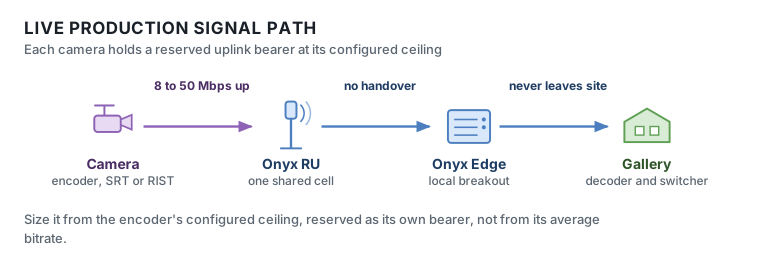
### The signal path
### What each component does
| Component | Role in this workflow |
| --------------------------------- | ------------------------------------------------------------------------------------------------------------------------------------------------------------------------- |
| **Camera + encoder** | Compresses to H.264/H.265 and wraps in SRT, RIST, or Zixi. The encoder's configured ceiling - not its average - is what the network must reserve |
| **5G module** | Carries the SIM, holds the PDU session, and transmits at typically 23 dBm. That figure sets the uplink range and therefore where cameras can work |
| **Onyx RU** | The radio cell. O-RAN 7.2x low-PHY, placed for uplink coverage at camera positions rather than for even area coverage |
| **FHM** | Aggregates every RU into **one logical cell** with 1588v2 PTP and SyncE timing. This is what lets a hand-held operator cross the venue without a handover gap in the feed |
| **Onyx Edge - DU / CU / 5G Core** | High-PHY through PDCP, then the UPF terminates the session and enforces a 5QI 71 GBR bearer per camera |
| **Local breakout** | Puts the contribution feed onto the venue LAN. It never traverses a public network or a link to a distant core |
| **Decoder** | Absorbs jitter and drives SRT/RIST retransmission. Its buffer setting is the largest single term in the latency budget |
| **Production switcher** | Where the feed becomes part of the show |
| **Onyx Portal** | Per-camera throughput, RSRP, SINR, BLER, and alarms - displayed in the production gallery beside the multiviewer |
| **Mesh Node** | Wireless backhaul to RUs at temporary venues where fiber cannot be pulled for a short event |
### The contribution path, hop by hop
| # | From → To | Interface | What happens |
| -- | -------------------- | -------------------------------- | ------------------------------------------------------------------------------------------------------------------- |
| 1 | Camera → Encoder | SDI or IP | Baseband video into the encoder |
| 2 | *Inside the encoder* | H.264 / H.265, SRT / RIST / Zixi | Compressed to the configured ceiling; FEC and ARQ applied for loss resilience |
| 3 | Encoder → 5G module | Ethernet, USB, or integrated | Contribution stream handed to the radio |
| 4 | 5G module → Onyx RU | **5G NR Uu**, uplink | Transmitted on the camera's 5QI 71 GBR bearer. The GBR reservation must match the encoder ceiling, not its average |
| 5 | Onyx RU → FHM | **eCPRI**, O-RAN 7.2x | RU completes the low-PHY; FHM aggregates all RUs into one logical cell and holds PTP timing |
| 6 | FHM → Onyx Edge DU | Aggregated fronthaul | High-PHY, MAC, RLC. **No handover decision** - the operator has not crossed a cell boundary because there isn't one |
| 7 | DU → CU → UPF | F1 / N3, internal | RRC and PDCP; the UPF terminates the session and polices the QoS flow |
| 8 | UPF → Production LAN | **N6 local breakout** | The feed lands on the venue LAN, on site |
| 9 | LAN → Decoder | IP / SRT | The buffer absorbs jitter and drives retransmission of lost packets |
| 10 | Decoder → Switcher | SDI, NDI, or ST 2110 | Feed enters the production chain |
**Return path.** A switcher aux or multiviewer output runs back the other way - encoded, sent downlink on its own 5QI 4 GBR bearer at 2–5 Mbps, to a camera-mounted monitor. Talkback rides the same network on 5QI 1; see [Wireless Intercom & Talkback on 5G](/usecases-workflows/events-and-venues/wireless-intercom-and-talkback.md).
### Where the latency goes
Glass-to-glass is a chain, and the 5G segment is a small part of it. This is the most commonly misplaced assumption in the workflow.
| Stage | Typical contribution |
| ---------------------------------- | -------------------- |
| Camera → encoder | 1–3 ms |
| Encode | 15–40 ms |
| 5G uplink | 5–15 ms |
| Fronthaul and Onyx Edge | 1–3 ms |
| **SRT / RIST buffer - 2.5–4× RTT** | **40–120 ms** |
| Decode | 10–30 ms |
| **Total glass-to-glass** | **\~80–200 ms** |
{% hint style="info" %}
The transport buffer dominates. Tune it against measured RTT rather than leaving it at default, and verify recovery by forcing brief obstruction - that setting, not the radio, is where a latency budget is usually won or lost.
{% endhint %}
### Why uplink is the whole design
Nine of ten workflows on this site are uplink-dominant; this one is the most extreme. A device transmits at roughly 23 dBm against an RU's far higher downlink power, so **uplink range is much shorter than downlink range**. A coverage map drawn from downlink RSRP will overstate where cameras can actually work. Two consequences follow: place RUs from uplink throughput at camera positions, and configure an uplink-weighted TDD pattern - `DSUUU` on a 2.5 ms period gives roughly 60% uplink, against a default downlink-weighted pattern that cannot carry a camera load at all.
## Network Requirements
| Parameter | Target |
| ----------------------------------------- | ----------------------------------------------------------------------- |
| Uplink per camera, 1080p50/60 H.265 | 8–15 Mbps sustained |
| Uplink per camera, UHD/4K H.265 | 25–50 Mbps sustained |
| Aggregate uplink, 8 HD cameras | \~120 Mbps sustained |
| Downlink per camera, return video | 2–5 Mbps |
| Glass-to-glass latency | < 200 ms typical; < 100 ms where talent interacts on air |
| Network contribution to latency (one-way) | < 20 ms |
| Jitter | < 10 ms |
| Residual packet loss before FEC/ARQ | 10-6 |
| Availability during show window | 99.999% |
| Primary QoS | **5QI 71**: GBR, live uplink streaming, 150 ms PDB, 10-6 PER |
| Return video QoS | **5QI 4**: GBR, 300 ms PDB |
| TDD pattern | Uplink-weighted, e.g. `DSUUU` (\~60% UL) |
| Bands | n77, n78, n79, n48 (CBRS), n40 |
## Deploying It
The architecture above is the *what*. This is the sequence that gets it running.
{% stepper %}
{% step %}
### Survey to camera positions, not to area
Walk every planned position and hand-held route with the GXC survey application, recording achievable uplink throughput - not just RSRP. Roaming routes define the coverage that must be *continuous*, not merely present. Flag grandstands, metallic roofing, and tree canopy, which cost uplink margin exactly where cameras want to be.
{% endstep %}
{% step %}
### Confirm spectrum and set the TDD pattern
CBRS SAS grant for n48, a license or exemption for n77/n78, or the venue's existing assignment. Configure the uplink-weighted pattern and align frame timing across every cell in the band.
{% endstep %}
{% step %}
### Onboard cameras
SIM or eSIM per encoder in Onyx Portal, assigned to the Contribution group on 5QI 71, with GBR matched to the encoder ceiling. Assign reserved addressing. Record camera number to IMSI to IP in the production runsheet - faults are reported by camera number, and the operator needs to reach the right subscriber in seconds.
{% endstep %}
{% step %}
### Rehearse at full load
Every camera simultaneously at full rate, for at least the longest planned continuous segment. Contribution networks fail on aggregate sustained load, not on single-camera tests. Walk every roaming route while streaming. Tune the transport buffer to measured RTT.
{% endstep %}
{% step %}
### Baseline
Capture RSRP, SINR, BLER, and achieved uplink per camera. This is the reference against which show-time anomalies are judged.
{% endstep %}
{% step %}
### Monitor in show
Achieved uplink against reservation per camera; BLER as the leading indicator - uplink BLER above roughly 10% precedes visible artifacts by several seconds, enough time to cut away. Put the Onyx Portal dashboard in the gallery beside the multiviewer and route alerts to the RF engineer on the crew channel.
{% endstep %}
{% step %}
### Tear down
Export session performance data before decommissioning; it becomes the baseline for the next event at the venue. Suspend SIMs and archive the camera mapping.
{% endstep %}
{% endstepper %}
## Devices & Ecosystem
* **5G-capable contribution encoders** - bonded or single-modem field units, configured for a private APN and SIM rather than public bonding. Tested units from [Haivision](https://docs.gxc.io/devices/gxc-compatible-devices/broadcasting/haivision), [LiveU](https://docs.gxc.io/devices/gxc-compatible-devices/broadcasting/liveu), [TVU](https://docs.gxc.io/devices/gxc-compatible-devices/broadcasting/tvu) and [Kiloview](https://docs.gxc.io/devices/gxc-compatible-devices/broadcasting/kiloview).
* **Camera-back transmitters** - [Sony PDT-FP1](https://docs.gxc.io/devices/gxc-compatible-devices/broadcasting/sony), which takes HDMI from the camera and carries it over the private network on n48, n77, n78 or n79.
* **5G CPE** - for a camera with no integrated 5G path, a compact unit at the camera position provides an Ethernet handoff.
* **Transport protocols** - SRT, RIST, or Zixi for error-resilient contribution; NDI where the production is fully IP on site.
* **Receivers and decoders** - hosted on the venue LAN, or as containers on the Onyx Edge where the appliance has capacity.
* **Return video and talkback endpoints** - camera-mounted monitors and belt packs; see [Wireless Intercom and Talkback](/usecases-workflows/events-and-venues/wireless-intercom-and-talkback.md).
## Design Considerations
{% hint style="warning" %}
**The uplink budget is the whole design.** Device transmit power is typically 23 dBm against an RU's far higher downlink power, so the uplink range is much shorter than the downlink range. A coverage map drawn from downlink RSRP will overstate where cameras can work. Plan RU placement from uplink throughput at camera positions.
{% endhint %}
**Sustained, not peak.** Encoders are configured against a ceiling and will use it. Size the network for every camera at its ceiling simultaneously, and keep committed GBR below roughly 70% of cell uplink capacity so mobility and interference have headroom.
**Latency is a chain, not a number.** The 5G segment contributes under 20 ms one-way. The encoder, the transport buffer, and the decoder contribute far more. An SRT latency setting of 4× RTT is the single largest term in most glass-to-glass budgets - tune it deliberately rather than leaving it at default.
**Roaming routes deserve more margin than fixed positions.** A locked-off camera needs coverage at one point. A hand-held operator needs it continuously along a path, including through doorways, under structures, and in the gaps between RUs. The shared-cell architecture removes handover as a failure mode, but it does not create coverage where there is none.
**Plan redundancy per camera, not per network.** For cameras on the critical path - the ones that cannot be cut away from - provision a second path: a dual-SIM encoder, a second encoder, or a cabled fallback. Network-level redundancy does not help a camera whose single radio path is obstructed.
**Spectrum authorization drives the schedule.** CBRS SAS registration is routine. A license or exemption for n77 in a jurisdiction that does not yet license it for private use is not, and it can dominate the project timeline. Engage the regulator early.
## Validation Checklist
* [ ] Every camera position surveyed, with achievable uplink throughput recorded - not just RSRP
* [ ] Every roaming route walked while streaming, with no uplink rate collapse observed
* [ ] Uplink-weighted TDD pattern configured and matched across all cells in the band
* [ ] Spectrum authorization confirmed and in force for the show dates
* [ ] All cameras streaming simultaneously at configured ceiling for at least the longest planned segment
* [ ] Aggregate committed GBR below 70% of cell uplink capacity
* [ ] Glass-to-glass latency measured end to end and inside budget
* [ ] Transport buffer tuned to measured RTT and recovery verified under forced obstruction
* [ ] Return video and talkback validated concurrently with full camera load
* [ ] Per-camera baseline captured for RSRP, SINR, BLER, and achieved uplink
* [ ] Camera-number to IMSI to IP mapping in the production runsheet
* [ ] Onyx Portal dashboard visible in the gallery, alerts routed to the crew channel
* [ ] Redundant path provisioned and tested for every critical camera
## Next steps
* **Size it.** Take these requirements through [Plan Your Network](https://docs.gxc.io/plan-your-network): capacity, coverage, architecture, and a preliminary bill of materials.
* **Compare it.** [Network Requirements at a Glance](https://docs.gxc.io/usecases-workflows/network-requirements-at-a-glance) puts every workflow side by side, for sites carrying more than one.
* **Talk to us.** For a validated design and a quote, [contact GXC](https://gxc.io/contact-us/).
## Related reading
* [Wireless](/usecases-workflows/events-and-venues/wireless-intercom-and-talkback.md)
* [Network Requirements at a Glance](/usecases-workflows/network-requirements-at-a-glance.md)
* [2025 Australian Grand Prix](https://www.gxc.io/events-connectivity/)
---
# Agent Instructions
This documentation is published with GitBook. GitBook is the documentation platform designed so that both humans and AI agents can read, navigate, and reason over technical content effectively. Learn more at gitbook.com.
## Querying This Documentation
If you need additional information that is not directly available in this page, you can query the documentation by asking a question.
Perform an HTTP GET request on the following URL with the `ask` and `goal` query parameters:
```
GET https://docs.gxc.io/usecases-workflows/events-and-venues/live-video-production.md?ask=&goal=
```
`ask` is the immediate question: it should be specific, self-contained, and written in natural language.
`goal` is what the user is ultimately trying to achieve, the reason they need the answer. Sharing it helps GitBook give you a better, more relevant answer. A goal is most helpful when it describes the outcome the user wants rather than restating the question. For example, with `ask=how do I create an API token`, a goal like `automate deployments from our CI pipeline` lets GitBook tailor the answer to that use case.
The response will contain a direct answer to the question and relevant excerpts and sources from the documentation.
Use this mechanism when the answer is not explicitly present in the current page, you need clarification or additional context, or you want to retrieve related documentation sections.