> For the complete documentation index, see [llms.txt](https://docs.gxc.io/llms.txt). Markdown versions of documentation pages are available by appending `.md` to page URLs; this page is available as [Markdown](https://docs.gxc.io/plan-your-network/architecture.md).
# Architecture
Architecture design converts the capacity and coverage requirements into a deployable Onyx network. It determines how the required cells and radios are organized, connected, and deployed across the site.
Capacity determines how many cells are required. Coverage determines how many radios are required. Architecture determines how those cells and radios are organized and connected.
The architecture should answer:
* How many radios and cells are required?
* Which Onyx architecture best fits the deployment?
* How should the radios be connected?
* What fronthaul architecture is required?
* How many Onyx Edge servers are required?
* What switching is required?
* What backhaul is required?
* What redundancy or availability requirements apply?
* What architecture-specific RF and installation components are required?
### Do this in the Calculator
{% stepper %}
{% step %}
## Review the Architecture Recommendations
Once Capacity and Coverage inputs are set, review the following cards:
* **Architecture Recommendation**: e.g., "5G Multi-Cell (Standard)" or "Shared Cell 1×8," with a short rationale and specs (MIMO, bandwidth, handover behavior).
* **Frame Structure Recommendation** (LTE SA / 5G slot pattern): Your recommended pattern, starred (\*), alongside the alternatives and their DL:UL ratio and Mbps, so you can see why one was preferred.
* **Shared Cell Configuration Guide**: RUs/cell, resulting cell count, and handoffs for 1×8, 2×4, and 4×2 configurations. This table only appears when Shared Cell itself is the recommended architecture, not when Multi-Cell is recommended and Shared Cell is offered only as an alternative.
{% endstep %}
{% step %}
## Explore Alternatives
**Explore Alternatives is genuinely contextual, not a fixed list.** The suggestions in the sidebar change based on your current inputs: e.g., "Add continuous mobility" only appears for use cases like AGVs; "Switch to 5G NR" only appears while LTE is selected; "What if clutter is higher?" appears once other high-impact levers have already been tried.
Use it to pressure-test a design before committing to it.
{% endstep %}
{% endstepper %}
### Architecture Options
Every Onyx 5G cell takes one of three shapes. The choice is about **where the gNB functions live**, and it is the decision that most affects the bill of materials.
It is a choice **per cell, not per site**, so one Onyx Edge can carry all three at once. See *One network, mixed architectures* below.
{% hint style="info" %}
**The three architectures are 5G. On LTE there is one, and it is Integrated.** Every Onyx LTE access point is a complete eNodeB carrying the RAN stack onboard, reached over ordinary IP backhaul. There is no LTE Radio Unit, no LTE fronthaul and no FHM, so Distributed and Super Cell are 5G capabilities. An LTE site scales by adding access points, each one its own cell, with handover between them.
{% endhint %}
| | [Integrated](/plan-your-network/architecture/integrated.md) | [Distributed](/plan-your-network/architecture/distributed.md) | [Super Cell](/plan-your-network/architecture/super-cell.md) |
| -------------------- | -------------------------------------------------------------------------------------- | ------------------------------------------------------------- | ----------------------------------------------------------- |
| **CU / DU** | in the AP | on Onyx Edge | on Onyx Edge |
| **Onyx Edge role** | Core only | Core + CU + DU | Core + CU + DU |
| **FHM** | no | no | **required** |
| **Transport to AP** | backhaul, ordinary IP | eCPRI fronthaul | eCPRI fronthaul |
| **What you cable** | one CAT6 run to each AP, carrying PoE++ power on indoor models, or a wireless mesh hop | **fiber to every radio**, plus power at the radio position | same as Distributed |
| **Cells** | one per AP | one per RU | **one across up to 64 RUs** |
| **Handover on site** | yes | yes | **none** |
| **Access points** | `5g-gnb` family: G227, G228, G238, G243, G244, G430, G443 | `5g-access-points` family: G105, G505, G506, G509 | same as Distributed |
| **Best for** | small sites, fast pilots, and anywhere fiber to the radio is impractical | wider band choice, radios sited away from baseband, DAS feeds | continuous mobility across one large space |
{% hint style="warning" %}
**Super Cell is Distributed with an FHM added.** Same RUs, same CU and DU on Onyx Edge. The FHM makes several RUs share one cell ID. Without it, each RU is its own cell and devices hand over between them.
{% endhint %}
{% hint style="info" %}
**"eCPRI fronthaul" means fiber in practice, and that is the difference that shows up in the installation quote.** eCPRI is carried over Ethernet, so a short 10G copper run does work, between an RU and a switch in the same rack for example. Past that it is fiber. Every Onyx RU takes fronthaul on a 10G SFP+ cage and ships with single-mode long-range optics, and the link also carries PTP and SyncE timing on a latency budget measured in microseconds. That budget, not the connector, is what rules out a long copper run.
An integrated gNB AP has no such constraint. Its backhaul is ordinary IP on a latency budget measured in milliseconds, so it runs over existing CAT6, through existing switches, and across a wireless mesh hop. An indoor model such as the G227 takes backhaul and PoE++ power on that one cable.
So the practical question is whether you can get fiber to every radio position. Where you can, Distributed and Super Cell are open to you. Where you cannot, Integrated is what will actually deploy.
{% endhint %}
{% content-ref url="/pages/QyiptWj4pYGC7z43lArJ" %}
[Integrated](/plan-your-network/architecture/integrated.md)
{% endcontent-ref %}
{% content-ref url="/pages/iNgFIkqhyPpuBkKnZeZP" %}
[Distributed](/plan-your-network/architecture/distributed.md)
{% endcontent-ref %}
{% content-ref url="/pages/z8ELpXy3wWG1SOe1gCVu" %}
[Super Cell](/plan-your-network/architecture/super-cell.md)
{% endcontent-ref %}
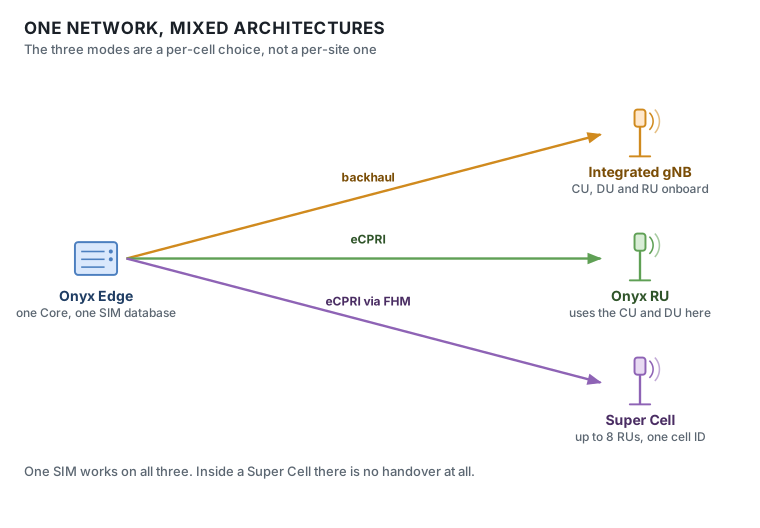
### One network, mixed architectures
The three modes are not mutually exclusive. Every cell terminates on the same 5G Core inside Onyx Edge, so a single site can run all three side by side.
All three on one Onyx Edge. Every cell lands on the same Core, so one SIM works across all of them.
An integrated gNB AP brings its own CU and DU and attaches to the Core. RU-based cells use the CU and DU inside the same Onyx Edge. Because every cell lands on the same Core, they share one subscriber database, one QoS policy set and one Onyx Portal, and a single SIM works across all of them.
In practice that means a warehouse can run a Super Cell over the pick faces where AGVs and scanners move continuously, a single integrated AP at the gatehouse, and a directly attached RU on the yard mast, all on one network. Within the Super Cell there is no handover at all; moving between cells is an ordinary inter-cell handover.
### RF distribution and transport
These describe how RF reaches the coverage area and how the AP is connected, not where the gNB functions run. They are a separate choice rather than an alternative to the three modes, and most of them work with any of the three.
| | Integrated | Distributed | Super Cell | Attaches at |
| ---------------------------- | :--------: | :---------: | :--------: | ----------------------------------------------------------------- |
| **DAS** | yes | yes | yes | the RF output of the AP or RU |
| **Mesh** · backhaul link | yes | yes | yes | rides any cell, because the link is ordinary 3GPP 5G |
| **Mesh** · the node's own AP | yes | no | no | the AP inside a Mesh Node is an integrated gNB (G228, G244) |
| **Sectorized outdoor** | yes | yes | yes | antenna choice on any outdoor unit |
| **Multi-Port Attach** | no | yes | yes | splits one 4×4 RU into two 2×2 sectors, still one RU and one cell |
{% hint style="info" %}
**A mesh link has two ends, and they have different rules.** The *backhaul* side is a 3GPP 5G connection, so it can ride whatever cell covers that spot, integrated or O-RAN. The *access* side, the AP inside the Mesh Node that serves local devices, must be an integrated gNB, because all it receives is IP backhaul over the mesh hop. An O-RAN RU cannot sit there: it needs eCPRI fronthaul with PTP and SyncE timing over fiber, which a wireless hop does not carry.
{% endhint %}
* **DAS**: Distributes RF across floors, areas, or complex building structures. Onyx supports both passive and active DAS with 1, 2, or 4-port MIMO distribution, and both RF and O-RAN DAS interfaces. Useful where public and private networks share infrastructure in a large venue.
* **Mesh**: Mesh Nodes provide wireless backhaul where Ethernet or fiber is impractical: temporary sites, outdoor yards, areas that cannot be cabled. Evaluate against throughput, latency, and reliability before selecting. Select APs act as the gateway node; on 5G this is supported on the G228 and G244.
* **Sectorized outdoor**: Sector antennas give directional coverage to improve range, manage interference, or concentrate capacity where devices actually are.
* **Multi-Port Attach**: Partitions one 4×4 RU into two independent 2×2 sectors, each driving its own directional antenna at a separate area. The RU still presents as one RU on one NR Cell, so it occupies a single RU slot on an FHM. It is an RU feature, so it does not apply to integrated gNB APs. Trades per-sector downlink throughput for coverage reach. See [5G AP Deployment Modes](https://docs.gxc.io/docs/application-notes/5g-ap-deployment-modes).
{% hint style="info" %}
**What the calculator doesn't model:** Multi-floor DAS designs, and whether Mesh is the right call for a specific backhaul-limited zone. These still need the manual guidance below.
{% endhint %}
### TDD Frame Direction
LTE and 5G TDD configurations allocate radio resources between downlink and uplink traffic. The appropriate configuration depends on the dominant traffic direction established during capacity planning.
| Use case | Calculator's stated rule | Actual output (5G, default inputs) | Matches stated rule? |
| ------------------------------------ | ------------------------ | ---------------------------------- | -------------------- |
| Video Surveillance & Broadcast | UL-dominant → 2D1S7U | **2D1S7U** (38:100, UL-Dominant) | Yes |
| Machine Vision & Real-time Control | UL-dominant → DSUUU | **DSUUU** (24:44, UL-Leaning) | Yes (directionally) |
| Logistics, AGVs & Automated Vehicles | DL-dominant → DDDSU | **DDDSU** (52:16, DL-Leaning) | Yes |
| AR/VR & High-bandwidth Immersive | DL-dominant → DDDSU | **DDDSU** (52:16, DL-Leaning) | Yes |
| IoT, Telemetry & Sensors | "Balanced" → DDDSU | **DSUUU** (24:44, UL-Leaning) | **No** |
| General Enterprise / Voice & Data | "Balanced" → DDDSU | **DDDSU** (52:16, DL-Leaning) | Yes |
### Indoor Architecture Considerations
For indoor deployments:
* Use Shared Cell or DAS architectures where consistent signal distribution is required across multiple areas.
* Consider distributed antenna layouts for large open environments with high user mobility.
* Use appropriate Shared Cell configurations for high-density user or device environments.
* Use DAS where multi-floor facilities or complex building layouts make conventional AP placement impractical.
* Optimize AP placement to reduce dead zones and improve mobility and roaming behavior.
* Account for racks, machinery, walls, mezzanines, and other RF obstructions.
* Validate coverage and capacity across operational areas rather than only along building perimeters.
### Outdoor Architecture Considerations
For outdoor deployments:
* Use Mesh-enabled APs where wired infrastructure is limited or unavailable.
* Use sector antennas where directional coverage, range, capacity, or interference control is required.
* Design around physical obstructions such as vehicles, containers, machinery, buildings, and terrain.
* Account for mobility patterns across campuses, logistics yards, ports, and industrial sites.
* Validate RF propagation across all required operational areas.
* Consider uplink performance as well as downlink coverage when positioning outdoor APs and antennas.
* Evaluate wireless backhaul capacity and latency when using Mesh.
#### Architecture Design Output
At the end of this step, you should have established:
* Required cell count
* Required AP/RU count
* Selected architecture
* Shared Cell configuration, where applicable
* Fronthaul topology
* Onyx Edge requirements
* Switching requirements
* Backhaul requirements
* Mobility and handover considerations
* Redundancy and availability requirements
* Architecture-specific RF components
This defines how the capacity and coverage requirements will be implemented as a physical and logical Onyx network.
#### Next Step
Next, proceed to *Step 4* [*Accessories*](/plan-your-network/accessories.md) to identify the equipment, RF components, installation hardware, and other items required to build the preliminary BoM.
---
# Agent Instructions
This documentation is published with GitBook. GitBook is the documentation platform designed so that both humans and AI agents can read, navigate, and reason over technical content effectively. Learn more at gitbook.com.
## Querying This Documentation
If you need additional information that is not directly available in this page, you can query the documentation by asking a question.
Perform an HTTP GET request on the following URL with the `ask` and `goal` query parameters:
```
GET https://docs.gxc.io/plan-your-network/architecture.md?ask=&goal=
```
`ask` is the immediate question: it should be specific, self-contained, and written in natural language.
`goal` is what the user is ultimately trying to achieve, the reason they need the answer. Sharing it helps GitBook give you a better, more relevant answer. A goal is most helpful when it describes the outcome the user wants rather than restating the question. For example, with `ask=how do I create an API token`, a goal like `automate deployments from our CI pipeline` lets GitBook tailor the answer to that use case.
The response will contain a direct answer to the question and relevant excerpts and sources from the documentation.
Use this mechanism when the answer is not explicitly present in the current page, you need clarification or additional context, or you want to retrieve related documentation sections.