
Antennas used for Mesh Node Installation
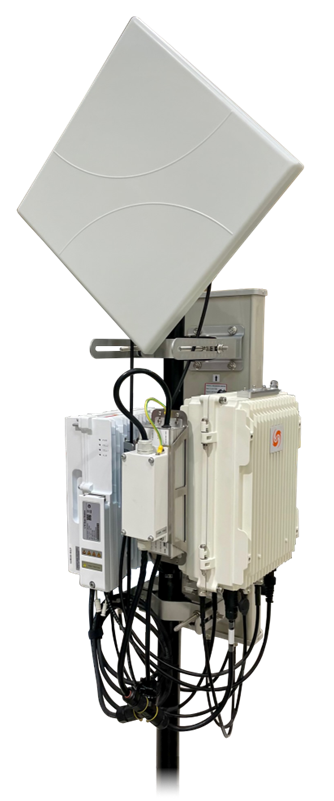
Pole Mounted GM01 Mesh Node & G501 Mesh AP with Antennas
Accessory Kit Components

Mesh Node Mounting Kit Components

Mesh Node Mounting Kit Components
| Item | QTY | Part No | Description |
|---|---|---|---|
| 1 | 1 | 230001-00 | Mesh Node PSU/Surge Suppressor Mounting Bracket |
| 2 | 1 | 210048-00 | Mesh Node Mounting Bracket |
| 3 | 4 | 220035-00 | Mesh Node Pole Mount Clamps |
| 4 | 4 | 230040-00 | 90mm Long M8-1,25 Stainless Steel Hex Bolts |
| 5 | 4 | 230105-00 | 120mm Long M8-1,25 Stainless Steel Hex Bolts |
| 6 | 4 | 220036-00 | M8 Stainless Steel Flat Washers |
| 7 | 8 | 220038-00 | M8-1,25 Stainless Steel Hex Flange Nuts |
| 8 | 4 | 220056-00 | 16mm Long M8-1,25 Stainless Steel Hex Bolts |
| 9 | 6 | 210040-00 | 8mm Long M4-0,7 Pan Head Stainless Steel External Star Sems Screws |
| 10 | 4 | 230002-00 | 8mm Long M3-0,5 Stainless Steel Square-Cone Sems Screws |
| 11 | 1 | N/A | All fasteners and an installation drawing are provided in a reclosable bag |
GM01 LEDs

GM01 LEDs
| LED | Color | Status | Description | | ---- | ----- | ------ | ---------------------------- | | PWR | Green | On | Power is on | | PWR | Green | Off | No power | | WiFi | Green | On | Wi-Fi Service is running | | WiFi | Green | Off | Wi-Fi Service is not running | | LINK | Green | On | Backhaul is connected | | LINK | Green | Off | Backhaul is not connected |GM01 Interface Connectors

GM01 Interfaces
| Interface | Connector | Cable Type | Connects to | | ---------- | -------------------------------------- | --------------------- | ---------------------------------------------- | | ±48VDC PWR | Female 3-Pin IP67 Latch/Lock Connector | 3-Conductor 16 AWG | 48VDC Power Supply via Waterproof Cable Joiner | | CPE ANT0 | Type-N Female | Type-N RF Patch Cable | Backhaul Antenna Input 0 | | CPE ANT1 | Type-N Female | Type-N RF Patch Cable | Backhaul Antenna Input 1 | | ENET | RJ45 | CAT6, 6A, 7 or higher | Access Point ETH Interface | | SC ANT0 | Type-N Female | Type-N RF Patch Cable | External Cellular Antenna Input 0 | | SC PORT0 | Type-N Female | Type-N RF Patch Cable | Access Point ANT0 | | SC PORT1 | Type-N Female | Type-N RF Patch Cable | Access Point ANT1 | | SC ANT1 | Type-N Female | Type-N RF Patch Cable | External Cellular Antenna Input 1 | ## Installation Preparation – Location and Environment The GM01 Mesh Node can be installed on a pole or a wall. Because the Mesh Node is always co-located with a G501 or G101 AP, the requirements are the same as for the APs. For the best signal coverage, place the unit in an unobstructed location. In addition to network planning, when determining where to place the GM01 Mesh Node, you need to consider the best location for signal coverage. Avoid locating the Mesh AP and Mesh Node in areas where there may be extreme temperatures, harmful gases, unstable voltages, volatile vibrations, flames, explosives, or electromagnetic interference (e.g., large radar stations, transformer substations). Avoid areas prone to impounded water, soaking, leakage, or condensation. The GM01 environmental specifications are listed in *Table: Environmental Specifications*.Environmental Specifications
| Item | Description | | --------------------- | ------------------------------- | | Operating Temperature | -40°C to +55°C, -40°F to +131°F | | Storage Temperature | -45°C to +70°C, -49°F to +158°F | | Relative Humidity | 5% to 95% RH | | Atmospheric Pressure | 70 to 106 kPa | {% hint style="info" %} **NOTE:** Please see the GXC Mesh Node GM01 Spec Sheet for current detailed specifications. {% endhint %} --- # Agent Instructions This documentation is published with GitBook. GitBook is the documentation platform designed so that both humans and AI agents can read, navigate, and reason over technical content effectively. Learn more at gitbook.com. ## Querying This Documentation If you need additional information that is not directly available in this page, you can query the documentation by asking a question. Perform an HTTP GET request on the following URL with the `ask` and `goal` query parameters: ``` GET https://docs.gxc.io/hw/lte/4g-mesh-nodes/gm01/gm01-mesh-node-installation-guide/installation-preparation.md?ask=