> For the complete documentation index, see [llms.txt](https://docs.gxc.io/llms.txt). Markdown versions of documentation pages are available by appending `.md` to page URLs; this page is available as [Markdown](https://docs.gxc.io/hw/5g/5g-network-mobile-kits/one-box-solution-gxc-5g-mobile-kit/one-box-quick-start-guide/system-operation.md).
# System Operation
{% hint style="info" %}
**NOTE:** During this time, observe the LED indications on the AP to verify that it is starting up correctly as shown in the
{% endhint %}
{% hint style="info" %}
**NOTE:** After pressing the Server Power Button, the One-Box appliance should become available on the Onyx Portal within 10 minutes.
{% endhint %}
{% hint style="info" %}
**NOTE:** This system has not been fully integrated into the GXC Portal. At this time, you will be limited to viewing the status of the items shown below and control access of subscribers. Configuration of the gNB parameters will be performed via the gNB local interface, as described below.
{% endhint %}
## Onyx Portal Status
Refer to the Onyx Portal Dashboard to view the status of your One-Box appliance, venue, subscriber status, and backhaul health. Green indicates that the system is online and all services are available. You will also see alert status related to the Onyx Edge.
Onyx Portal Dashboard
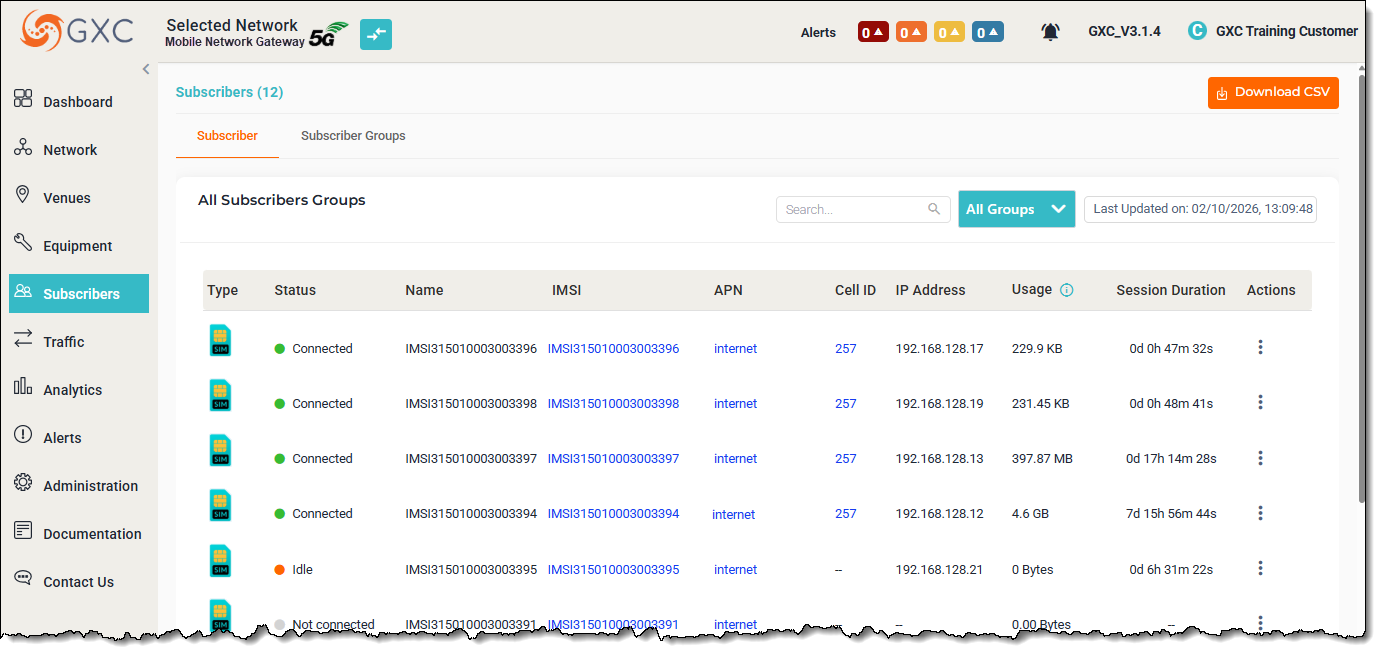
After installing SIMs on UE devices refer to the subscriber page to view the status of subscribers.
Subscriber Status
If the system does not show “Online” within 10 minutes, verify the Prerequisites have been met, then if additional assistance is required contact GXC Customer Service.
## SCE-2120 Configuration
{% hint style="info" %}
**NOTE:** Be cautious when changing parameters in the local interface. Misconfiguration of SCE-2120 Required Parameters may result in the systems ability to operate correctly.
{% endhint %}
### SCE-2120 Local Access
{% hint style="info" %}
**NOTE:** This step should only be done if it is required to access the AP directly to change parameters.
{% endhint %}
Follow the following instructions for local access to the SCE-2120
1. Set an Ethernet interface on your laptop to the 192.168.8.x/24 subnet, other than 192.168.8.100.
2. Make the following connections as shown below.
### SCE-2120 Local Interface
Using your browser access the AP GUI
at
* The Admin Password will be in the following format:
* AskNodeBxxxx (x’s are the last 4 characters of the APs MAC - all CAPS)
\
You should next get the home screen.
Typical Home Screen Information
where:
### SCE-2120 Required Settings
These settings are preconfigured at by GXC Staging Team and should not be changed without consulting GXC customer support.
#### Network Addressing
#### Sync Source
Change these parameters as allowed by accessibility to a GPS signal.
{% hint style="info" %}
**NOTE:** This can be changed to GPS if a sufficient GPS can be obtained by the provided GPS antenna.
{% endhint %}
#### gNB CU
Do not change any parameters on this page without consulting GXC Technical Support.
{% hint style="info" %}
**NOTE:** If the gNB N2 IP is changed it must match the Network IP address of the unit.
{% endhint %}
#### gNB DU
Configured as required by GXC staging. Can be changed as required by the customer.
#### RF Antenna
Set as required.
---
# Agent Instructions
This documentation is published with GitBook. GitBook is the documentation platform designed so that both humans and AI agents can read, navigate, and reason over technical content effectively. Learn more at gitbook.com.
## Querying This Documentation
If you need additional information that is not directly available in this page, you can query the documentation by asking a question.
Perform an HTTP GET request on the following URL with the `ask` and `goal` query parameters:
```
GET https://docs.gxc.io/hw/5g/5g-network-mobile-kits/one-box-solution-gxc-5g-mobile-kit/one-box-quick-start-guide/system-operation.md?ask=&goal=
```
`ask` is the immediate question: it should be specific, self-contained, and written in natural language.
`goal` is what the user is ultimately trying to achieve, the reason they need the answer. Sharing it helps GitBook give you a better, more relevant answer. A goal is most helpful when it describes the outcome the user wants rather than restating the question. For example, with `ask=how do I create an API token`, a goal like `automate deployments from our CI pipeline` lets GitBook tailor the answer to that use case.
The response will contain a direct answer to the question and relevant excerpts and sources from the documentation.
Use this mechanism when the answer is not explicitly present in the current page, you need clarification or additional context, or you want to retrieve related documentation sections.