> For the complete documentation index, see [llms.txt](https://docs.gxc.io/llms.txt). Markdown versions of documentation pages are available by appending `.md` to page URLs; this page is available as [Markdown](https://docs.gxc.io/hw/5g/5g-access-points/g506/g506-ap-hardware-installation-guide.md).
# G506 AP Hardware Installation Guide
## About this Guide
This guide provides the information you need to install a GXC G506 Radio Unit (RU). It also includes a general description of the unit, guidelines for using it, and an overview of its capabilities.
{% hint style="info" %}
**NOTE:** Installation of this device should only be performed by a licensed Certified Professional Installer (CPI) per limitations set forth in FCC Part 96 CBRS band, as well as guidelines as summarized by the OnGo Alliance.
{% endhint %}
In this guide, the GXC G506 may be referred to as an Access Point (AP), Radio Unit (RU), Remote Radio Unit (RRU), or Open Radio Unit (ORU).
### General Active RF Installation Instructions
Only experienced installation professionals who are familiar with local building and safety codes, and wherever applicable, are licensed by the appropriate government regulatory authorities should install RF devices and antennas. Failure to do so may void the product warranty and may expose the end user to legal and financial liabilities. The manufacturer and its resellers or distributors are not liable for injury, damage or regulation violations associated with the installation of RF devices or antennas.
{% hint style="info" %}
**NOTE:** The G506 RU is designed to be installed and operated outdoors to conform to CBSD - FCC specifications.
{% endhint %}
{% hint style="info" %}
**NOTE:** Prior to installation, locate the Product ID Label and record the serial number and MAC address of the unit and the proposed installation location in a material registry / equipment journal for future reference.
{% endhint %}
### Safety Information
{% hint style="danger" %}
**WARNING:** Read the installation instructions before connecting the system to its power source.
{% endhint %}
{% hint style="danger" %}
**WARNING:** Equipment installation must comply with local and national electrical codes.
{% endhint %}
{% hint style="danger" %}
**WARNING:** This product relies on the existing building or structure for short-circuit (overcurrent) protection. Ensure that the protective device is rated no greater than 15A.
{% endhint %}
{% hint style="danger" %}
**WARNING:** Do not operate this wireless network device near unshielded blasting caps or in an explosive environment unless the device has been modified and qualified for such use.
{% endhint %}
{% hint style="danger" %}
**WARNING:** Do not operate this wireless network device near unshielded blasting caps or in an explosive environment unless the device has been modified and qualified for such use.
{% endhint %}
{% hint style="danger" %}
**WARNING:** To comply with the United States Federal Communications Commission (FCC) radio frequency (RF) exposure limits, antennas should be located at a minimum of 83 centimeters (33 inches) or more from the body of all persons.
{% endhint %}
#### Country Safety Statements
**EU: Electromagnetic Fields (Directive 2014/53/EU)**
European Council Recommendation 2014/53/EU details basic restrictions and reference levels on human exposure to electromagnetic fields as advised by the ICNIRP. Adherence to these recommended restrictions and reference levels should provide a high level of protection as regards the established health effects that may result from exposure to electromagnetic fields.
**CE: RF Exposure Statement**
To comply with RF Exposure requirements, this equipment should be installed and operated at a minimum distance of 107 cm between the radiating device and your body.
**Precautions for Wireless Devices**
When using this device, ensure that the antenna of the device is at least 20 cm away from all people.
{% hint style="danger" %}
**WARNING:** WARNING: Do not use this device where using wireless devices is prohibited or may cause interference or danger.
{% endhint %}
If you are using any electrical medical device, contact its manufacturer for the restrictions on the use of this device.
{% hint style="warning" %}
**CAUTION:** The EM radio waves generated by this device may interfere with the operation of electronic medical devices. Do not take this device into operating rooms, intensive care units (ICUs), or coronary care units (CCUs).
{% endhint %}
**Usage Safety Precautions**
* Do not use this device where flammables or explosives are stored, for example, in a gas station, oil depot, or chemical plant. Otherwise, explosions or fires may occur. In addition, follow the instructions indicated in text or symbols in area used.
* Keep this device far from electronic devices that generate strong magnetic or electric fields, such as microwave ovens, satellite dish antennas, or large appliances.
* Do not use any other power adapter except the one that is provided with this device. Use of other adapters could damage this device.
* Before connecting and disconnecting cables, ensure that your hands are dry.
* To avoid electric shock, damage, and fire resulting from short-circuiting, do not use the product if wet, with wet hands, or while holding or drinking any liquids.
* Only insert relevant cables or devices into the ports, do not insert metal or other foreign objects.
* Do not place naked flame sources, such as lighted candles, on this device. Keep this device far from sources of heat and fire, such as a heater or a candle.
* Damage caused by user misuse or not following instructions are not covered by warranty.
**Service Information**
Refer all repairs to qualified service personnel. Do not modify any part of this device, as this will void the warranty. Disconnect the power to this product and return it for service if the following conditions apply:
1. The product does not function after following the operating instructions outlined in this manual.
2. The product has been dropped or impacted and appears physically damaged. Locate the serial number of the product and record this on your registration card for future reference. Also record the MAC address, located on the product sticker.
**UL Outdoor Usage Requirements**
{% hint style="danger" %}
**WARNING:** All interconnecting cables must be routed inside UL listed conduits for outdoor use. This device is designed for outdoor use with an ingress protection code of IP65.
{% endhint %}
**Equipment Class Grounding**
{% hint style="danger" %}
**WARNING:** Class I equipment achieves electric shock protection through basic insulation and protective earth grounding. This requires all conductive parts that could assume a hazardous voltage in the event of basic insulation failure to be connected to a protective earth conductor.
{% endhint %}
**Grounding Requirements for DC Model**
{% hint style="info" %}
**NOTE:** This device is designed to allow the connection of the grounded conductor of the DC supply circuit to the grounding conductor on the device.
{% endhint %}
## Introduction
The GXC G506 is designed for Open 5G Radio Access Network (O-RAN) and is combined with additional O-RAN elements to provide a complete 5G mobile radio communication system provide 5G-NR Sub-6 GHz indoor coverage and optimal 5G network access at throughput speeds of over 1Gbps to satisfy the demands of enterprise, industrial, and commercial campuses. This guide provides information and steps for installing the RU but is intended for installation by pre-trained personnel only.
### Onyx Platform Features
The G506 RU is a part of the GXC 5G Onyx Platform, which integrates multiple hardware and software elements to bring a full solution to customers. The Onyx Platform provides an enterprise network based on a Cellular Mesh architecture. This private network platform offers high resiliency, flexible deployments, strong coverage in hard-to-reach areas, and a powerful distributed application platform. Key features of the Onyx Platform:
* ORAN Ecosystem, includes Rack-Based CU, DU, and FHMs and both Indoor and Outdoor-rated RUs
* On-premises core network
* A robust network management platform tied together with a single-pane-of-glass controller presented as a web portal
### G506 RU
The G506 RU is designed for open 5G Radio Access Network (O-RAN) and is combined with additional O-RAN elements to provide a complete 5G mobile radio communication system to provide 5G-NR Sub-6 GHz indoor coverage and optimal 5G network access at throughput speeds of over 1Gbps to satisfy the demands of enterprise, industrial, and commercial campuses.
The RU is designed with a flexible vRAN solution that reduces costs and increases connection speeds via split fronthaul network implementation. The RU can be mounted on walls, poles, or ceilings and utilizes internal or optional external (separate model) antennas.
This RU is based on open interfaces as defined by the O-RAN alliance with the fronthaul interface between the RU and the Distributed Unit (DU) that complies with RAN split 7.2a and includes the following signals:
* User plane data (UP)
* Control plane data (CP)
* Synchronization signals (PTP)
* Management plane data (MP) This guide provides information and steps for installing the RU but is intended for installation by pre-trained personnel only.
GXC 5G Onyx Platform Architecture

### Specifications
[*G506 AP Specification Sheet*](/hw/5g/5g-access-points/g506/g506-specification-sheet.md)
## Getting Started
### Package Contents
{% hint style="info" %}
**NOTE:** Specifications and appearance may change without notice.
{% endhint %}
#### G506 RU
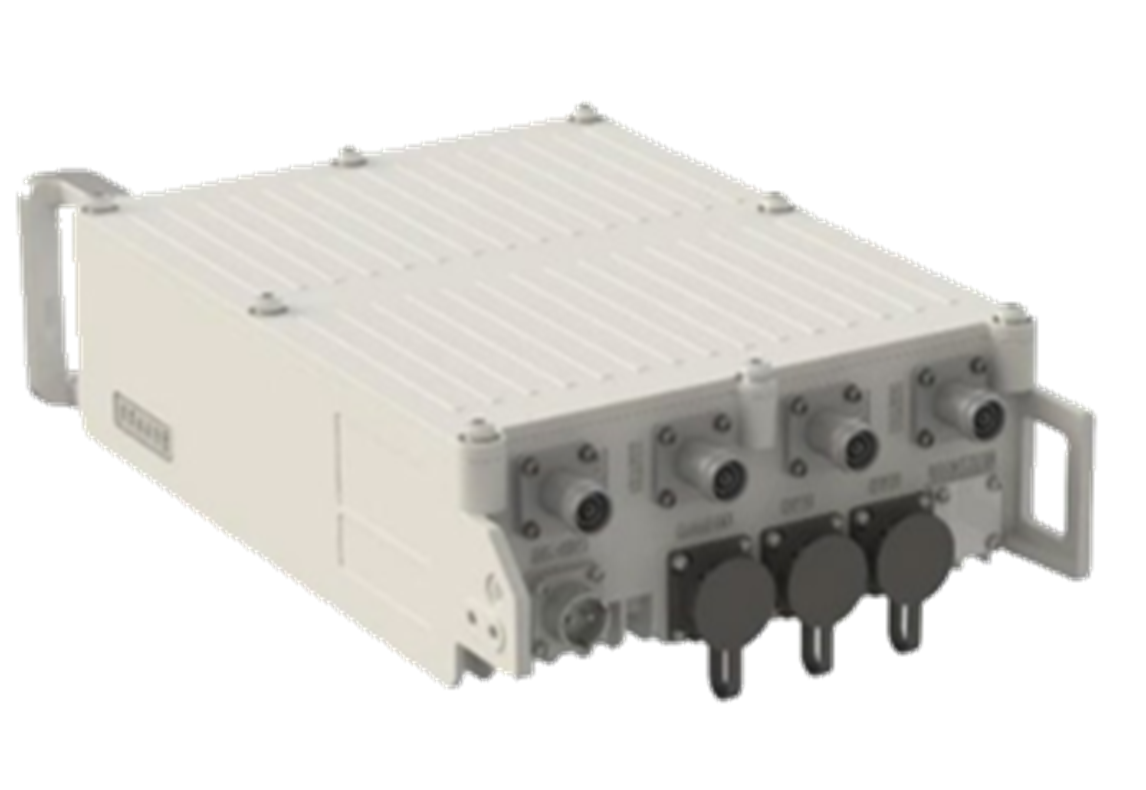
GXC G506 RU Package Contents
Parts
QTY
Image
Remote Radio Unit NOTE: Unit is delivered with connectors covered by protective caps. Remove protective caps before use. NOTE: 1 pc. of SFP+ Transceiver is pre-installed in Remote Radio Unit.
1
LC-to-LC SM Fiber Patch Cable (10m) (packaged separately)
1
SFP+ Transceivers 10G SFP+, 1310 nm, Single-Mode, Duplex LC, Long Range (packaged separately)
2
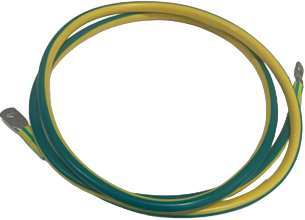
Chassis Ground Cable 1.5 m, 6 AWG (16 mm2), green/yellow Wire with pre-terminated ring terminals
1
#### Mounting Bracket Components
{% hint style="info" %}
**NOTE:** Specifications and appearance may change without notice.
{% endhint %}
Mounting Bracket Kit Package Contents
Parts
QTY
Image
RU Mounting Plate
1
Wall/Pole Mounting Plate
1
Auxiliary Pole clamp (supports poles with diameter of 60mm (2.36 in.) to 120 mm (4.72 inches))
#### Installation Tools
The following table includes some of the common tools used for this installation. The tools required will vary depending on the type of installation.
Partial Listing of Required Tools
| |  |  |  |
| --------------------------------------------------------------------------------------------------------------------------------------------------------------------------------------------------------------------------------------------------------- | --------------------------------------------------------------------------------------------------------------------- | --------------------------------------------------------------------------------------------------------------------- | --------------------------------------------------------------------------------------------------------------------- |
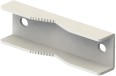
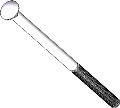
| Adjustable Wrench | 18 mm Combo Wrench | Torque Wrench: (Adjustable or 18mm) | 3/8-Inch Drive Adjustable Torque Wrench |
| |  |  |  |
| 3/8 Inch Drive, 10 mm Hex Socket Bit | Level Bar | Marker | Clean Work Gloves |
#### Other Items (Not Included / User Provided)
The items listed below will be required to complete the installation. Type and quantity may vary depending on the installation and local requirements.
Other Items (Not Included / User Provided)
| Item | Description |
| ---------------------------------- | ---------------------------------------------- |
| 4.3-10 RF antenna cables (up to 4) | 50-ohm feeder |
| RF antenna | Omni or directional |
| All-weather electrical tape | Used for weather proofing |
| All-weather mastic tape | Used for weather proofing |
| Tie wraps | Used for weather proofing and cable management |
## Installation Preparation
This document describes the installation process for pole and wall mounting of the GXC G506 5G outdoor RU, and the recommended location and environment required for optimal performance.
{% hint style="danger" %}
**WARNING:** This and all telecommunications equipment must be installed in locations that are not easily accessible to the general public and do not pose a hazard to nearby personnel or equipment. Installation must be performed only by a licensed and certified professional.
{% endhint %}
### Pre-Installation Notes
In the process of transportation, handling, and installation of the GXC G506 5G outdoor RU the customer or installer must adhere to the following usage requirements:
* Before the installation, it is required to transport the G506 RU to the installation site while still in its shipping packaging. Unpacking or transferring the unit in an unprotected manner could lead to damage of the external connectors or enclosure of the G506 RU. External damage like this will not be covered under the product warranty.
* Avoid collisions between the G506 RU and other components, parts, doors, walls, shelves, and other objects during transportation, handling, and installation processes.
* During transportation, handling, and installation, wear clean protective gloves. It is prohibited to touch parts with bare hands or with dirty gloves. Contamination of the G506 RU’s connectors can lead to deficient performance or product failure.
* Before installing the G506 RU, the installer must be familiar with its exterior, ports, indicators, installation scenarios and installation clearance requirements.
* Inspect and clean all ports for any debris prior to making any connections using industry approved methods and materials.
### Hardware Information
#### RU Exterior
G506 Dimensions

#### G506 Ports and LEDs
Power supply socket, for details see RU power cable section
Bottom ports
Local-M
Debug port, RJ45
Bottom ports
OP1
Optical port 0, LC, connected to the DU - Main
Bottom ports
OP2
Optical port 1, LC, connected to the DU - Secondary
Bottom ports
10M/TRIG
10M/TRIG port
G506 LEDs
Indicator
Color
Status
Description
Run
Green
Steady on
Single board failure.
Run
Green
Steady off
Single board failure.
Run
Green
Slow Blinking
(on for 1s and off for 1s)
Normal operation
Run
Green
Fast Blinking
(on for 0.1s and off for 0.1s)
The single board is starting up and loading the software or upgrading the software.
ALM
Red
Steady on
Major Alarm
ALM
Red
Steady off
No Alarm
ALM
Red
Slow Blinking
(on for 1s and off for 1s)
General alarm, alarm severity is lower than that of normally bright state.
OP1/OP2
Green
Steady on
OP1/OP2 link is normal.
OP1/OP2
Green
Steady off
Abnormal transceiver of optical module
OP1/OP2
Green
Slow Blinking
(on for 1s and off for 1s)
OP1/OP2 out of lock (possible causes: dual-mode clock interlock, OP1 interface rate mismatch, etc.)
OP1/OP2
Green
Slow Blinking
(on for 0.1s and off for 0.1s)
The optical module is not in place or the power supply of the optical module is powered down
ACT
Green
Steady on
Normal
ACT
Green
Steady off
Not activated or carrier not activated
VSWR
Red
Steady on
Serious alarm, VSWR (Voltage Standing Wave Ratio) affecting use
VSWR
Red
Steady off
No VSWR alarm
VSWR
Red
Slow Blinking
(on for 1s and off for 1s)
General VSWR alarm does not affect usage
### General Antenna Information
When connecting a 4x4 MIMO outdoor RU to a 4x4 slant- or cross-polarized antenna, installers should follow industry best practices and safety protocols to ensure signal integrity, performance, and proper polarization orientation.
#### Special Port Mapping
The following table is provided for special cases where a Front Haul Multiplexer (FHM) or a Multi-Port Connect configuration is used.
Special Port Mapping
| AP Port Number | 1 | 2 | 3 | 4 |
| ------------------------------------------------------ | -------- | -------- | -------- | -------- |
| | G506 | G506 | G506 | G506 |
| AP Port Number | 1 | 2 | 3 | 4 |
|
Antenna polarization (4x4 standard)
| H or +45 | H or +45 | V or -45 | V or -45 |
|
Antenna polarization (4x4 FHM co-located RU)
| V or -45 | V or -45 | H or +45 | H or +45 |
| Multi-Port Connect : | | | | |
| Antenna#1 2x2 dual | H or +45 | | V or -45 | |
| Antenna#2 2x2 dual | | H or +45 | | V or -45 |
#### Antenna Polarization and MIMO Fundamentals
**Slant/Cross-Polarized Configuration:** 4x4 MIMO systems typically use dual-slant polarization (+45° and -45°) or vertical/horizontal cross-polarization to maximize spatial diversity and minimize correlation between antenna elements. This configuration allows the system to transmit and receive independent data streams simultaneously with better performance.
**Polarization Matching**: Given two communicating RUs their antenna systems should match in polarization configuration for optimum performance. Most 4x4 outdoor slant antennas alternate polarization across ports (e.g., Port 1: +45°, Port 2: -45°, Port 3: +45°, Port 4: -45°).
The following table provides a short summary of differences between slant- (±45) and cross- (H/V) polarization.
Summary of Differences between Slant and Cross Polarization
| Aspect | Slant-Polarization (±45) | Cross-Polarization (H/V) |
| ------------------ | ------------------------ | ---------------------------------- |
| Angle | +45° and -45° | 0° (Horizontal) and 90° (Vertical) |
| Use Case | Common in LTE/5G | Common in Wi-Fi, some LTE |
| Port Configuration | Alternating slants | Alternating H/V or H-H/V-V |
| Physical Mounting | Less sensitive to tilt | More sensitive to rotation |
#### Physical Port Connections
**Port Mapping:** There is no universal industry-wide convention that dictates which port is labeled H, V, +45°, or –45° in multi‑port (cross‑ or slant‑polarized) MIMO antennas—different manufacturers may label ports according to their own designs and datasheets.
**Example Port Mapping:** A 4x4 MIMO antenna system may follow this convention:
* Ports 1 & 3: +45° slant polarization (or vertical)
* Ports 2 & 4: -45° slant polarization (or horizontal)
{% hint style="warning" %}
**CAUTION:** Always verify the port polarization and orientation of the antenna system you are deploying. Failure to do may result in poor system performance.
{% endhint %}
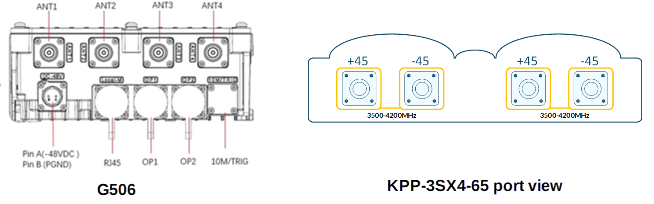
In the case of the RU and a KPP-3sx4-65 antenna, the cabling port connections are shown in the following table.
G506 Port to KPP-3sx4-65 Port Mapping
| G506 RU port | Antenna Port (left to right) | Antenna Polarization |
| ------------ | ---------------------------- | -------------------- |
| ANT1 | First port | +45° |
| ANT2 | Second port | -45° |
| ANT3 | Third port | +45° |
| ANT4 | Fourth port | -45° |
A figure of the RU and antenna ports are provided below for the reader’s reference.
G506 and KPP-3SX4-65 Port View
**Connector Types:** Verify the connector types for outdoor installations prior to installation, ensuring proper impedance and weather proofing in accordance with local requirements and best practices.
{% hint style="warning" %}
**CAUTION:** Failure to use the correct connector types on both ends of the RF jumper cable will result in damage to the RU, antenna, and RF jumper.
{% endhint %}
**Cable Requirements:** Use low-loss coaxial cables (LMR-240 or equivalent) with matched electrical length between all four RF paths. Cable length differences should not exceed ±2cm to maintain phase coherence.
#### Installation Rules and Best Practices
**Labeling:**
* Label all cables with weather-proof labels.
* Place labels such that they will not be covered by final weatherproof boots or tape.
**Physical Separation**:
* Maintain minimum 0.5λ (wavelength) spacing between antenna elements at the operating frequency.
**Grounding and Safety:**
* Install proper RF grounding at both the antenna and RU
* Use surge protection on all RF lines
* Follow local electrical codes and tower safety regulations
* Ensure all connections are weatherproofed to IP67 or better
**Orientation and Alignment:**
* Mount antennas with proper mechanical tilt (typically 0-15° down tilt)
* Ensure cross-polarized elements maintain orthogonal relationship
* Use precision inclinometers for accurate mechanical alignment
**RF Path Management:**
* Keep all four RF cables equal length (±1% tolerance)
* Avoid sharp bends (minimum bend radius = 10x cable diameter)
* Route cables to minimize mutual coupling and external interference
* Label cables clearly (Port 1-4, +45°/-45°) for maintenance
**Testing and Verification:**
* After installation (if applicable), verify:
* VSWR of RF cabling between RU and antenna
* Port-to-port isolation
* Proper polarization alignment using field strength measurements
* Successful MIMO stream establishment through system diagnostics
**Regulatory Compliance:**
* Ensure antenna gain and EIRP levels comply with local regulations
* Document installation with photos and measurement reports for warranty, compliance records.
### Co-located Dual 4x4 MIMO RUs w/FHM
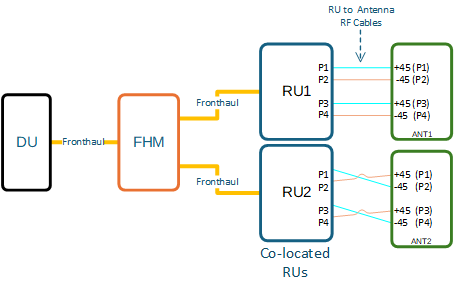
The following figure, describes a special case of two co-located 5G RUs mounted next to each other (within 10m of one another) fed from an FHM. This polarization-swapped dual AP setup is chosen to enhance signal diversity, reduce co-located interference, and improve MIMO performance in a shared coverage zone. It introduces controlled polarization diversity at the network level, which benefits:
* UE connectivity stability
* Signal quality across orientations
* Interference management
* Throughput in edge and overlapping regions
Co-located Dual 4x4 MIMO RUs
The table below tabulates the information from the previous figure.
## G506 RU Installation
### Instructions and Limitations
The G506 RU can be installed on poles and walls, with details as follows. Other installation locations and structures are feasible. However, if alternate structures are utilized, it is the installer or customer’s responsibility to assess and deem those locations as acceptable and to utilize industry standard construction methods to verify the unit’s stability and orientation corresponds with these specifications.
#### Installation Overview
The installation specifications described in this document only define the adaptability of the specific installation components and scenarios pictured and described.
{% hint style="warning" %}
**CAUTION:** Prior to installation, assess the strength and reliability of the structure proposed for the unit installation based on the actual weight of the installed equipment.
{% endhint %}
#### Application Limitations
To ensure proper air circulation and effective heat dissipation around the G506 RU, limitations on the unit application environment include, but are not limited to, the following points:
* Do not install the G506 RU in indoor or outdoor cabinets that are completely sealed and lack either air exchange or active cooling systems such as heat exchangers, air conditioners, etc., which will ensure the ambient temperature will not exceed the specified temperature range.
* Do not install the G506 RU in equipment rooms or network closets that are completely sealed and do not have active cooling systems as detailed above.
{% hint style="warning" %}
**CAUTION:** Inappropriate application environments can reduce heat dissipation capability of the G506 RU, which may cause the unit to malfunction or fail.
{% endhint %}
### Installation Clearance Requirements
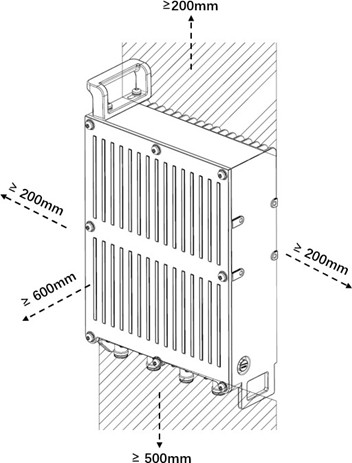
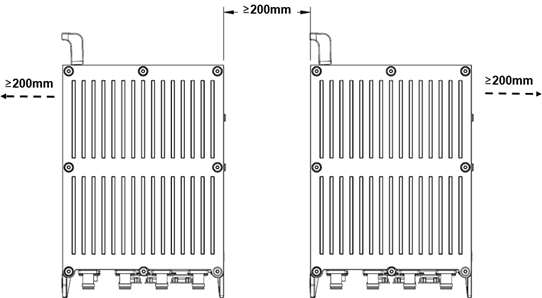
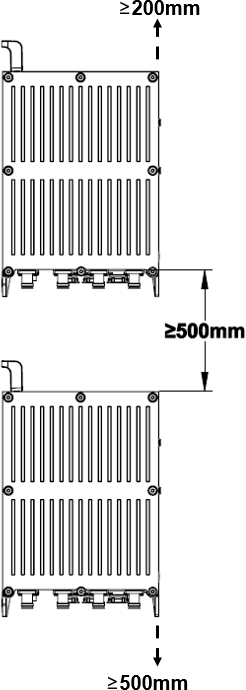
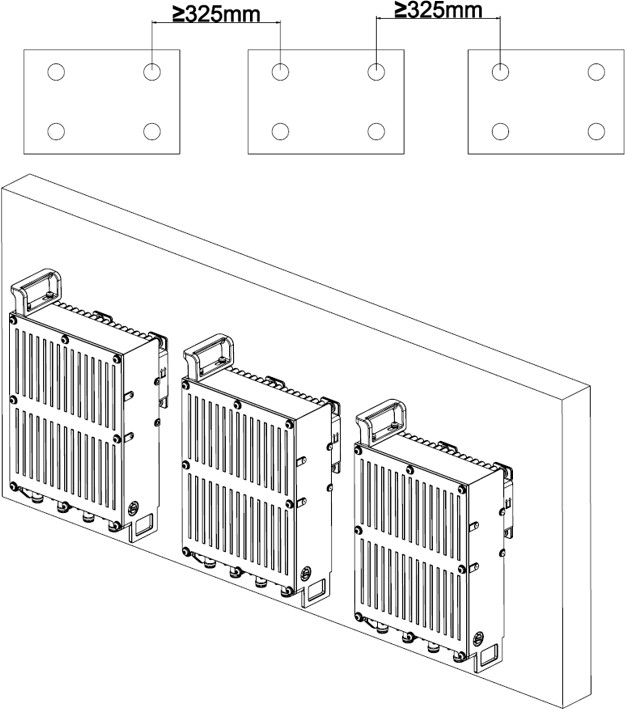
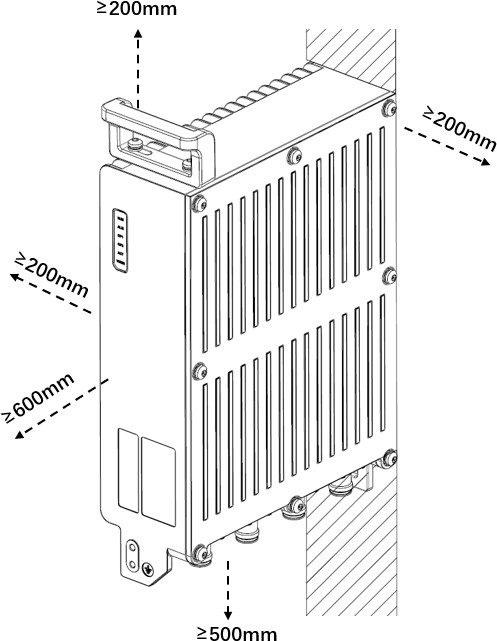
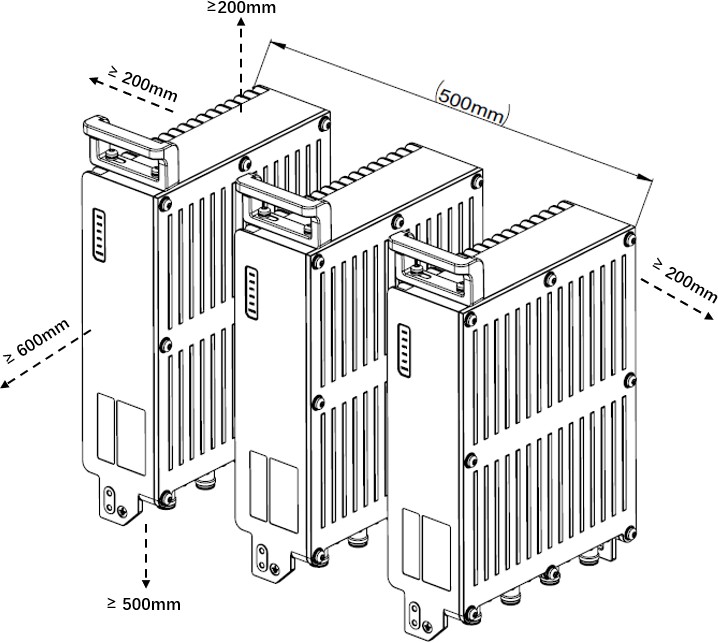
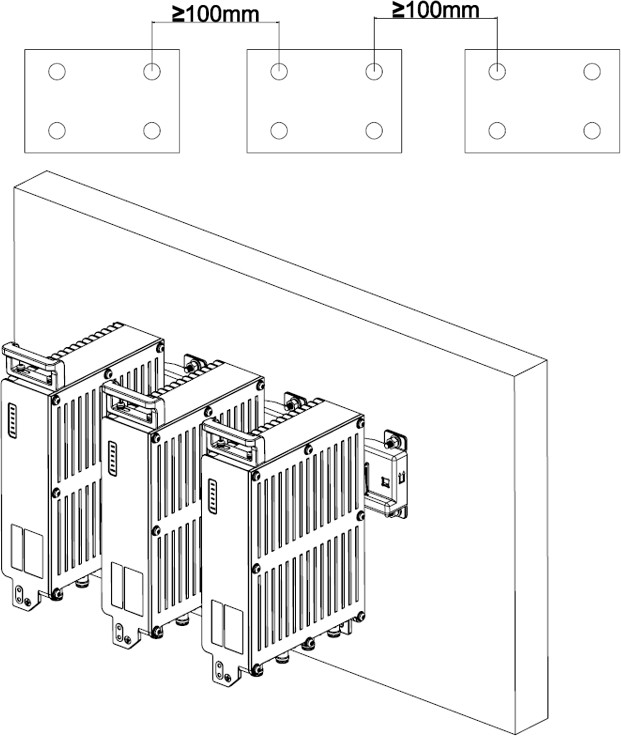
The minimum clearance recommended for the G506 RU installation are shown below. Ensure that the ambient air temperature remains in the specified operational temperature range and these clearance dimensions are maintained to ensure normal operation and allow ample room for maintenance.
Minimum G506 Clearance for a Single Unit
Minimum G506 Clearance between Units
Minimum Vertical Spacing between G506 Units
Recommended G506 Bracket Clearance for Three or More Units (Back Mount)
Recommended G506 Clearance for a Single RU (Side Mount)
Recommended G506 Clearance for Three or More RUs (Side Mount)
Recommended Clearances for Three or More G506 Units in a Side-Mounted Mode on a Wall
{% hint style="warning" %}
**CAUTION:** To ensure proper air circulation and effective heat dissipation around the RU, do not install it in indoor or outdoor cabinets (such as enclosed camouflage boxes) or in closed rooms without active cooling systems. Such conditions can lead to overheating and may cause the RU to malfunction.
{% endhint %}
#### Transportation, Handling, and Installation
Before installation, transport the RU to the site in its packaging. Avoid collisions during transport, handling, and installation. Wear clean gloves and avoid touching connectors or ports with bare hands or dirty gloves.
#### Common Installation Process
1. Pre-installation Checklist
1. Ensure you understand the required safety standards, power requirements, and necessary tools.
2. Verify that all necessary parts and components are available or identified for procurement.
2. Site Preparation
1. Survey the installation site, including support structures.
2. Collect all required parts and tools.
3. Implement necessary safety measures at the site.
3. Mounting the RU
1. Use the mounting kit to securely attach the RU to a pole, bar, or a stable support frame.
4. Grounding
1. Connect the grounding cable from the RU to an appropriate earth conductor.
5. Antenna Connection
1. Attach the antenna cables from the RU to a certified external antenna.
2. Ensure waterproofing of the antenna cable connectors on both the RU and the external antenna.
6. Fiber Connections
1. Install the provided fiber cable into the SFP+ port and connect it to a fiber termination box.
7. Power Supply
1. Assemble the provided power cable to an appropriate power source, depending on the RU model.
2. The RUN light will automatically turn on and cycle once powered.
WARNING: This device must be grounded using a green and yellow striped copper wire with either a single core of at least 6 AWG.
### RU Installation - Wall
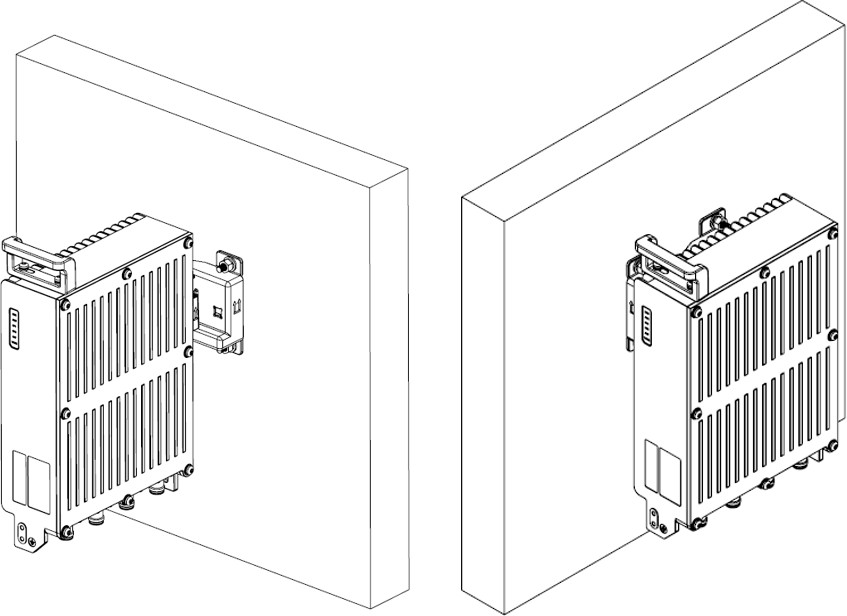
The G506 RU can easily be wall mounted using the materials in the Mounting Kit. Installation scenarios must meet heat-dissipation and waterproofing requirements of the RU. The following instructions are meant to assist the installer in the installation of the G506 onto common wall constructions. Follow all common safety practices and local requirements as required for installation.
G506 Wall Installation
#### Installation Materials
**Verification of Wall Mounting Kit Materials**
Check the G506 Mounting Kit package to ensure it contains the components required for wall mounting as shown in the following figure.
#### Wall Mount Installation Procedure
{% stepper %}
{% step %}
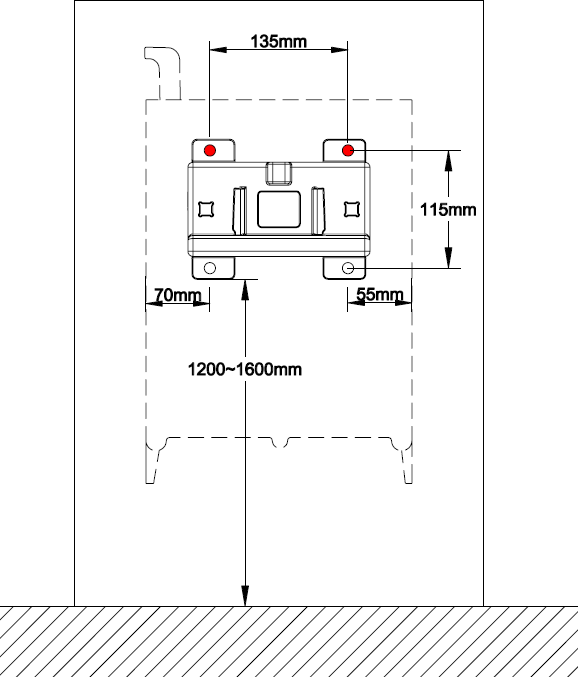
Place the installation bracket against the wall, use a level to verify that the installation bracket is placed horizontally, and then mark anchor points with a marker as shown below. The RU bracket should be mounted no less than 1200-1600mm from the surface of its installation location.
Marking Anchor Points
{% endstep %}
{% step %}
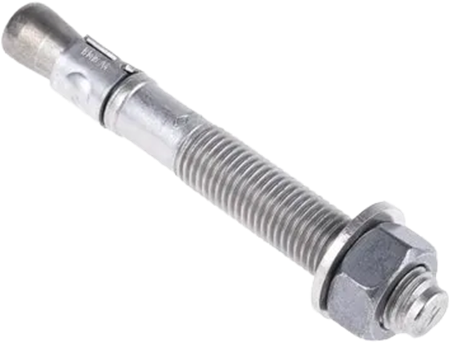
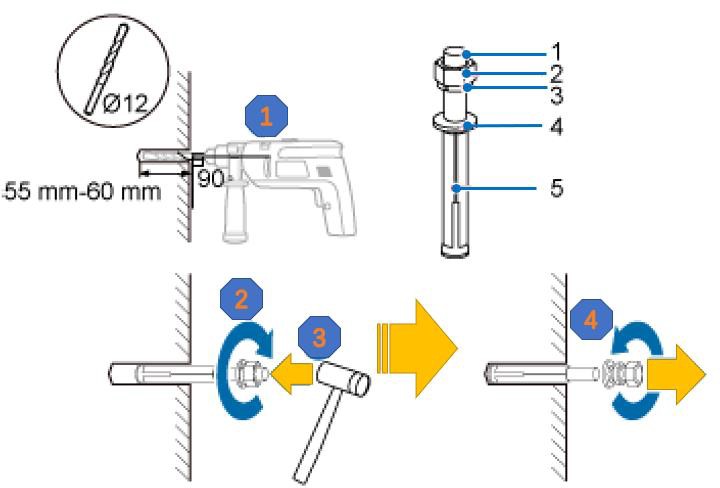
Drill holes at the anchor points, and then insert expansion anchor bolts, as shown below.
{% hint style="danger" %}
**WARNING:** The installer must determine if the anchor bolts are the correct hardware for the installation. If not, obtain the correct hardware for the installation.
{% endhint %}
Drilling Holes Inserting Expansion Anchor Bolts
Anchor Bolt Parts
Item
Description
1
M10 x 100 bolt
2
Nut
3
Spring Washer
4
Flat Washer
5
Expansion Sleeve
{% endstep %}
{% step %}
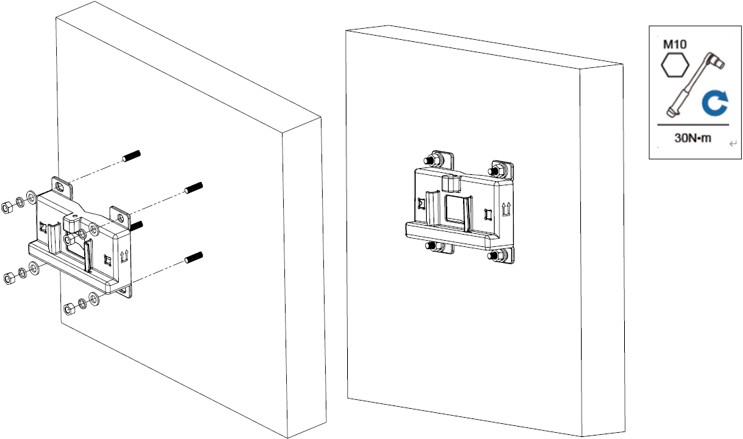
Install the installation bracket on the expansion anchor bolts, place the flat washers, spring washers, and nuts through the expansion anchor bolts and then use a torque socket to tighten the nuts.
Installation of the Wall Bracket
{% endstep %}
{% step %}
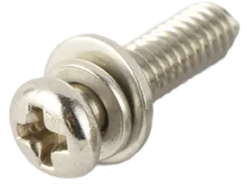
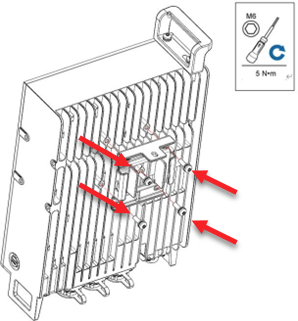
Use hexagon torque screwdriver to install the main bracket onto the rear of the G506, and tighten the four stainless screws.
{% endstep %}
{% step %}
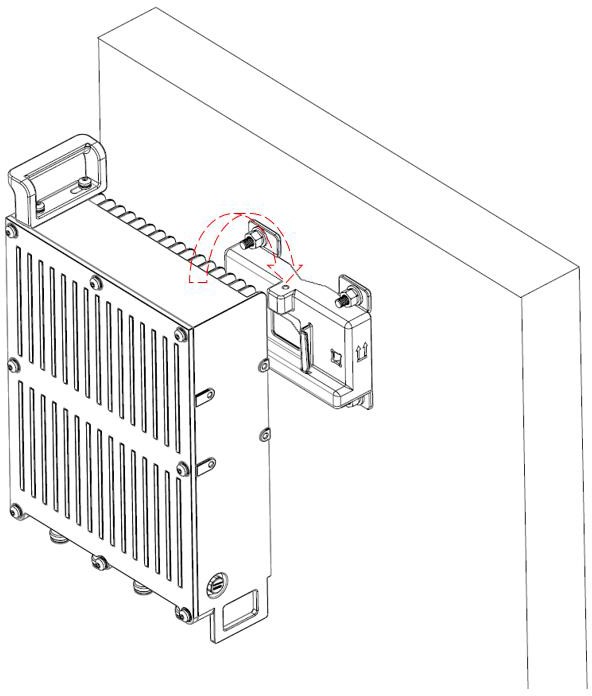
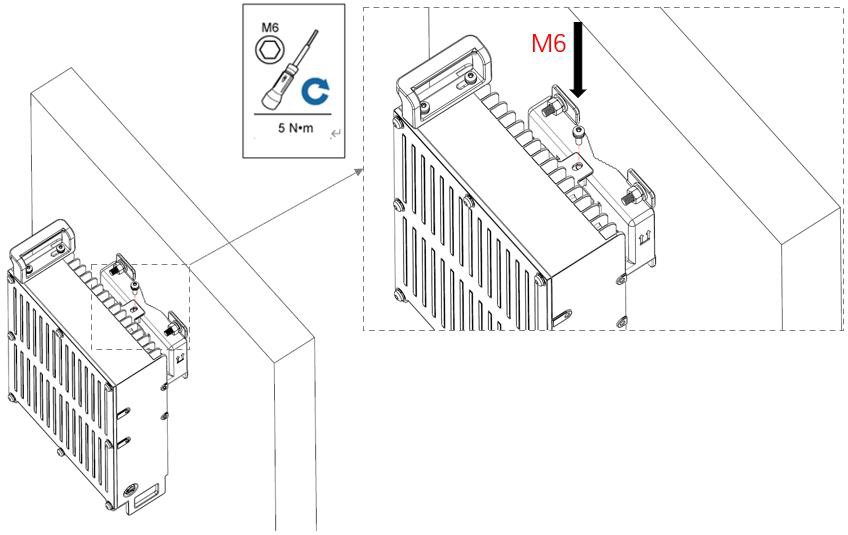
Install the G506 onto the main bracket and tighten the M6 screw as shown in the figures below.
Installation of G506 on Wall Bracket
Tighten the M6 Screw onto the Wall Bracket
{% endstep %}
{% endstepper %}
### RU Installation – Pole
The diameter of a pole for installing an ORRU ranges from 60 mm to 120 mm (with a pole wall thickness of 3.5 mm and above), the recommended diameter is 80 mm.
#### Pole Installation Materials
**Verification of Pole Mounting Kit Materials**
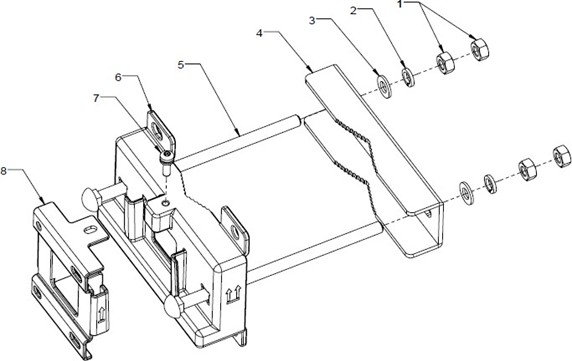
Check the G506 Mounting Kit package to ensure it contains the components required for pole mounting as shown in the figure and table below.
Pole Mounting Parts for G506
Components Required for Pole Mounting Kit G506
| Item # | Description | Pole Mounting Quantity |
| ------ | ---------------------------------------------- | ---------------------- |
| 1 | M10 Hex Nuts | 4 pcs. |
| 2 | M10 Split Washers | 2 pcs. |
| 3 | M10 Flat Washers | 2 pcs. |
| 4 | Auxiliary Bracket | 1 pc. |
| 5 | Square neck bolt (M10x200ZA-SS316-GB/T12-2013) | 2 pcs |
| 6 | Wall/Pole mounting bracket | 1 pc. |
| 7 | M6×20-SS-GB/T 9074, Screw assy. | 1 pc. |
| 8 | RU Mounting Bracket | 1 pc. |
#### Pole Mount Installation Procedure
The Pole Mounting Kit of the G506 RU supports installation on poles, masts or other sturdy structural infrastructure that has a circumscribed circular diameter in the range of 60 to 120 mm (2.36 to 4.72 inches).
{% hint style="danger" %}
**WARNING:** Prior to installation, perform a thorough evaluation of the specific installation location and mounting feature. Install the G506 RU onto features or surfaces that are structurally sound and can support the weight of the G506 RU and associated additional equipment; approx. 57 kg (125 lbs.)
{% endhint %}
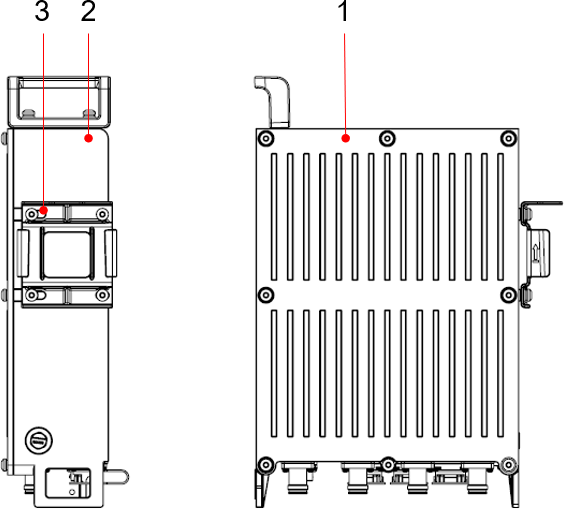
G506 Front and Side View
G506 Side and Back View on a Pole

{% stepper %}
{% step %}
Determine a position for installing the mounting brackets, it is recommended that the RU be installed at a minimum position 1200 mm (47 in) to 1600 mm (63 in) high above the ground.
{% endstep %}
{% step %}
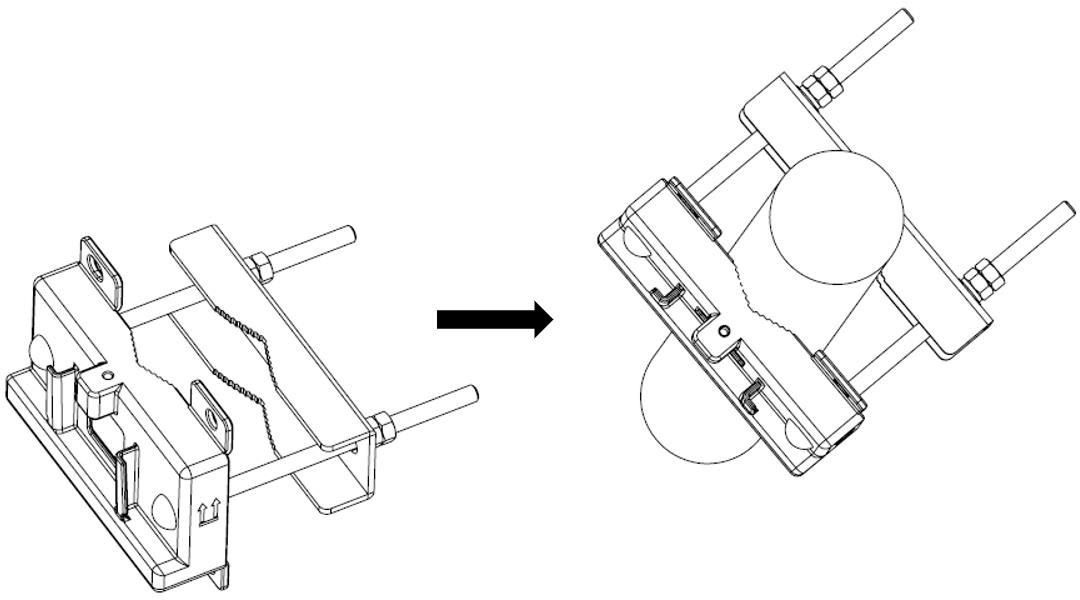
Install the mounting brackets onto the pole and tighten the nuts on the bolts, as shown in the following figure.
Mounting Bracket Installation
{% endstep %}
{% step %}
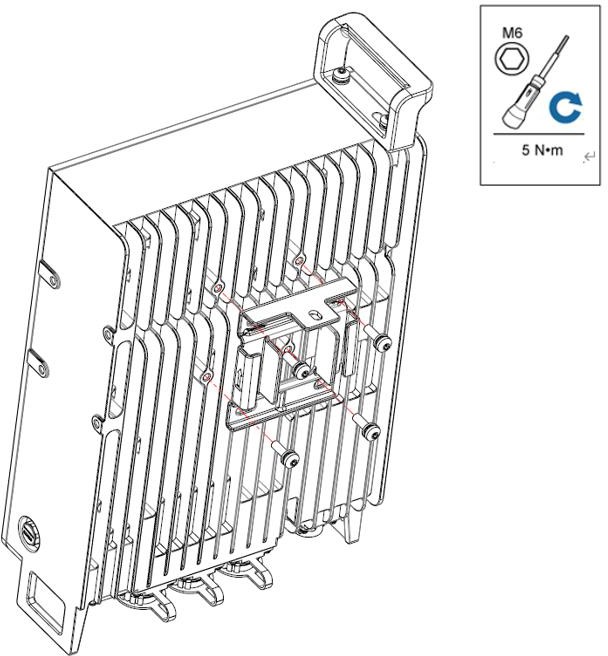
Install the main bracket onto the rear side of ORRU and tighten the M6 screws as shown in the following figure.
Main Bracket Installation onto the Rear of the G506
{% endstep %}
{% step %}
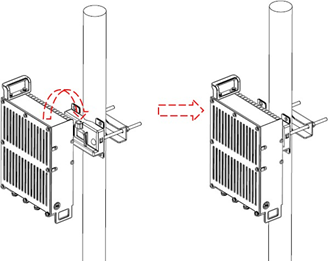
Install the RU onto the pole and tighten the M6 screw as shown in the following figures.
G506 Installation onto a Pole (Rear Mount)
{% endstep %}
{% endstepper %}
Tighten the M6 Screw onto the Bracket
## Grounding and Lightning Protection
The G506 RU Installation must have Class 1 Equipment Grounding. Prior to applying power to the G506 RU, the unit must be protected against lightning and other incidental electrical shocks by a protective earth ground. The following rules concerning Class 1 Equipment Grounding must be followed.
* Use the included pre-terminated 6 AWG yellow-green ground cable assembly, or any equivalent or larger gauge yellow-green cable assembly.
* Always terminate the ground cable to a known high quality ground connection, as near as possible to the equipment.
* Connect to a reliable outdoor grounding point (earth) using one ground screw.
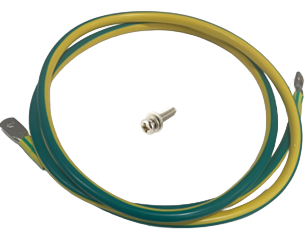
* The connection of the grounding points and ground bar needs to be tight and reliable. Rustproofing the terminals, e.g., with antioxidant coating or grease, is required. To facilitate the chassis ground, a 1.5 m long pre-terminated 6 AWG yellow-green ground cable assembly is provided with the G506 RU. In addition, a 20 mm Long M6 screw assembly is provided to attach the cable to the G506. Attach the screw such that it contacts only the unpainted portion of the chassis hole grounding area.
Provided Ground Cable and Chassis Screw Assembly
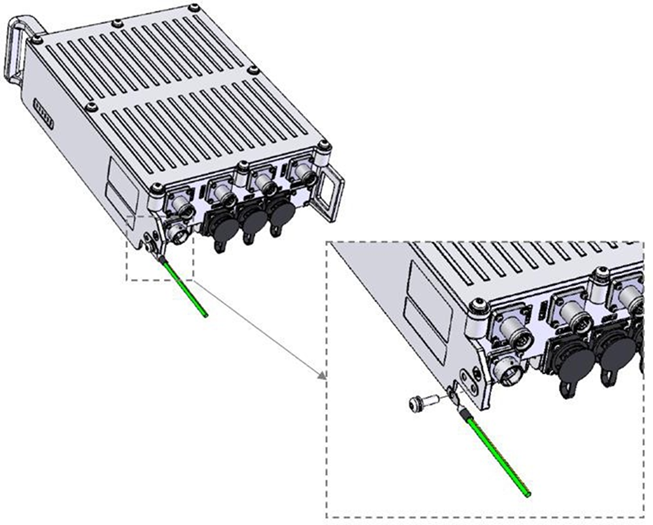
Ground Lug Placement Orientation on G506
{% hint style="danger" %}
**WARNING:** Prior to termination of the Grounding Cable Assembly to the G506 RU, ensure that physical mounting of the unit is complete, stable, can support the weight of the additional cables, power is not applied to the unit, the grounding terminal block or other ground location has 0 Volts present, and that the earth ground connection is low resistance and impedance.
{% endhint %}
{% stepper %}
{% step %}
Using a #2 Phillips screwdriver, install the M6 x 20 mm screw assembly as indicated in the figure above.
{% endstep %}
{% step %}
Ensuring that the Ground Cable Assembly is routed downward or on the shortest path to the grounding terminal strip of the installation location, and that the orientation of the Grounding Ring Terminal is correct on the body of the G506 RU, tighten and torque the M6 x 20 mm screw assembly using an Adjustable Torque Wrench to 5 Nm (3.6 ft-lbs.)
{% endstep %}
{% step %}
Terminate the other Ring Terminal of the Ground Cable Assembly to the ground terminal block of the installation location or other verified grounding location / feature, torquing the hardware connection per the terminal block or other feature’s manufacturer specifications.
{% endstep %}
{% step %}
Thoroughly coat both the ground termination on the G506 RU and the installation grounding termination with electrical-rated antioxidant coating or grease.
{% endstep %}
{% endstepper %}
## Cable Connections
The Onyx 5G platform supports RUs in the following configurations. Where the RU in this case is the G506.

### RF Cable Connections
The following figure and table refer to the cable connections for the G506.
| | | | | | |
| ---- | ----------------------------- | --------------------------- | ----------------------------------------------- | ---------------------- | ------------------------------- |
| Item | Cable | Side A | Side A | Side B | Side B |
| Item | Cable | Connector Type | Location | Connector Type | Location |
| 1 | GND Cable | OT terminal (M6, 6mm2) | RU GND terminal | OT terminal (M6, 6mm2) | GND bar |
| 2 | RF jumper | 4.3-10 male | RU RF ports | 4.3-10 male | Antenna |
| 3 | Fronthaul fiber optical cable | LC connector | RU CPRI port | LC connector | Fronthaul port on ES-7 (or FHM) |
| 4 | RU power cable | 2-way connector (press fit) | Pin A (-48VDC) and Pin B (PGND) ports on the RU | Equipment dependent | External DC power |
### RF Cable Installation and Weather Proofing
{% hint style="warning" %}
**CAUTION:** Prior to exposing the G506 to rain, snow or freezing temperatures, weatherproofing of RF Connections is necessary. The G506 Product Warranty will be void if waterproof instructions are not followed by local professional standards and practices. The waterproofing figure shown below is only an example. It is advised to take photos of each step as evidence in case they are requested.
{% endhint %}
{% stepper %}
{% step %}
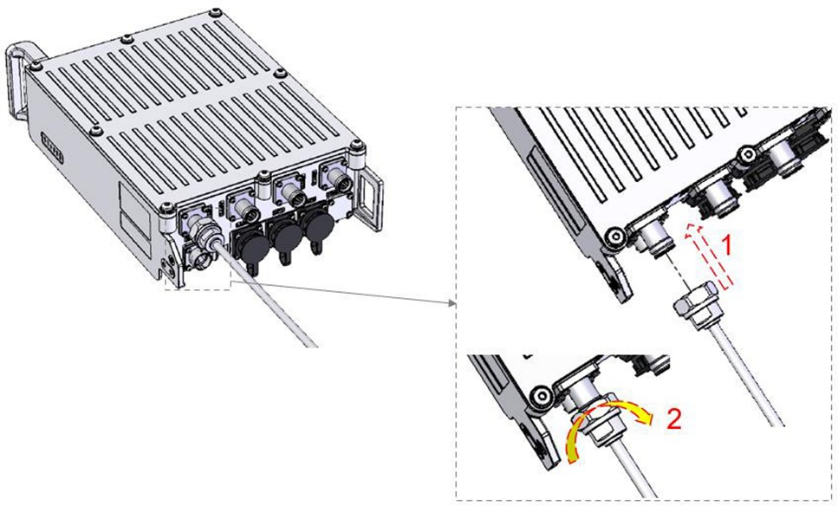
Install the 4.3-10 connector on the RF jumper to the ANTx port of the G506 and use a torque wrench to tighten the connector as shown in the following figure to 5 N-m (44.25 in-lbs).
RF Cable Installation
{% endstep %}
{% step %}
Install the other end of the RF jumper to the external antenna system.
{% endstep %}
{% step %}
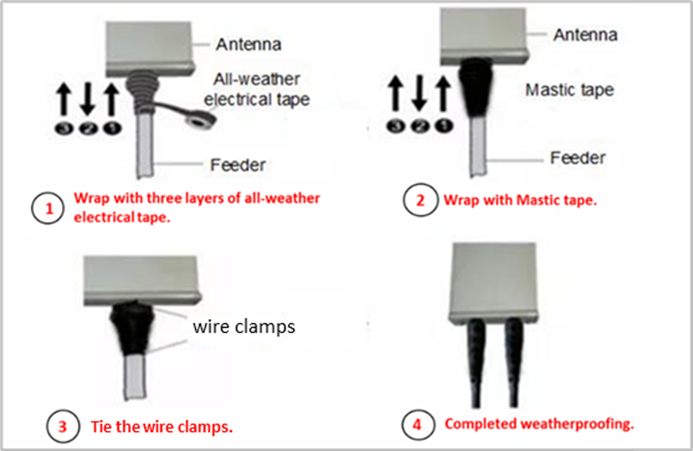
Use the waterproof tape and PVC insulation tape to waterproof both ends of the connector. Example shown below.
Waterproofing Example
{% endstep %}
{% endstepper %}
### GND Cable Installation
Ensure this is completed as described in the [*Grounding and Lightning Protection*](broken://pages/42991675734d6a30da459950d6fd86e77d5a7f89) section of this document.
### CPRI Cable Installation
{% hint style="info" %}
**NOTE:** Use ESD protection when installing RFE optical cables
{% endhint %}
{% hint style="info" %}
**NOTE:** The following YouTube link is provided as a reference for the assembly of a [*Rosenberger Fiber Enclosure (RFE)*](https://youtu.be/LDiFGvownuk?si=O6b_0hv_-XskTcJX).
{% endhint %}
#### Assemble the RFE
{% stepper %}
{% step %}
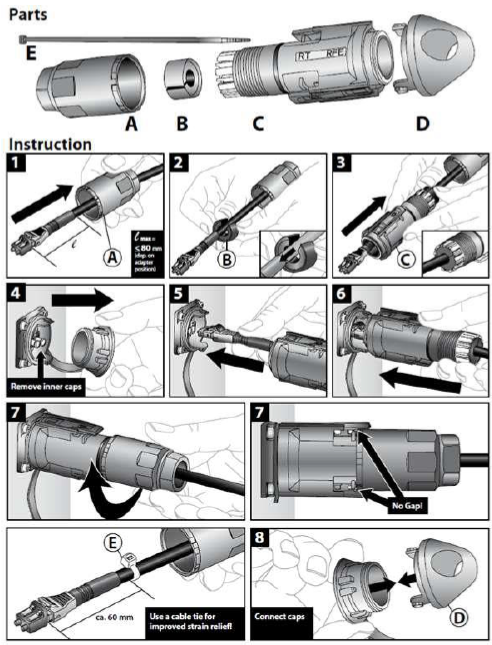
Assemble the RFE as shown below.
CPRI Optical Cable RT/RFE Assembly
{% endstep %}
{% step %}
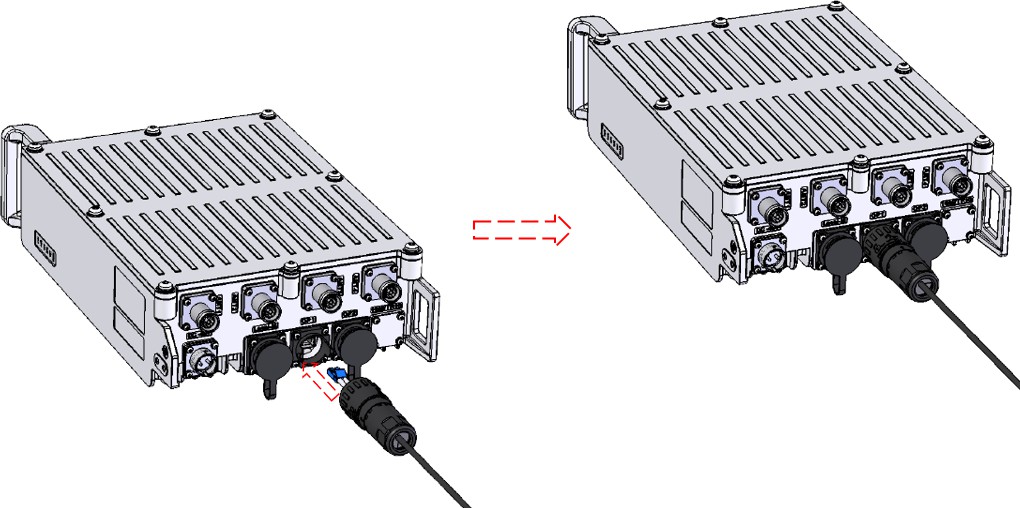
Insert the optical module into the CPRI/Ethernet port on the RU as shown below.
Optical Module Installation
{% endstep %}
{% endstepper %}
### Power Supply Cable Assembly
{% hint style="info" %}
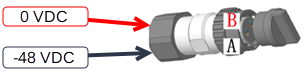
**NOTE:** The RU power supply is a 2 wire -48VDC input, and the power supply connector is a press fit type.
{% endhint %}
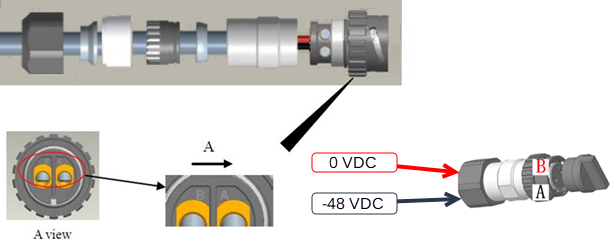
The cable polarity should be as follows:
Barrel connections for a -48 VDC source
{% hint style="danger" %}
**WARNING:** Do not reverse the positive and negative cables. Reverse connection of positive and negative poles may result in equipment malfunction or personal injury. Therefore, check the power cable connection before powering on the RU
{% endhint %}
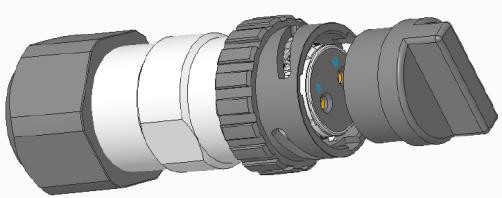
Assemble the connector as shown in the following figures.
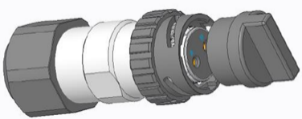
DC connector
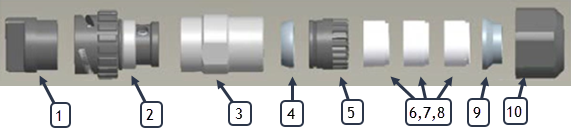
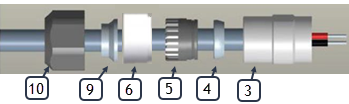
Connector Package Contents
DC Connector Parts
Item
Description
1
Dust cap
2
Coupling shell (female supports 2.5-10mm2)
3
Shell
4
Shielding ring
5
Plastic clip
6
Sealing rubber (cable OD 6-9mm)
7
Sealing rubber (cable OD 9-14mm)
8
Sealing rubber (cable OD 14-18mm)
9
Hold-down ring (Cable OD < 10mm)
10
Compression Nut
#### Cable Stripping Detail
{% stepper %}
{% step %}
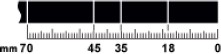
Determine the length of the power cable for different operations based on the labels, as shown below.
Cable Length Determination
{% endstep %}
{% step %}
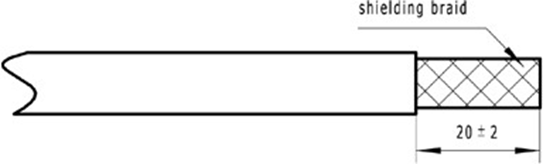
Strip the specified length of the sheath off the power cable, don’t cut the shielding braid, as shown below.
Stripping the Specified Length of Sheath
{% endstep %}
{% step %}
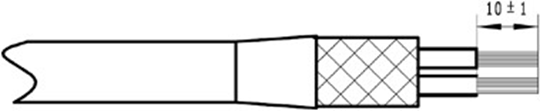
Remove individual fractured shielding wire, fold back the shielding braid and fix it on the outer jacket with adhesive tape, remove the inner insulation, as shown below.
Stripping the Shielding Wire
{% endstep %}
{% step %}
Strip the inner jacket of the conductor per dimension shown, as shown below.
{% endstep %}
{% step %}
Use a Torx screwdriver T15 to terminate the two conductors in the corresponding contacts A / B in the front plug assembly, as shown below.
Wire Assembly
{% endstep %}
{% step %}
Mate the dust cap (1) onto the coupling shell (2) and assemble the shell (3) into position using a torque wrench as shown below.
Shielding Ring Assembly

{% hint style="info" %}
**NOTE:** The dust cap must be attached to the coupling shell in order to torque the shell correctly.
{% endhint %}
{% endstep %}
{% step %}
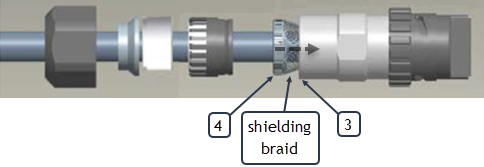
Spread open the shielding braid and slide down the shielding ring (4) into position so that the entire shielding braid is equally groomed around it. Between the shielding ring and the inside surface of the shell (3), extra length of the shielding braid should be folded and trimmed around and into the inner diameter of the shielding ring, as shown below.
Shielding Braid Detail
{% endstep %}
{% step %}
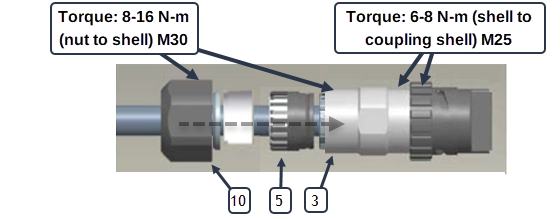
Press the Plastic clip (5) down into a tightly seated position into the shell (3). Assemble the nut (10) onto the shell (3) and tighten using an M25 and M30 spanner as shown in the figures below.
Nut to Shell Assembly
{% endstep %}
{% step %}
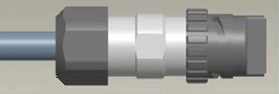
The assembled connector is shown in the figure below.
Assembled connector
{% endstep %}
{% endstepper %}
### RU Power Cable Installation
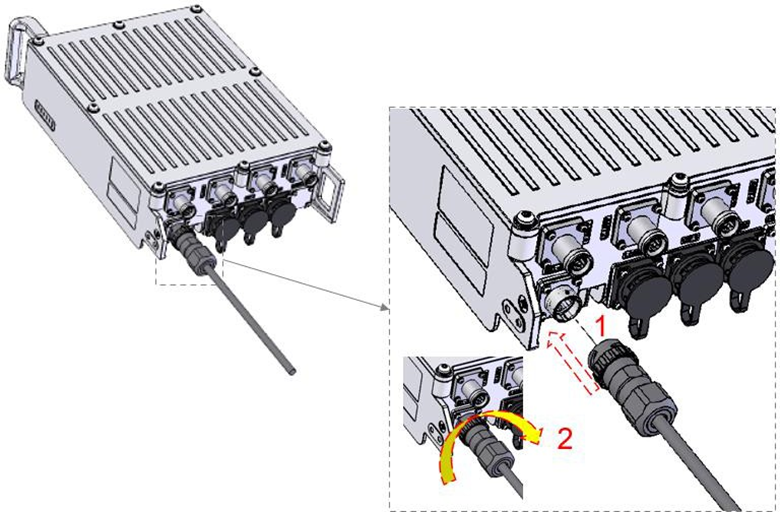
Install the assembled power supply cable into the connector on the RU and rotate the plug to lock it into place as shown in the following figure.
RU Power Supply Cable Installation
## Post Installation Steps
After installing the RU, connect it to the Core/gNB server or FHM. Your configuration will be dependent on the use of an ONYX-FHM-001 (Fronthaul Multiplexer) in your network configuration.
**Single RU:** Connect the RU directly to the Core/gNB server to s0f3 as shown below for a single RU.
Onboard the RU. Refer to the *Onyx Portal Operations Guide* *(Manage Equipment > Manage APs > Add APs > Add APs to 5G Networks).*
**Multiple RU:** Connect the RUs to the installed Onyx-FHM-001 starting with port 0. Ensure all RUs are of the same model.
To edit the FHM. Refer to the *Onyx Portal Operations Guide (Manage Equipment > Manage FHM > Edit FHM*
RU to Core/gNB or FHM
---
# Agent Instructions
This documentation is published with GitBook. GitBook is the documentation platform designed so that both humans and AI agents can read, navigate, and reason over technical content effectively. Learn more at gitbook.com.
## Querying This Documentation
If you need additional information that is not directly available in this page, you can query the documentation by asking a question.
Perform an HTTP GET request on the following URL with the `ask` and `goal` query parameters:
```
GET https://docs.gxc.io/hw/5g/5g-access-points/g506/g506-ap-hardware-installation-guide.md?ask=&goal=
```
`ask` is the immediate question: it should be specific, self-contained, and written in natural language.
`goal` is what the user is ultimately trying to achieve, the reason they need the answer. Sharing it helps GitBook give you a better, more relevant answer. A goal is most helpful when it describes the outcome the user wants rather than restating the question. For example, with `ask=how do I create an API token`, a goal like `automate deployments from our CI pipeline` lets GitBook tailor the answer to that use case.
The response will contain a direct answer to the question and relevant excerpts and sources from the documentation.
Use this mechanism when the answer is not explicitly present in the current page, you need clarification or additional context, or you want to retrieve related documentation sections.





 |  |  |  |
| --------------------------------------------------------------------------------------------------------------------------------------------------------------------------------------------------------------------------------------------------------- | --------------------------------------------------------------------------------------------------------------------- | --------------------------------------------------------------------------------------------------------------------- | --------------------------------------------------------------------------------------------------------------------- |
| Adjustable Wrench | 18 mm Combo Wrench | Torque Wrench: (Adjustable or 18mm) | 3/8-Inch Drive Adjustable Torque Wrench |
|
|  |  |  |
| --------------------------------------------------------------------------------------------------------------------------------------------------------------------------------------------------------------------------------------------------------- | --------------------------------------------------------------------------------------------------------------------- | --------------------------------------------------------------------------------------------------------------------- | --------------------------------------------------------------------------------------------------------------------- |
| Adjustable Wrench | 18 mm Combo Wrench | Torque Wrench: (Adjustable or 18mm) | 3/8-Inch Drive Adjustable Torque Wrench |
|  |  |  |  |
| 3/8 Inch Drive, 10 mm Hex Socket Bit | Level Bar | Marker | Clean Work Gloves |
#### Other Items (Not Included / User Provided)
The items listed below will be required to complete the installation. Type and quantity may vary depending on the installation and local requirements.
|  |  |  |
| 3/8 Inch Drive, 10 mm Hex Socket Bit | Level Bar | Marker | Clean Work Gloves |
#### Other Items (Not Included / User Provided)
The items listed below will be required to complete the installation. Type and quantity may vary depending on the installation and local requirements.

 {% hint style="warning" %}
**CAUTION:** To ensure proper air circulation and effective heat dissipation around the RU, do not install it in indoor or outdoor cabinets (such as enclosed camouflage boxes) or in closed rooms without active cooling systems. Such conditions can lead to overheating and may cause the RU to malfunction.
{% endhint %}
#### Transportation, Handling, and Installation
Before installation, transport the RU to the site in its packaging. Avoid collisions during transport, handling, and installation. Wear clean gloves and avoid touching connectors or ports with bare hands or dirty gloves.
#### Common Installation Process
1. Pre-installation Checklist
1. Ensure you understand the required safety standards, power requirements, and necessary tools.
2. Verify that all necessary parts and components are available or identified for procurement.
2. Site Preparation
1. Survey the installation site, including support structures.
2. Collect all required parts and tools.
3. Implement necessary safety measures at the site.
3. Mounting the RU
1. Use the mounting kit to securely attach the RU to a pole, bar, or a stable support frame.
4. Grounding
1. Connect the grounding cable from the RU to an appropriate earth conductor.
5. Antenna Connection
1. Attach the antenna cables from the RU to a certified external antenna.
2. Ensure waterproofing of the antenna cable connectors on both the RU and the external antenna.
6. Fiber Connections
1. Install the provided fiber cable into the SFP+ port and connect it to a fiber termination box.
7. Power Supply
1. Assemble the provided power cable to an appropriate power source, depending on the RU model.
2. The RUN light will automatically turn on and cycle once powered.
{% hint style="warning" %}
**CAUTION:** To ensure proper air circulation and effective heat dissipation around the RU, do not install it in indoor or outdoor cabinets (such as enclosed camouflage boxes) or in closed rooms without active cooling systems. Such conditions can lead to overheating and may cause the RU to malfunction.
{% endhint %}
#### Transportation, Handling, and Installation
Before installation, transport the RU to the site in its packaging. Avoid collisions during transport, handling, and installation. Wear clean gloves and avoid touching connectors or ports with bare hands or dirty gloves.
#### Common Installation Process
1. Pre-installation Checklist
1. Ensure you understand the required safety standards, power requirements, and necessary tools.
2. Verify that all necessary parts and components are available or identified for procurement.
2. Site Preparation
1. Survey the installation site, including support structures.
2. Collect all required parts and tools.
3. Implement necessary safety measures at the site.
3. Mounting the RU
1. Use the mounting kit to securely attach the RU to a pole, bar, or a stable support frame.
4. Grounding
1. Connect the grounding cable from the RU to an appropriate earth conductor.
5. Antenna Connection
1. Attach the antenna cables from the RU to a certified external antenna.
2. Ensure waterproofing of the antenna cable connectors on both the RU and the external antenna.
6. Fiber Connections
1. Install the provided fiber cable into the SFP+ port and connect it to a fiber termination box.
7. Power Supply
1. Assemble the provided power cable to an appropriate power source, depending on the RU model.
2. The RUN light will automatically turn on and cycle once powered.
 #### Installation Materials
**Verification of Wall Mounting Kit Materials**
Check the G506 Mounting Kit package to ensure it contains the components required for wall mounting as shown in the following figure.
#### Installation Materials
**Verification of Wall Mounting Kit Materials**
Check the G506 Mounting Kit package to ensure it contains the components required for wall mounting as shown in the following figure.
 {% endstep %}
{% endstepper %}
### RU Installation – Pole
The diameter of a pole for installing an ORRU ranges from 60 mm to 120 mm (with a pole wall thickness of 3.5 mm and above), the recommended diameter is 80 mm.
#### Pole Installation Materials
**Verification of Pole Mounting Kit Materials**
Check the G506 Mounting Kit package to ensure it contains the components required for pole mounting as shown in the figure and table below.
{% endstep %}
{% endstepper %}
### RU Installation – Pole
The diameter of a pole for installing an ORRU ranges from 60 mm to 120 mm (with a pole wall thickness of 3.5 mm and above), the recommended diameter is 80 mm.
#### Pole Installation Materials
**Verification of Pole Mounting Kit Materials**
Check the G506 Mounting Kit package to ensure it contains the components required for pole mounting as shown in the figure and table below.

 {% hint style="danger" %}
**WARNING:** Prior to termination of the Grounding Cable Assembly to the G506 RU, ensure that physical mounting of the unit is complete, stable, can support the weight of the additional cables, power is not applied to the unit, the grounding terminal block or other ground location has 0 Volts present, and that the earth ground connection is low resistance and impedance.
{% endhint %}
{% stepper %}
{% step %}
Using a #2 Phillips screwdriver, install the M6 x 20 mm screw assembly as indicated in the figure above.
{% endstep %}
{% step %}
Ensuring that the Ground Cable Assembly is routed downward or on the shortest path to the grounding terminal strip of the installation location, and that the orientation of the Grounding Ring Terminal is correct on the body of the G506 RU, tighten and torque the M6 x 20 mm screw assembly using an Adjustable Torque Wrench to 5 Nm (3.6 ft-lbs.)
{% endstep %}
{% step %}
Terminate the other Ring Terminal of the Ground Cable Assembly to the ground terminal block of the installation location or other verified grounding location / feature, torquing the hardware connection per the terminal block or other feature’s manufacturer specifications.
{% endstep %}
{% step %}
Thoroughly coat both the ground termination on the G506 RU and the installation grounding termination with electrical-rated antioxidant coating or grease.
{% endstep %}
{% endstepper %}
## Cable Connections
The Onyx 5G platform supports RUs in the following configurations. Where the RU in this case is the G506.

### RF Cable Connections
The following figure and table refer to the cable connections for the G506.
{% hint style="danger" %}
**WARNING:** Prior to termination of the Grounding Cable Assembly to the G506 RU, ensure that physical mounting of the unit is complete, stable, can support the weight of the additional cables, power is not applied to the unit, the grounding terminal block or other ground location has 0 Volts present, and that the earth ground connection is low resistance and impedance.
{% endhint %}
{% stepper %}
{% step %}
Using a #2 Phillips screwdriver, install the M6 x 20 mm screw assembly as indicated in the figure above.
{% endstep %}
{% step %}
Ensuring that the Ground Cable Assembly is routed downward or on the shortest path to the grounding terminal strip of the installation location, and that the orientation of the Grounding Ring Terminal is correct on the body of the G506 RU, tighten and torque the M6 x 20 mm screw assembly using an Adjustable Torque Wrench to 5 Nm (3.6 ft-lbs.)
{% endstep %}
{% step %}
Terminate the other Ring Terminal of the Ground Cable Assembly to the ground terminal block of the installation location or other verified grounding location / feature, torquing the hardware connection per the terminal block or other feature’s manufacturer specifications.
{% endstep %}
{% step %}
Thoroughly coat both the ground termination on the G506 RU and the installation grounding termination with electrical-rated antioxidant coating or grease.
{% endstep %}
{% endstepper %}
## Cable Connections
The Onyx 5G platform supports RUs in the following configurations. Where the RU in this case is the G506.

### RF Cable Connections
The following figure and table refer to the cable connections for the G506.