> For the complete documentation index, see [llms.txt](https://docs.gxc.io/llms.txt). Markdown versions of documentation pages are available by appending `.md` to page URLs; this page is available as [Markdown](https://docs.gxc.io/hw/5g/5g-access-points/g105/g105-ap-installation-guide.md).
# G105 AP Installation Guide
## About this Guide
This guide provides the information you need to install a GXC G105 RU. It also includes a general description of the unit, guidelines for using it, and an overview of its capabilities.
{% hint style="info" %}
**NOTE:** Installation of this device should only be performed by a licensed Certified Professional Installer (CPI) per limitations set forth in FCC Part 96.
{% endhint %}
In this guide, the GXC G105 may be referred to as an Access Point (AP), Radio Unit (RU), Remote Radio Unit (RRU), and Open Radio Unit (ORU).
### General Active RF Installation Instructions
Only experienced installation professionals who are familiar with local building and safety codes, and wherever applicable, are licensed by the appropriate government regulatory authorities should install RF devices and antennas. Failure to do so may void the product warranty and may expose the end user to legal and financial liabilities. The manufacturer and its resellers or distributors are not liable for injury, damage or regulation violations associated with the installation of RF Devices or antennas.
{% hint style="info" %}
**NOTE:** The G105 AP is designed to be installed and operated indoors to conform to CBSD - FCC specifications.
{% endhint %}
{% hint style="info" %}
**NOTE:** Prior to installation, locate the Product ID Label and record the serial number and MAC Address of the unit and the proposed installation location in a material registry / equipment journal for future reference.
{% endhint %}
### Safety Information
{% hint style="danger" %}
## **WARNING:** Read the installation instructions before connecting the system to its power source.
{% endhint %}
{% hint style="danger" %}
## **WARNING:** Equipment installation must comply with local and national electrical codes
{% endhint %}
{% hint style="danger" %}
## **WARNING:** This product relies on the existing building or structure for short-circuit (overcurrent) protection. Ensure that the protective device is rated no greater than 15A
{% endhint %}
{% hint style="danger" %}
## **WARNING:** Do not operate this wireless network device near unshielded blasting caps or in an explosive environment. Explosions or fires may occur if installed in these environments
{% endhint %}
{% hint style="danger" %}
## **WARNING:** Do not operate this wireless network device near unshielded blasting caps or in an explosive environment. Explosions or fires may occur if installed in these environments
{% endhint %}
{% hint style="danger" %}
## **WARNING:** In order to comply with the United States Federal Communications Commission (FCC) radio frequency (RF) exposure limits, antennas should be located at a minimum of 83 centimeters (33 inches) or more from the body of all persons.
{% endhint %}
### Usage Safety Precautions
* Install or place this device on a stable surface.
* Keep this device far from electronic devices that generate strong magnetic or electric fields, such as microwave ovens, satellite dish antennas, or large appliances.
* Place this device in a cool and well-ventilated indoor area. Do not expose the device to direct sunlight.
* Do not use this device in an area under or over temperatures ranging from 5°C to +50°C.
* Do not cover this device. Reserve a minimum space of 100 mm around this device for heat dissipation.
* Use only the power adapter provided with this O-RAN Unit. Do not use alternative power adapters. Use of other adapters can damage this device.
* Before connecting and disconnecting cables, ensure that your hands are dry.
* To avoid electric shock, damage, and fire resulting from short-circuiting, do not use the product if wet, with wet hands, or while holding or drinking any liquids.
* Only insert relevant cables or devices into the ports, do not insert metal or other foreign objects.
* Do not place naked flame sources, such as lighted candles, on or near this device. Keep this device far from sources of heat and fire, such as a heater or a candle.
* Damage caused by user misuse or not following these instructions is not covered by the warranty.
### Electrical Safety Precautions
{% hint style="warning" %}
**CAUTION:** The power supply cord must be plugged into a socket or outlet that is provided with a suitable earth ground.
{% endhint %}
Refer all repairs of this product to qualified service personnel. Do not modify any part of this device, as this will void the warranty.
Disconnect power from this product and return it for service if any of the following conditions apply:
* The product does not function after following the operating instructions outlined in this manual.
* The product has been dropped or impacted and appears physically damaged.
### Base Station Battery Backup
It is recommended to use an uninterruptible power supply (UPS) battery backup system to ensure a reliable and stable power supply to avoid hardware damage due to a power outage.
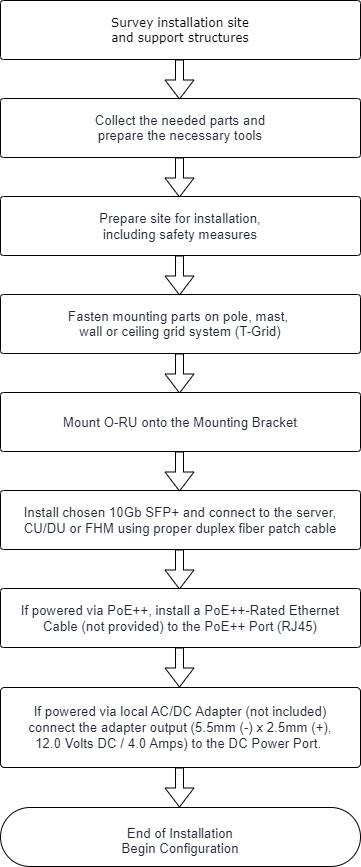
The GXC G105 is designed for Open 5G Radio Access Network (O-RAN) and is combined with additional O-RAN elements to provide a complete 5G mobile radio communication system provide 5G-NR Sub-6 GHz indoor coverage and optimal 5G network access at throughput speeds of over 1Gbps to satisfy the demands of enterprise, industrial, and commercial campuses.
This guide provides information and steps for installing the Radio Unit but is intended for installation by pre-trained personnel only.
## Introduction
### Onyx Platform Features
The G105 AP is a part of the GXC 5G Onyx Platform, which integrates multiple hardware and software elements to bring a full solution to customers. The Onyx Platform provides an enterprise network based on a Cellular Mesh architecture. This private network platform offers high resiliency, flexible deployments, strong coverage in hard-to-reach areas, and a powerful distributed application platform.
Key features of the Onyx Platform:
* ORAN Ecosystem, includes Rack-Based CU, DU, and FHMs and both Indoor and Outdoor-rated APs
* On-premises core network
* A robust network management platform tied together with a single-pane-of-glass controller presented as a web portal
### G105 Access Point
The G105 AP is designed for open 5G Radio Access Network (O-RAN) and is combined with additional O-RAN elements to provide a complete 5G mobile radio communication system to provide 5G-NR Sub-6 GHz indoor coverage and optimal 5G network access at throughput speeds of over 1Gbps to satisfy the demands of enterprise, industrial, and commercial campuses.
The radio unit is designed with a flexible vRAN solution that reduces costs and increases connection speeds via split fronthaul network implementation. The access point can be mounted on walls, poles, or ceilings and utilizes either adjustable attached antennas (included) or customer specified remote antennas for deployment flexibility. This Radio Unit is based on open interfaces as defined by the O-RAN alliance with the fronthaul interface between the Access Point and the Distributed Unit (DU) that complies with RAN split 7.2a and includes the following signals:
* User plane data (UP)
* Control plane data (CP)
* Synchronization signals (PTP)
* Management plane data (MP)
This guide provides information and steps for installing the Access Point but is intended for installation by pre-trained personnel only.
GXC 5G Onyx Platform Architecture

### Specifications
[*G105 AP Specification Sheet*](/hw/5g/5g-access-points/g105/g105-ap-specification-sheet.md)
## Getting Started
### Package Contents
{% hint style="info" %}
**NOTE:** This device is designed to allow the connection of the grounded conductor of the DC supply circuit to the grounding conductor on the device.
{% endhint %}
#### G105 RU
GXC-APInxx-105 RU Package Contents
Parts
Qty
Image
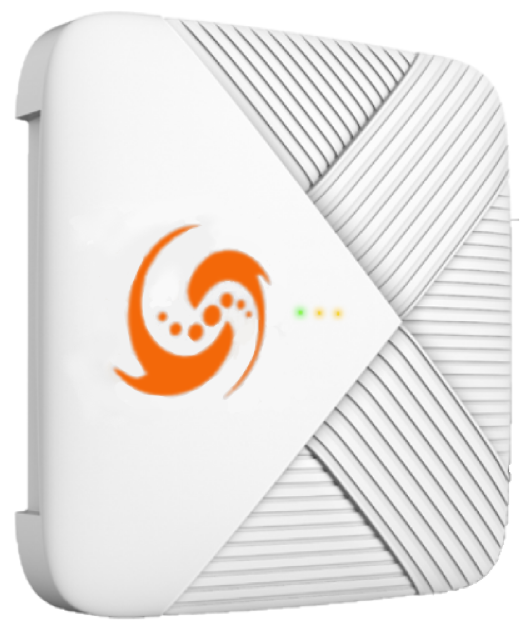
GXC-APInxx-105 Remote Radio Unit
1
External Dipole Antennas (RP-SMA)
4
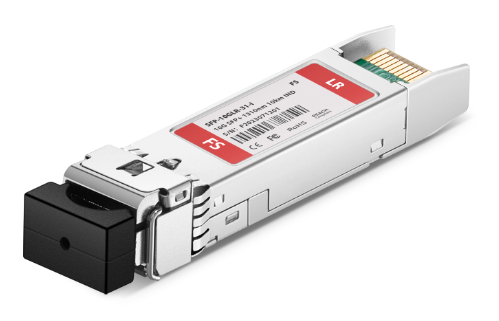
1310nm LR (10km) Duplex LC/UPC SFP+ Optical Transceiver Modules
2
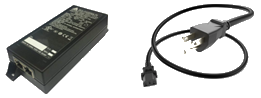
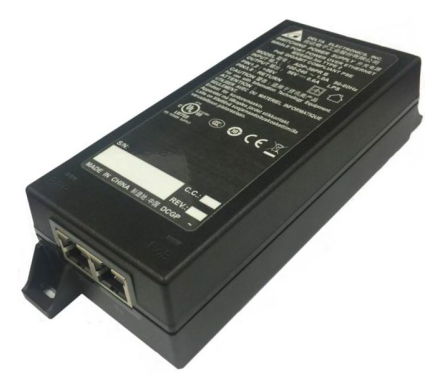
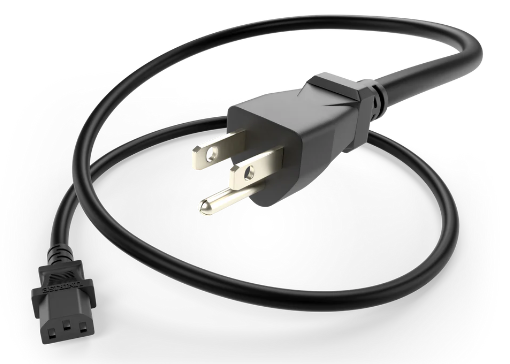
IEEE 802.3bt Compliant PoE Injector (Adapter) including AC Power Cord
2
1.5m CAT6 LAN Cable
1
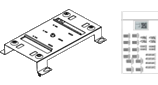
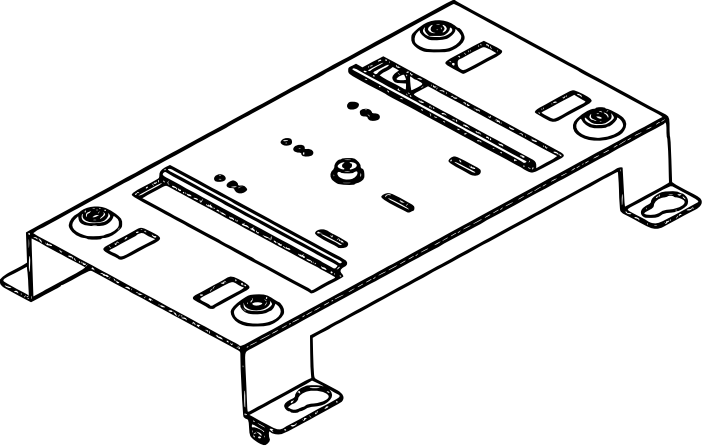
GXC-APInxx-105 Mounting Bracket Kit
1
#### GXC-APInxx-105i RU
GXC-APInxx-105i RU Package Contents
Parts
Qty
Image
GXC-APInxx-105i Remote Radio Unit
1
1310nm LR (10km) Duplex LC/UPC SFP+ Optical Transceiver Modules
2
IEEE 802.3bt Compliant PoE Injector (Adapter) including AC Power Cord
2
1.5m CAT6 LAN Cable
1
GXC-APInxx-105 Mounting Bracket Kit
1
#### G105 RU Mounting Bracket
{% hint style="info" %}
**NOTE:** This device is designed to allow the connection of the grounded conductor of the DC supply circuit to the grounding conductor on the device.
{% endhint %}
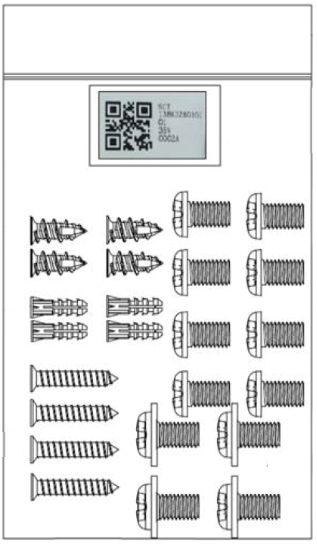
G105 RU Mounting Bracket Package Contents
Item
Qty
Image
RU Mounting Bracket
1
M3.5 x 20 mm Long Screw
4
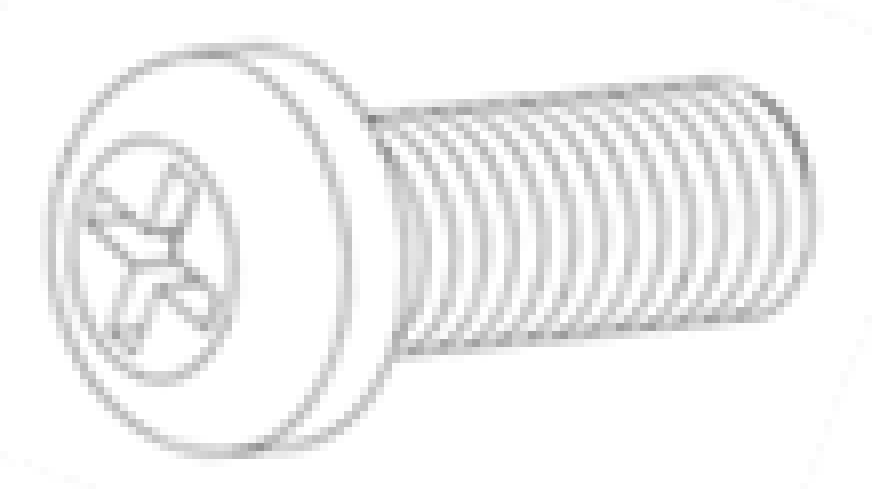
M4 x 6 mm Long Screw
4
M3 x 8 mm Long Screw
8
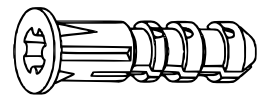
Concrete Screw Anchor
4
Plaster / Drywall Screw Anchor
4
### Other Items (Not Included / User Provided)
Other Items (Not Included / User Provided)
Parts
Qty
Image
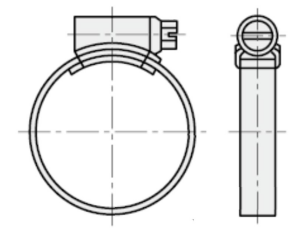
Stainless Steel Pipe Clamps (Size Determined by Dia. of Pipe/Mast)
2
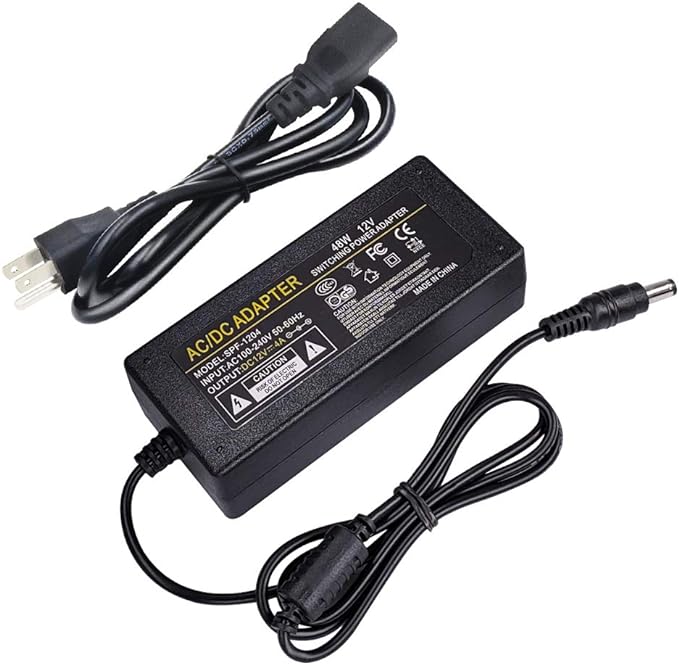
12 Volt Output AC/DC PSU – 54-Watt (min), 2.5 mm (+) x 5.5 mm (-)
1
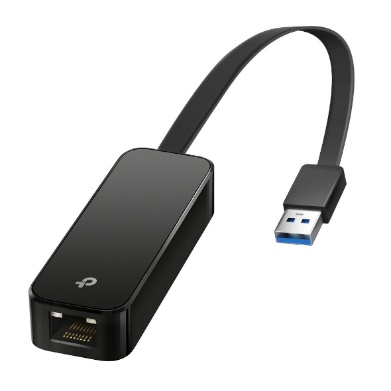
USB 3.0 to Gigabit Ethernet Network Adapter
1
## Installation Preparation
This document describes the installation process of pole and wall mounting of the GXC G105 5G indoor RU and the recommended location and environment required for optimal performance.
### Pre-Installation Notes
In the process of transportation, handling, and installation of the GXC G105 5G indoor RU the customer or installer must adhere to the following usage requirements:
* Before the installation, it is required to transport the G105 RU to the installation site while still in its shipping packaging. Unpacking or transferring the unit in an unprotected manner could lead to damage of the external connectors or enclosure of the G105 RU. External damage like this will not be covered under the product warranty.
* Avoid collisions between the G105 RU and other components, parts, doors, walls, shelves, and other objects during transportation, handling, and installation processes.
* During transportation, handling, and installation, wear clean protective gloves. It is prohibited to touch parts with bare hands or with dirty gloves. Contamination of the G105 RU’s connectors can lead to deficient performance or product failure.
* Before installing the G105 RU, the installer must be familiar with its exterior, ports, indicators, installation scenarios and installation clearance requirements.
NOTE: The following figure shows the GXC-APInxx-105 (External Antenna SKU). These dimensions are identical for the GXC-APInxx-105i (Internal Antenna SKU), with the exception that the four external antennas and antenna connectors are removed.
G105 RU Overall Dimensions (mm)

## Installation Procedure
Before installing the radio unit, understand the required safety standards, power requirements, necessary tools, parts, and components available or needed.
### External Connector Familiarization
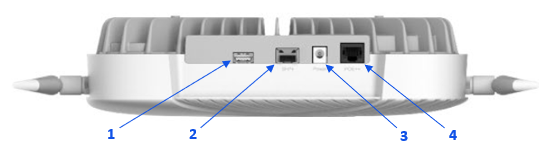
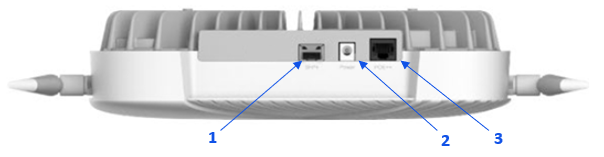
As seen in the following figure, on the top surface of the G105 RU, there are a total of three connector ports. These ports are marked SFP+, Power, and PoE++. Ensure that all covers or caps remain on ports until interconnection or termination is necessary. In addition, if an interconnection or termination is removed from the connector, the installer or technician must apply a proper cover or cap to protect the internal surfaces of the connector.
Top Port View of the G105
G105 AP Ports
Item #
Item
Description
1
“SFP+” Port
To be used with 10Gb SFP+ Transceiver to connect to FH CUSM Plane. This port can be utilized to access RU M-Plane and provides connection for C/U- and S-Planes.
2
“DC Power” Port
2.5 mm (+) x 5.5 mm (-) DC Power Port. Local power provided by AC/DC Adapter (not included).
3
“PoE++” Port
RJ45 Jack utilizing IEEE 802.3bt-2018 pin-out. This port can be utilized to remotely power the remote from up to 100 meters (328 feet) away from PoE++ Switch using PoE++ rated Ethernet Cable. No network function.
### PoE++ IEEE 802.3bt (Type 3/4) Injector
A single port, AC/DC PoE++ Injector is provided with the G105 RU. This PoE++ Injector is certified to be IEEE 802.3bt (Type 3/4) compliant Power Sourcing Equipment (PSE). This PoE++ Injector has the following specifications.
{% hint style="info" %}
**NOTE:** The equipment is to be connected only to internal PoE++ networks without routing to the outside plant.
{% endhint %}
{% hint style="info" %}
**NOTE:** This product is intended to be supplied by a Listed power supply or PoE++ connector, output rated 54Vdc, min. 1.5A and documented as a Limited Power Source (LPS).
{% endhint %}
#### PoE++ IEEE 802.3bt (Type 3/4) Injector AC Input Ratings / Characteristics
### Alternate DC Power Supply Recommended Specifications
The G105 RU provides the option of electrical powering via the integrated 2.5 mm x 5.5 mm DC Power Jack. This jack is designed such that the center conductor (2.5 mm male pin) is to be provided with 12.0 +/- 5% Volts DC and the outer conductor (5.5 mm female receptacle) is to be provided with the 0 Volts DC.
A standard AC/DC Power Supply Unit (PSU) should be used to power the G105. The PSU should be capable of producing 12.0 Volt DC Output and supplying a minimum of 4.5 Amperes of current (54 Watts).
Other specifications should be equal to or exceed those of the specific application or, at a minimum, meet or exceed the specifications of the G105 RU.
{% hint style="info" %}
**NOTE:** An AC/DC PSU is not supplied with the G105 AP.
{% endhint %}
### Antenna Details
#### Special Port Mapping
In special cases where external antennas (other than those provided with this AP) are used, the following table is provided for cases where a Front Haul Multiplexer (FHM) or a Multi-Port Connect configuration is used.
Special Port Mapping
AP Port Number
1
2
3
4
Antenna polarization (4x4 standard)
H or +45
H or +45
V or -45
V or -45
Antenna polarization (4x4 FHM co-located RU)
V or -45
V or -45
H or +45
H or +45
Multi-Port Connect :
Antenna#1 2x2 dual
H or +45
V or -45
Antenna#2 2x2 dual
H or +45
V or -45
{% hint style="info" %}
**NOTE:** This device is designed to allow the connection of the grounded conductor of the DC supply circuit to the grounding conductor on the device.
{% endhint %}
#### GXC-APInxx-105 External Antennas
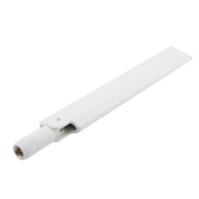
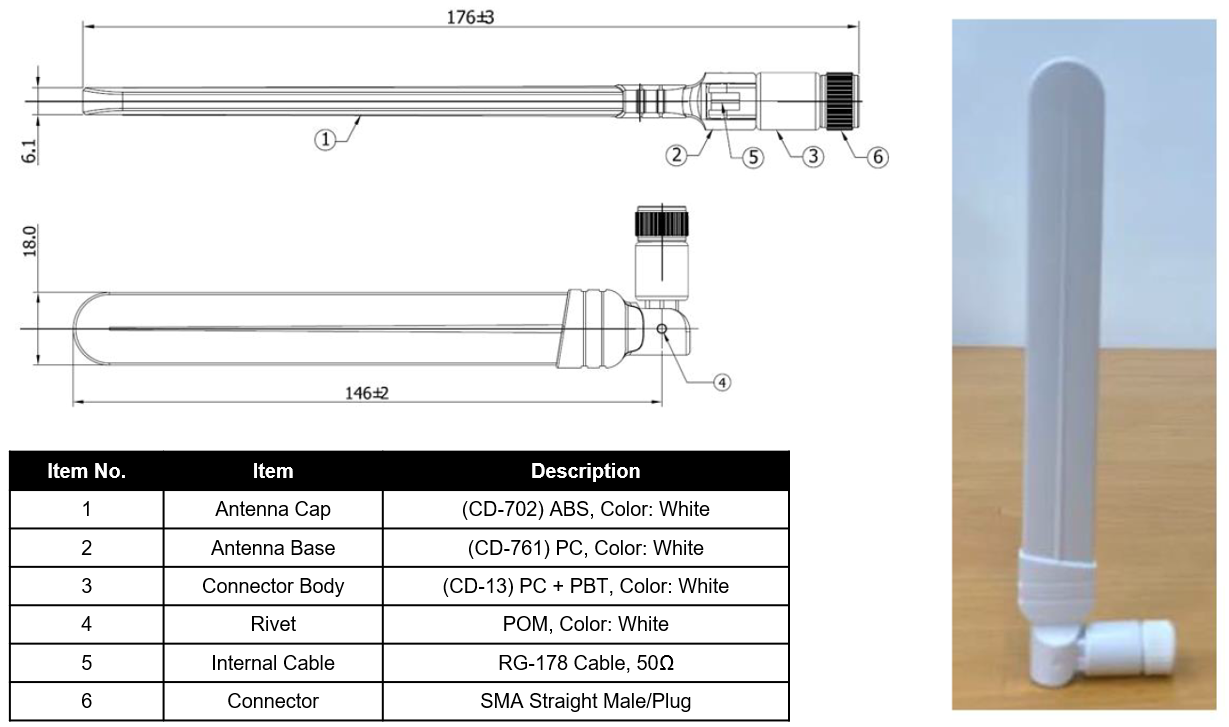
The G105 RU Kit includes 4 pcs. of an externally mounted dipole terminal antenna. These compact and adjustable antennas provide a gain in the range of 3.2 to 4.3 dBi in a frequency band of 3300 to 3800 MHz.
Typical External Antenna Form Factor and Component Detail
External Antenna Specifications
| Frequency | 3300 to 3800 MHz |
| ----------------- | ---------------- |
| Antenna Type | Dipole |
| Radiation Pattern | Omni-Directional |
| Peak Gain | 3.2 |
| Return Loss | >8.99 |
| Efficiency | 50% |
Installation of the antennas is made by inserting and threading the Hinged Male/Plug SMA Connector (Pin) of the antenna to the mating Female/Jack SMA Connector (Receptacle) presented on the body of the G105 RU. Finger-tighten the finger grips (barrel nut) of the antennas, but do not torque.
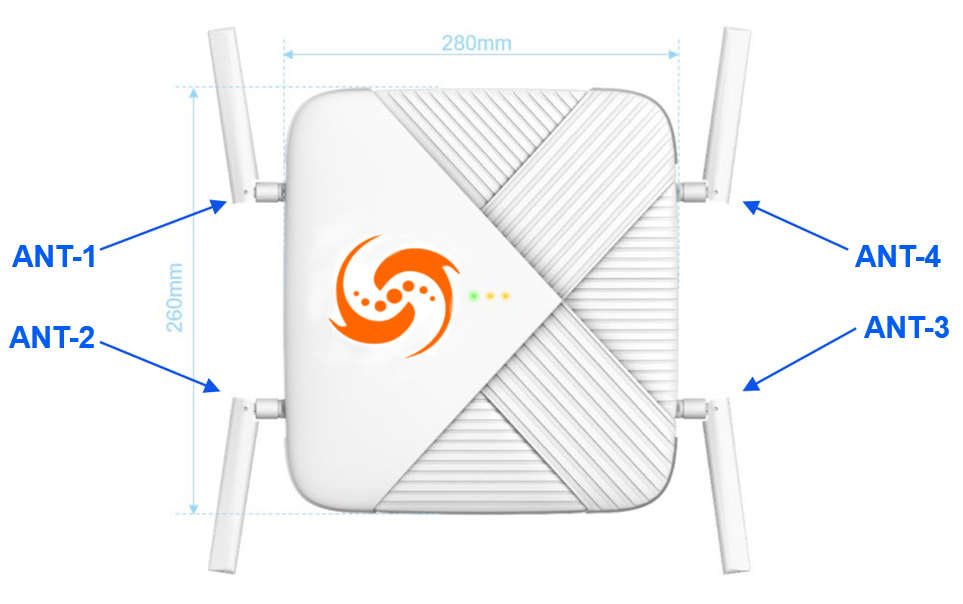
Adjust the position of the antenna elements such that the preferred coverage pattern is attained. The figure below shows initial suggested antenna orientation for the RU. Adjustment may be necessary.
Front View of G105 Showing Antenna Placement
Front View of G105 Showing Antenna Placement
Item #
Item
Description
1
ANT-1
SMA adjustable dipole antennas
2
ANT-2
SMA adjustable dipole antennas
3
ANT-3
SMA adjustable dipole antennas
4
ANT-4
SMA adjustable dipole antennas
G105 External Antenna 2D Radiation Pattern

#### GXC-APInxx-105i Internal Antennas
The G105i RU utilizes 4 pcs. of a Planer Inverted-F Antenna (PIFA). These antennas are inaccessible to the customer and have a fixed radiation pattern. This radiation pattern is omni-directional; however, most of the radiating power is hemispherical and is centered on the front face of the RU.
GXC-APInxx-105i Antenna Specifications
| Frequency | 3300 to 4200 MHz |
| ----------------- | ---------------- |
| Antenna Type | PIFA |
| Radiation Pattern | Hemispherical |
| Peak Gain | 3.2 |
| Return Loss | > 8.99 |
| Efficiency | > 50% |
G105i Internal Antenna 2D Radiation Pattern
### LED Indicators
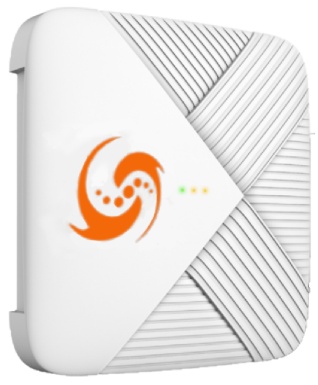
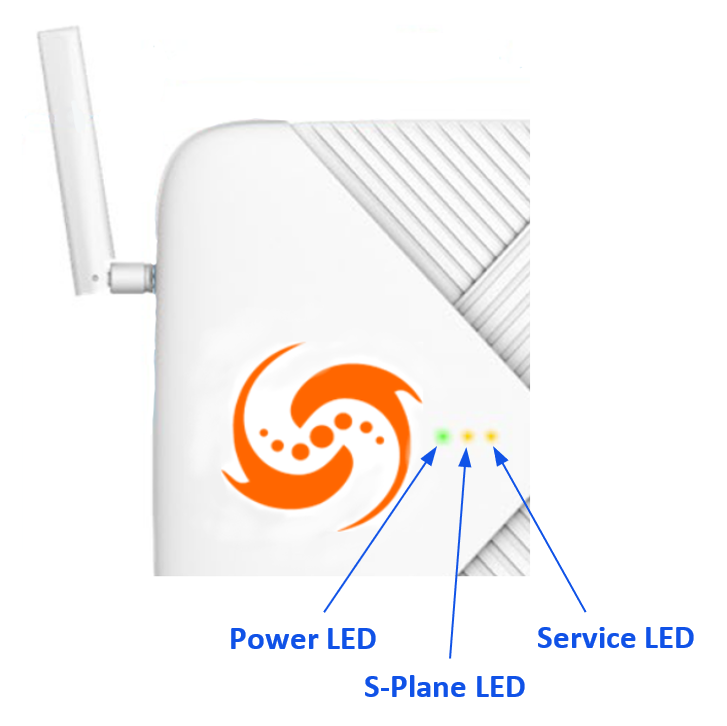
There are 3 light emitting diodes (LEDs) present on the front surface of the G105 RU. These LEDs provide the local user with an indication of the unit’s status and can also be used for troubleshooting. Presented in this guide is a summary of LED behaviors. For further details, please refer to the G105 User Guide.
LED Indicators
* “Power” LED – Indicates the power status of the G105 RU.
* Solid Green: Power On
* Off: Normal - Powered Off
* “S-Plane” LED – Indicates the Precision Time Control (PTP) Lock status of the G105 RU.
* Green:
* Solid: PTP Locked
* Slow Blinking: PTP Holdover – PTP is locked, but there are lost PTP packet(s)
* Fast Blinking: PTP Freerun – Received PTP/SyncE input, but not yet locked
* Red:
* Solid: PTP Freerun – No PTP/SyncE Input
* Fast Blinking: PTP Freerun – Only SyncE Input
* Off
* Off: PTP Service not running
* “Service” LED – Indicates the system CU-Plane and/or M-Plane Status of the G105 RU.
* Green:
* Solid: RU is radiating – CU-Plane is configured, and unit is radiating
* Slow Blinking: RU is initializing – BBU unit is initializing, config, calibration, sync…
* Fast Blinking: RU ready to radiate – BBU is running; no CU-Plane packet received
* Red:
* Solid: RF Component Boot-Up Fail – RF Component failed to properly boot
* Slow Blinking: Received data, but incorrect or out of receiving window – BBU is running, CU-Plane Packet out of window. Inspect BBU Reception Report Log. Monitor on-time, early, late packet counting. CP: On-time Total < 95% UP: On-time Total < 95%
* Fast Blinking: M-Plane Call Home Failure Definition TBD
* Off
* Off: CU-Plane not running – BBU not running
## G105 Access Point Installation
### Instructions and Limitations
The G105 AP can be mounted on walls, poles, or ceilings, with details as follows. Other installation locations and structures are feasible. However, if alternate structures are utilized, it is the installer or customer’s responsibility to assess and deem these locations as acceptable and to utilize industry standard construction methods to verify the unit’s stability and orientation corresponds with these specifications.
{% hint style="info" %}
**NOTE**: The installation specifications described in this document only define the adaptability of the specific installation components and scenarios pictured and described.
{% endhint %}
{% hint style="warning" %}
**CAUTION**: Prior to installation, assess the strength and reliability of the structure proposed for the unit installation based on the actual weight of the installed equipment.
{% endhint %}
### Application Limitations
To ensure proper air circulation and effective heat dissipation around the G105 RU, limitations on the unit application environment include, but are not limited to, the following points:
* Do not install the G105 AP in indoor or outdoor cabinets that are completely sealed and lack either air exchange or active cooling systems such as heat exchangers, air conditioners, etc., which will ensure the ambient temperature will not exceed the specified temperature range.
* Do not install the G105 AP in equipment rooms or network closets that are completely sealed and do not have active cooling systems as detailed above.
{% hint style="warning" %}
**CAUTION:** To ensure proper air circulation and effective heat dissipation around the radio unit, do not install AP in indoor or outdoor cabinets (such as enclosed camouflage boxes) or closed rooms that lack active cooling systems. Such conditions will cause overheating and may cause the radio unit to malfunction or fail.
{% endhint %}
### Preferred Installation Orientation and Clearance Requirements
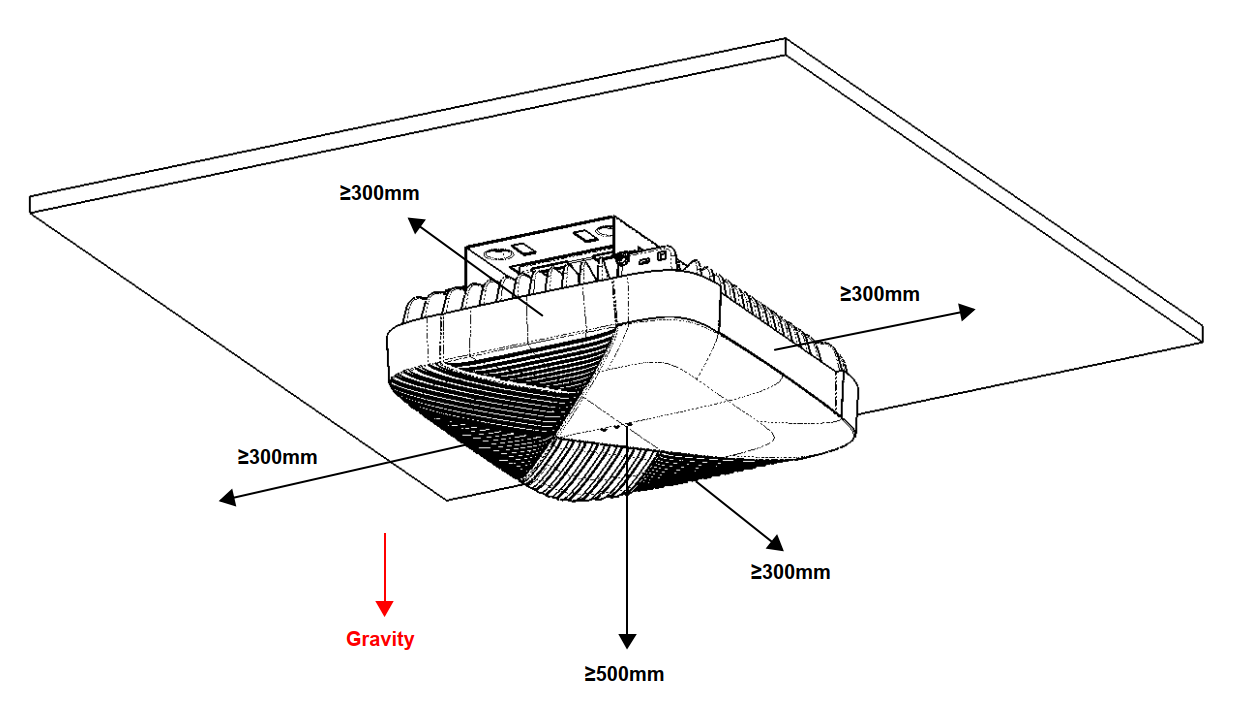
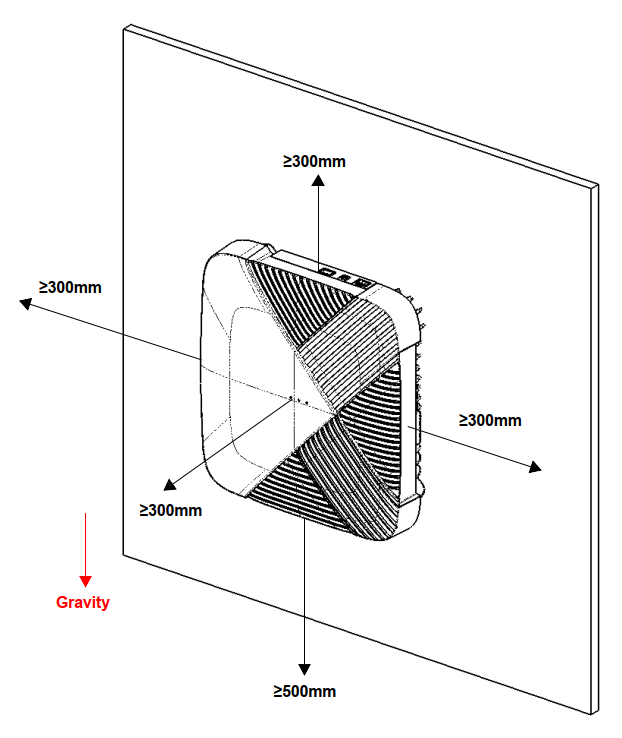
The preferred mounting orientations for the G105 AP and the recommended clearances are shown in the following figures. Maintaining these clearances and specified surrounding ambient air temperatures ensures normal operation and ample room for maintenance.
The minimum clearance recommended for the G105 AP installation is shown in Figure 9 and Figure 10. Ensure that the ambient air temperature remains in the specified operational temperature range and these clearance dimensions are adhered to, to ensure normal operation and allow ample room for maintenance.
Minimum Clearance Dimension Requirements – Ceiling Mount
Minimum Clearance Dimension Requirements – Wall Mount
### Common Installation Tools
Common Installation Tools
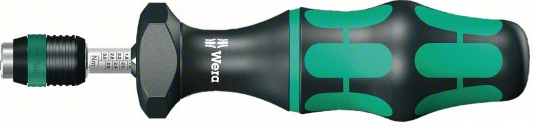
Adjustable Torque Driver
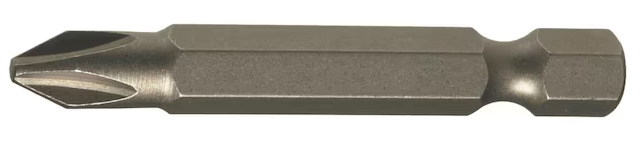
#2 Phillips Driver Bit
Percussion Drill or Drill Driver
Tape Measure
4 mm Concrete Drill Bit 2 mm / 4 mm HSS Drill Bit 3/8-Inch HSS Drill Bit
Level Bar
Fine Tip Marker
Clean Work Gloves
### Wall Mount Installation
The G105 is suitable for installation onto well-constructed cement, wood, or plaster/drywall sheathed walls. The following section details the components, tools and process necessary for wall mounting of the G105 RU.
{% hint style="warning" %}
**CAUTION:** Prior to installation onto walls, verify that wall construction is structurally sound and that it can support the weight of the G105 AP and associated additional equipment (approx. 15 kg (33.0 lbs.)
{% endhint %}
#### Wall Mounting Kit Hardware Requirements
The following table details the hardware requirements for various wall mounting applications of the G105 RU.
Wall Mounting Kit Hardware Requirements
| Installation Application | Part / Assembly | Kit Location | Quantity Required |
| ------------------------ | ---------------------------- | -------------------- | ----------------- |
| Cement Wall | G105 RU | G105 RU Kit | 1 |
| Cement Wall | Concrete Screw Anchor | G105 RU Mounting Kit | 4 |
| Cement Wall | G105 RU Mounting Bracket | G105 RU Mounting Kit | 1 |
| Cement Wall | M3.5 x 20 mm Long Screw | G105 RU Mounting Kit | 4 |
| Cement Wall | M4 x 6 mm Long Screw | G105 RU Mounting Kit | 4 |
| Cement Wall | M3 x 8 mm Long Screw | G105 RU Mounting Kit | 2 |
| Wood Wall | G105 RU | G105 RU Kit | 1 |
| Wood Wall | G105 RU Mounting Bracket | G105 RU Mounting Kit | 1 |
| Wood Wall | M3.5 x 20 mm Long Screw | G105 RU Mounting Kit | 4 |
| Wood Wall | M4 x 6 mm Long Screw | G105 RU Mounting Kit | 4 |
| Wood Wall | M3 x 8 mm Long Screw | G105 RU Mounting Kit | 2 |
| Plaster / Drywall Wall | G105 RU | G105 RU Kit | 1 |
| Plaster / Drywall Wall | Plaster/Drywall Screw Anchor | G105 RU Mounting Kit | 4 |
| Plaster / Drywall Wall | G105 RU Mounting Bracket | G105 RU Mounting Kit | 1 |
| Plaster / Drywall Wall | M3.5 x 20 mm Long Screw | G105 RU Mounting Kit | 4 |
| Plaster / Drywall Wall | M4 x 6 mm Long Screw | G105 RU Mounting Kit | 4 |
| Plaster / Drywall Wall | M3 x 8 mm Long Screw | G105 RU Mounting Kit | 2 |
#### Cement Wall Installation
Take the following steps to mount the G105 RU to a typical concrete wall.
{% stepper %}
{% step %}
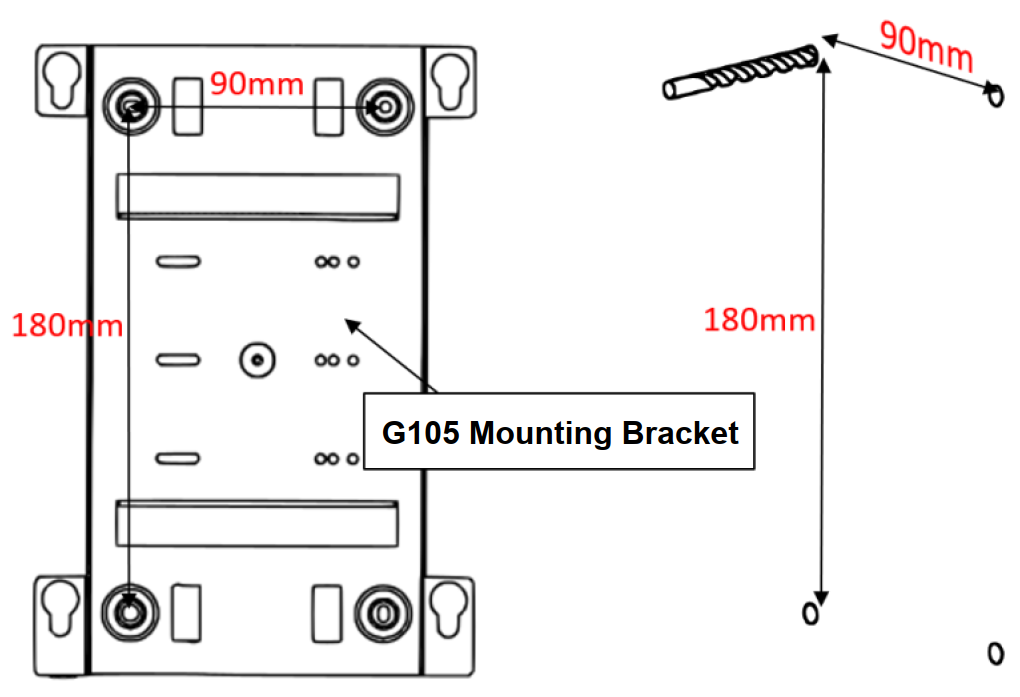
Place the G105 Mounting Bracket onto wall in orientation shown in Figure 11 ensuring that top edge is level.
{% endstep %}
{% step %}
Using a fine tip marker, mark the location of each of the indicated holes of the G105 RU Mounting Bracket.
{% endstep %}
{% step %}
Remove the G105 RU Mounting Bracket and verify the vertical and horizontal dimensions of the marked locations to ensure hole alignment.
{% endstep %}
{% step %}
Using a hammer drill and a 4 mm Diameter Concrete (Impact) Drill Bit, drill four holes approximately 25 mm deep and centered on the marked locations.
Drilling Holes for Concrete Anchors
{% endstep %}
{% step %}
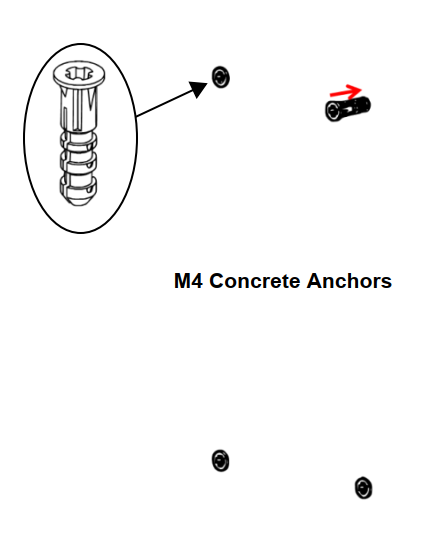
Insert the nose of a Concrete Anchor into the drilled hole. Repeat for a total of 4 pcs. of the Concrete Anchors. As necessary, use a hammer to lightly tap the anchor until the flange of the anchor is flush to the wall.
Inserting Concrete Anchors into Wall
{% endstep %}
{% step %}
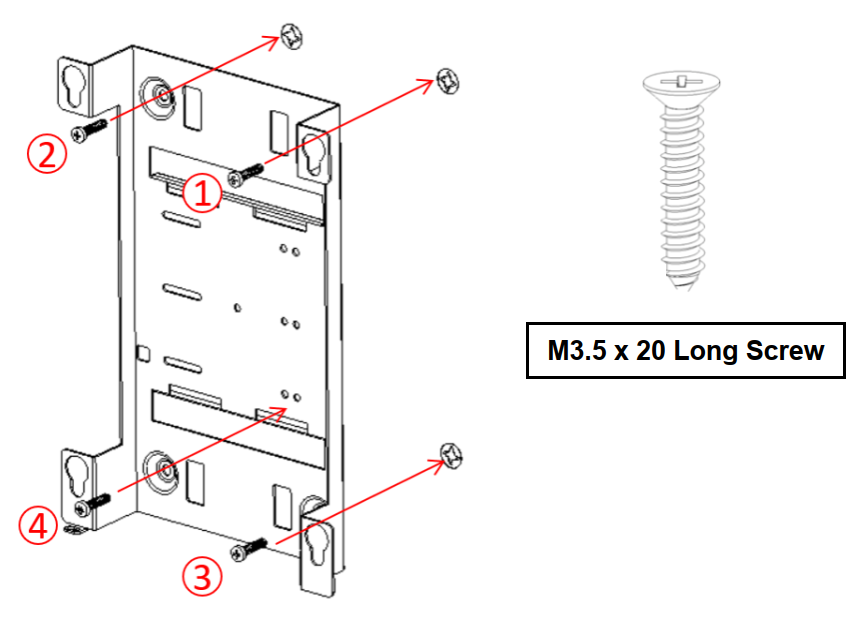
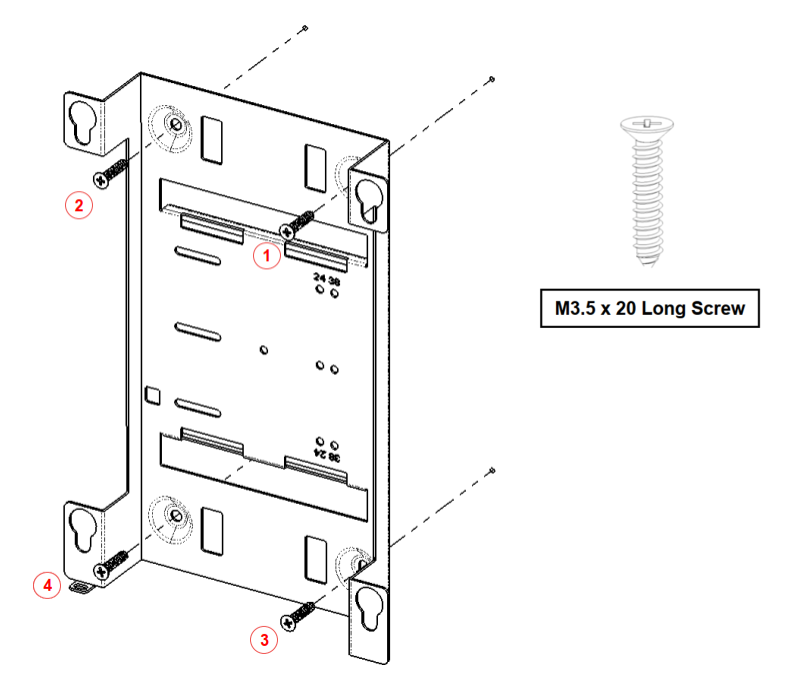
Insert the 4 pcs. of the M3.5 x 20 mm Long Screws through the indicated holes of the G105 RU Mounting Bracket and into the Concrete Anchors in the order shown below. Tighten each screw to snug (approximately 0.6 Nm (5 in-lbs.)) using a torque screwdriver and #2 Phillips Bit.
Fastening the G105 Mounting Bracket to Concrete Wall
{% endstep %}
{% step %}
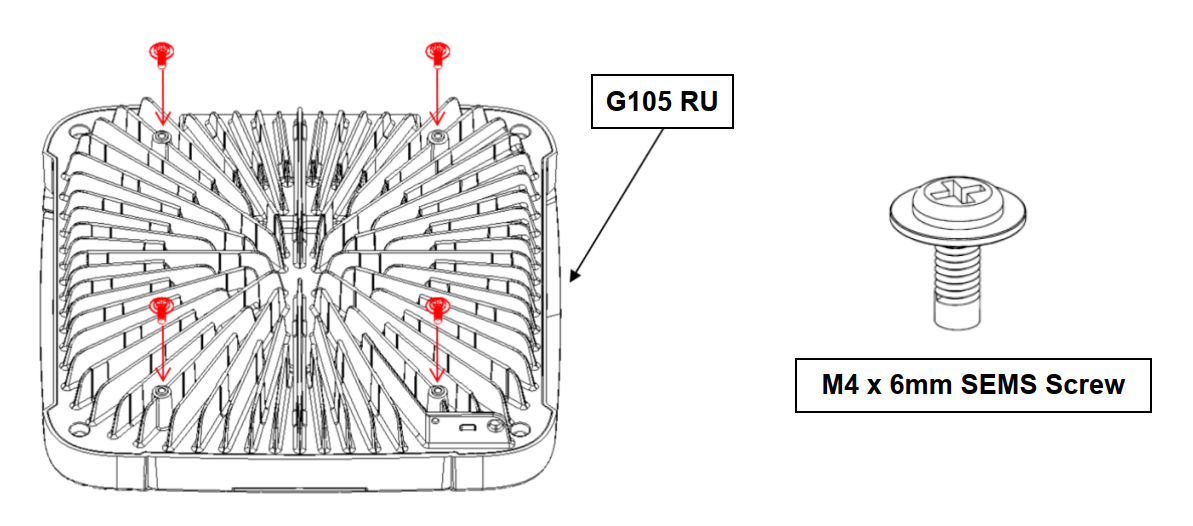
Insert 4 pcs. of M4 x 6 mm Long SEMS Screw into threaded bosses of the heatsink of the G105 RU as shown in Figure 14 and torque each of these screws to 1.4 Nm (12 in-lbs.) using a torque driver and Phillips #2 bit, ensuring that the washer of the screw is flush to the cast boss.
M4 x 6 mm SEMS Screws Installed into G105 RU Heatsink
{% endstep %}
{% step %}
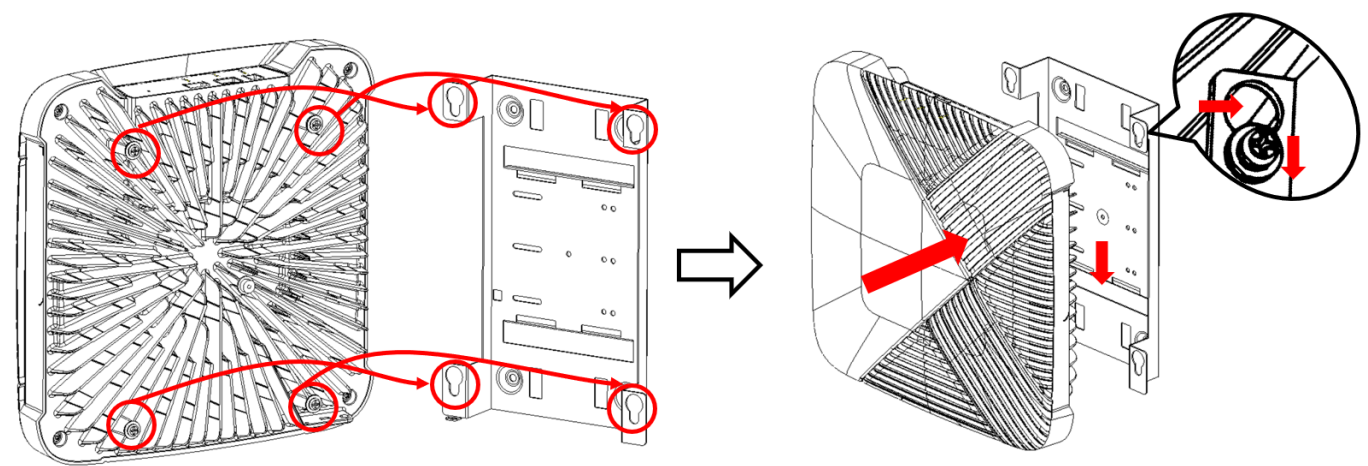
Orient the G105 RU such that the connector interface surface is facing upward and align the heads of the 4 pcs. of the M4 x 6 mm SEMS Screws installed in the G105 RU Heatsink with the larger diameter holes of the keyhole slots of the G105 RU Mounting Bracket as shown. Insert the heads of the screws through the large diameter keyholes and slide the unit downward such that the smaller diameter holes of the keyhole slots of the G105 RU Mounting Bracket capture the shanks of the screws, as shown below.
Installation of the G105 RU onto the Mounting Bracket
{% endstep %}
{% step %}
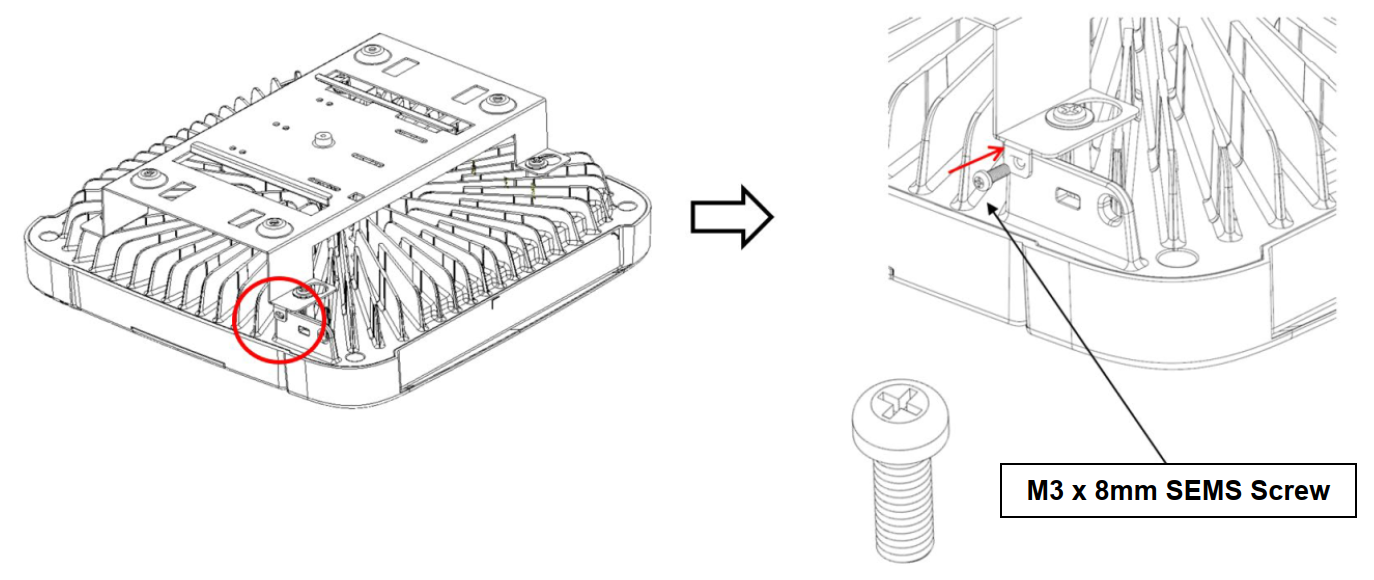
Insert 1 pc. of M3 x 8 mm Long Screw through the hole in the tab of the G105 Mounting Bracket and thread into the tab of the G105 RU Heatsink as shown. Torque the M3 x 8 mm Long Screw to 0.6 Nm (5 in-lbs.) using a torque screwdriver and #2 Phillips Bit, as shown below.
Installing M3 x 8 mm Locking Screw
{% endstep %}
{% endstepper %}
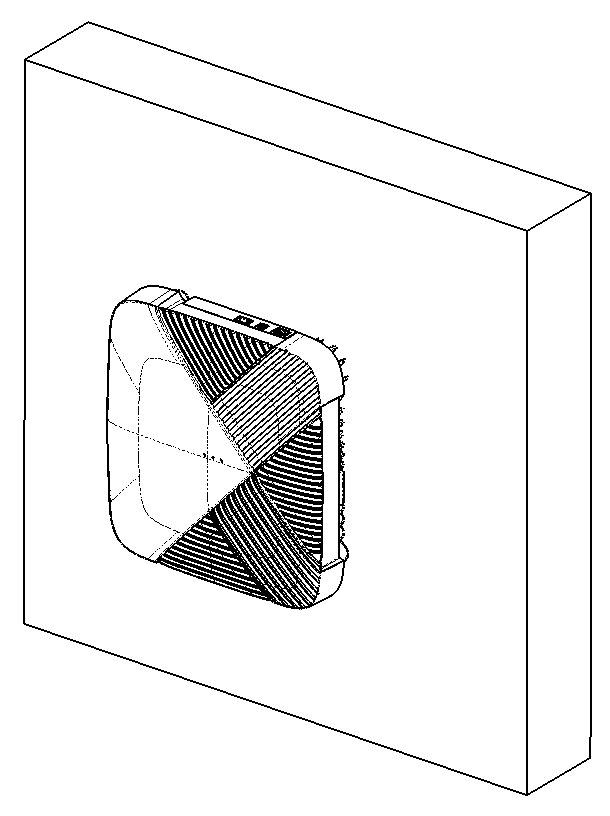
Completed Concrete Wall Installation
#### Drywall / Plaster and Lathe Installation
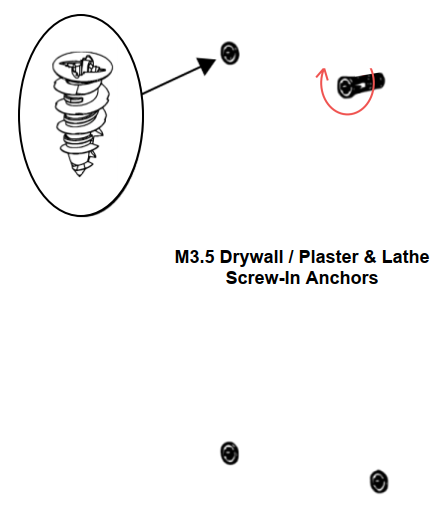
The G105 RU Mounting Bracket can also be installed onto a wall finished with drywall or plaster and lathe. When installing into these wall materials, the included screw-in anchors can be utilized to mount the bracket and support the unit.
{% stepper %}
{% step %}
Place the G105 Mounting Bracket onto the mounting surface ensuring the top edge is level.
{% endstep %}
{% step %}
Using a fine tip marker, mark the location of each of the indicated holes of the G105 RU Mounting Bracket.
{% endstep %}
{% step %}
Remove the G105 RU Mounting Bracket and verify the vertical and horizontal dimensions of the marked locations to ensure hole alignment.
{% endstep %}
{% step %}
Using a drill driver and a 4 mm Diameter High-Speed Steel (HSS) Drill Bit, drill four holes through the drywall or plaster/lathe material centered on the marked locations.
Drilling Holes for Drywall or Plaster/Lathe Anchors
{% endstep %}
{% step %}
Insert the 4 pcs. of the Screw-In Drywall / Plaster and Lathe Anchors into the 4 mm drilled holes and tighten using drill driver and #2 Phillips Bit until head of the anchors are flush with the surface of the substrate.
{% endstep %}
{% step %}
Insert the 4 pcs. of the M3.5 x 20 mm Long Screws through the indicated holes of the G105 RU Mounting Bracket and into the installed anchors. Tighten each screw to the point the mounting bracket is flush with the wall and torque to approximately 1.4 Nm (12 in-lbs.)) using a torque screwdriver and #2 Phillips Bit.
G105 Mounting Bracket Installation
{% endstep %}
{% step %}
Insert 4 pcs. of M4 x 6 mm Long SEMS Screw into threaded bosses of the heatsink of the G105 RU as shown in Figure 20 and torque each of these screws to 1.4 Nm (12 in-lbs.) using a torque driver and Phillips #2 bit, ensuring that the washer of the screw is flush to the cast boss.
M4 x 6 mm SEMS Screws Installed into G105 RU Heatsink
{% endstep %}
{% step %}
Orient the G105 RU such that the connector interface surface is facing upward and align the heads of the 4 pcs. of the M4 x 6 mm SEMS Screws installed in the G105 RU Heatsink with the larger diameter holes of the keyhole slots of the G105 RU Mounting Bracket as shown. Insert the heads of the screws through the large diameter keyholes and slide the unit downward such that the smaller diameter holes of the keyhole slots of the G105 RU Mounting Bracket capture the shanks of the screws, as shown below.
Installation of the G105 RU onto the Mounting Bracket
{% endstep %}
{% step %}
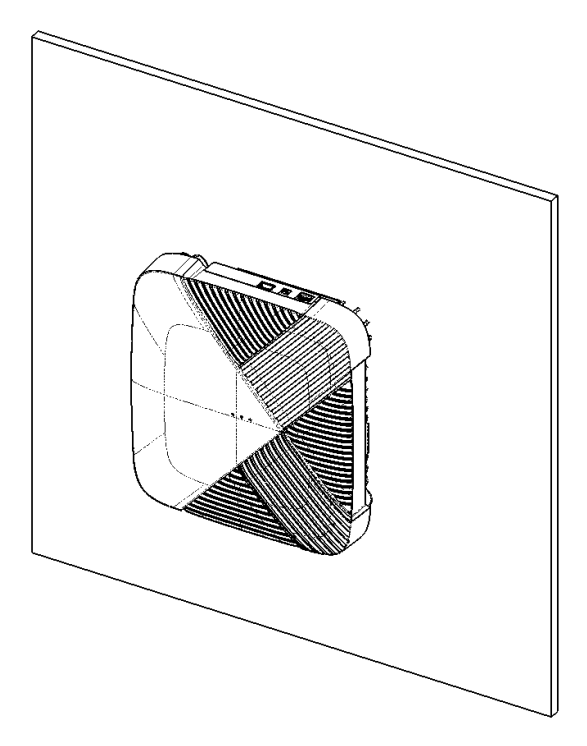
Insert 1 pc. of M3 x 8 mm Long Screw through the hole in the tab of the G105 Mounting Bracket and thread into the tab of the G105 RU Heatsink as shown. Torque the M3 x 8 mm Long Screw to 0.6 Nm (5 in-lbs.) using a torque screwdriver and #2 Phillips Bit, as shown below.
{% endstep %}
{% endstepper %}
#### Wood Wall or Wood Sheathed Wall/Ceiling Installation
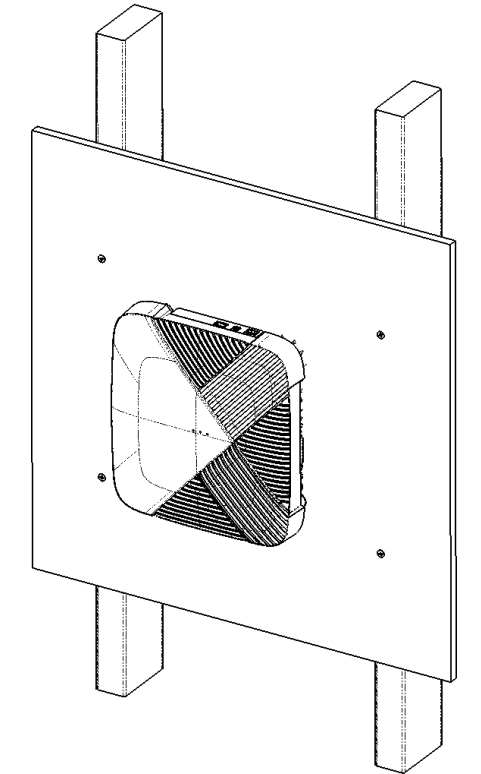
Installation onto a structural wood or wood-sheathed wall or ceiling requires the direct mounting of the G105 Mounting Bracket using wood screws. If the spacing of wood structural members does not align with mounting holes of the G105 Mounting Bracket, it is suggested that a plywood or similar material brace is used to span the structural members.
The mounting structure or construction of the structural brace must be designed such that it can support the weight of the G105 RU and associated additional equipment (approx. 15 kg (33.0 lbs.)
{% stepper %}
{% step %}
Place the G105 Mounting Bracket onto the wood mounting surface ensuring that the top edge is level.
{% endstep %}
{% step %}
Using a fine tip marker, mark the location of each of the indicated holes of the G105 RU Mounting Bracket.
{% endstep %}
{% step %}
Remove the G105 RU Mounting Bracket and verify the vertical and horizontal dimensions of the marked locations to ensure hole alignment.
{% endstep %}
{% step %}
Using a drill driver and a 2 mm Diameter High-Speed Steel (HSS) Drill Bit, drill four holes through the plywood mounting brace or approximately 40 mm deep into the wooden structure member centered on the marked locations.
Drilling Pilot Holes for Mounting Screws
{% endstep %}
{% step %}
Insert the 4 pcs. of the M3.5 x 20 mm Long Screws through the indicated holes of the G105 RU Mounting Bracket and into the 2 mm pilot holes in the wood substrate. Tighten each screw to the point the mounting bracket is flush with the wall and torque to 1.4 Nm (12 in-lbs.)) using a torque screwdriver and #2 Phillips Bit.
Fastening the G105 Mounting Bracket to Concrete Wall
{% endstep %}
{% step %}
Insert 4 pcs. of M4 x 6 mm Long SEMS Screw into threaded bosses of the heatsink of the G105 RU as shown below and torque each of these screws to 1.4 Nm (12 in-lbs.) using a torque driver and Phillips #2 bit, ensuring that the washer of the screw is flush to the cast boss.
M4 x 6 mm SEMS Screws Installed into G105 RU Heatsink
{% endstep %}
{% step %}
Orient the G105 RU such that the connector interface surface is facing upward and align the heads of the 4 pcs. of the M4 x 6 mm SEMS Screws installed in the G105 RU Heatsink with the larger diameter holes of the keyhole slots of the G105 RU Mounting Bracket as shown. Insert the heads of the screws through the large diameter keyholes and slide the unit downward such that the smaller diameter holes of the keyhole slots of the G105 RU Mounting Bracket capture the shanks of the screws, as shown below.
Installation of the G105 RU onto the Mounting Bracket
{% endstep %}
{% step %}
Insert 1 pc. of M3 x 8 mm Long Screw through the hole in the tab of the G105 Mounting Bracket and thread into the tab of the G105 RU Heatsink as shown. Torque the M3 x 8 mm Long Screw to 0.6 Nm (5 in-lbs.) using a torque screwdriver and #2 Phillips Bit, as shown below.
Local (Console) Connector. No default IP Address. When connected to a DHCP Server, IP is assigned, and port can be utilized with SSH to login to RU.
2
“SFP+” Port
To be used with 10Gb SFP+ Transceiver to connect to FH Switch. Can be utilized to access RU M-Plane and provides connection for C/U- and S-Planes.
3
“DC Power” Port
2.5 mm (+) x 5.5 mm (-) DC Power Port. Local power provided by AC/DC Adapter (not included).
4
“PoE++” Port
RJ45 Jack utilizing IEEE 802.3bt-2018 pin-out. Can be utilized to remotely power the remote from up to 100 meters (328 feet) away from PoE++ Switch using PoE++ rated Ethernet Cable.
### Port Connections
G105 Port Connection Diagram

#### USB Port
The USB Port on the PR1450 is a USB 3.0 Type-A Jack which can be utilized for Ethernet Communication with the powered G105 RU. This USB Jack is used in conjunction with a USB 3.0 to Gigabit Ethernet Adapter and a Cat5E, Cat6 or Cat6A Ethernet Cable to connect the G105 RU to a PC via an SSH Client.
#### SFP+ Port
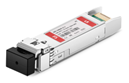
Insert an SFP+ Transceiver that matches the SFP+ Transceiver used in the associated CU/DU/Server or Fronthaul Multiplexer (FHM). The manufacturer’s instructions for the insertion of the SFP+ Transceiver should be provided with the item.
{% hint style="warning" %}
**CAUTION:** Optical SFP+ Transceivers have optical transmitters and receivers. Take care not to contaminate the optical components. Carefully remove any plug or cover and do not touch any mating optical connectors. Clean mating optical connectors using appropriate fiber optic cleaning tools prior to connection.
{% endhint %}
If an Optical SFP+ Transceiver is utilized, clean the mating duplex optical patch cable connector using manufacturer’s suggested fiber connector cleaning tools and insert it until the molded latches engage with the receptacle of the Optical SFP+ Transceiver.
#### Recommended SFP+ Transceivers
Recommended SFP+ Transceivers
Manufacturer
Description
Manufacturer P/N
Intel
Ethernet SFP+ SR Optical Transceiver
FTLX8571D3BCL
Dell
Ethernet SFP+ SR Optical Transceiver
LTF8502-BC+-DEN
Eoptolink
Ethernet SFP+ SR Optical Transceiver
EOLP-8596-02-I
Finisar
Ethernet SFP+ SR Optical Transceiver
FTLX8571D3BCL
Luxshare
Ethernet SFP+ SR Optical Transceiver
LUXSHARE-ICT
Cisco
Ethernet SFP+ SR Optical Transceiver
SFP-10G-SR
JPC
Ethernet SFP+ SR Optical Transceiver
TNP199007A00038-7
JPC
Ethernet SFP+ SR Optical Transceiver
TNP199007A00038-A
Finisar
Ethernet SFP+ LR Optical Transceiver
FTLX1471D3BCL
Luxshare
Ethernet SFP+ LR Optical Transceiver
PGN1SSD01-NC-T
Eoptolink
Ethernet SFP+ LR Optical Transceiver
EOLP-1396-10
Cisco
Ethernet SFP+ LR Optical Transceiver
SFP-10G-LR
JPC
Ethernet SFP+ LR Optical Transceiver
TNP14200103A009-A
JPC
Ethernet SFP+ LR Optical Transceiver
TNP14200103A009-7
#### DC Power Port
The DC Power Port of the G105 RU is an integrated 2.5 mm x 5.5 mm DC Power Jack. This jack is used as a powering option for the product. It is designed such that the center conductor (2.5 mm male pin) is to be provided with 12.0 +/- 5% Volts DC and the outer conductor (5.5 mm female receptacle) is to be provided with the 0 Volts DC. A standard AC/DC Power Supply Unit (PSU) should be used to power the G105. The PSU should be capable of producing 12.0 Volt DC Output and supplying a minimum of 4.5 Amperes of current (54 Watts).
{% hint style="warning" %}
**CAUTION:** Use either the DC Power Port or the PoE++ Port for powering the G105RU. Do not use both power options or damage to the product may occur.
{% endhint %}
#### PoE++ Port
The PoE++ Port of the G105 RU is an RJ45 Jack. This jack is only used as a powering option for the product and is not used for Ethernet Communication with the remote.
This port utilizes a 4-pair powering configuration that is compliant with IEEE 802.3bt. The G105RU is a Type 3 PD and features an analog handshake to identify itself to the PoE Injector (PSE).
It is suggested that a high-quality category Ethernet cable with a wire gauge sufficient to carry no less than 75 Watts be utilized for the connection between the PoE Injector and the G105 RU. Refer to the earlier PoE Injector section for the necessary specifications to aid in selection.
{% hint style="warning" %}
**CAUTION:** Use either the DC Power Port or the PoE++ Port to power the G105RU. Using both power options simultaneously may damage the device.
{% endhint %}
## Post Installation Steps
After installing the RU, connect it to the Core/gNB server or FHM. Your configuration will be dependent on the use of an ONYX-FHM-001 (Fronthaul Multiplexer) in your network configuration.
* Single RU: Connect the RU directly to the Core/gNB server to s0f3 as shown below for a single RU.
* Onboard the RU. Refer to the *Onyx Portal Operations Guide* (*Manage Equipment* > *Manage APs* > *Add APs* > *Add APs to 5G Networks*)
* Multiple RU: Connect the RUs to the installed Onyx-FHM-001 starting with port 0. Ensure all RUs are of the same model.
* Edit the FHM. Refer to the *Onyx Portal Operations Guide* (*Manage Equipment > Manage FHM > Edit FHM*)
RU to Core/gNB Server or FHM
## Appendix: Regulatory Compliance
### FCC Compliance
This device complies with part 15 of the FCC Rules. Operation is subject to the following two conditions: (1) This device may not cause harmful interference, and (2) this device must accept any interference received, including interference that may cause undesired operation. Any Changes or modifications not expressly approved by the party responsible for compliance could void the user's authority to operate the equipment. This equipment has been tested and found to comply with the limits for a Class B digital device, pursuant to part 15 of the FCC Rules. These limits are designed to provide reasonable protection against harmful interference in a residential installation. This equipment generates, uses, and can radiate radio frequency energy and, if not installed and used in accordance with the instructions, may cause harmful interference to radio communications. Operation of this equipment in a residential area is likely to cause harmful interference, in which case the user will be required to correct the interference at his own expense.
{% hint style="danger" %}
**WARNING:**This equipment complies with FCC radiation exposure limits set forth for an uncontrolled environment. This equipment should be installed and operated with a minimum distance of 33 inches (83 cm) between the radiator and your body.
{% endhint %}
### ISEDC Compliance
This device complies with Innovation, Science, and Economic Development Canada license-exempt RSS standard(s). Operation is subject to the following two conditions: (1) This device may not cause interference, and (2) This device must accept any interference, including interference that may cause undesired operation of the device. The antenna(s) used for this transmitter must be installed to provide a separation distance of at least 33 inches (83 cm) from all persons and must not be collocated or operating in conjunction with any other antenna or transmitter, End-Users must be provided with transmitter operation conditions for satisfying RF exposure compliance.
---
# Agent Instructions
This documentation is published with GitBook. GitBook is the documentation platform designed so that both humans and AI agents can read, navigate, and reason over technical content effectively. Learn more at gitbook.com.
## Querying This Documentation
If you need additional information that is not directly available in this page, you can query the documentation by asking a question.
Perform an HTTP GET request on the following URL with the `ask` and `goal` query parameters:
```
GET https://docs.gxc.io/hw/5g/5g-access-points/g105/g105-ap-installation-guide.md?ask=&goal=
```
`ask` is the immediate question: it should be specific, self-contained, and written in natural language.
`goal` is what the user is ultimately trying to achieve, the reason they need the answer. Sharing it helps GitBook give you a better, more relevant answer. A goal is most helpful when it describes the outcome the user wants rather than restating the question. For example, with `ask=how do I create an API token`, a goal like `automate deployments from our CI pipeline` lets GitBook tailor the answer to that use case.
The response will contain a direct answer to the question and relevant excerpts and sources from the documentation.
Use this mechanism when the answer is not explicitly present in the current page, you need clarification or additional context, or you want to retrieve related documentation sections.



 ### External Connector Familiarization
As seen in the following figure, on the top surface of the G105 RU, there are a total of three connector ports. These ports are marked SFP+, Power, and PoE++. Ensure that all covers or caps remain on ports until interconnection or termination is necessary. In addition, if an interconnection or termination is removed from the connector, the installer or technician must apply a proper cover or cap to protect the internal surfaces of the connector.
### External Connector Familiarization
As seen in the following figure, on the top surface of the G105 RU, there are a total of three connector ports. These ports are marked SFP+, Power, and PoE++. Ensure that all covers or caps remain on ports until interconnection or termination is necessary. In addition, if an interconnection or termination is removed from the connector, the installer or technician must apply a proper cover or cap to protect the internal surfaces of the connector.

 * “Power” LED – Indicates the power status of the G105 RU.
* Solid Green: Power On
* Off: Normal - Powered Off
* “S-Plane” LED – Indicates the Precision Time Control (PTP) Lock status of the G105 RU.
* Green:
* Solid: PTP Locked
* Slow Blinking: PTP Holdover – PTP is locked, but there are lost PTP packet(s)
* Fast Blinking: PTP Freerun – Received PTP/SyncE input, but not yet locked
* Red:
* Solid: PTP Freerun – No PTP/SyncE Input
* Fast Blinking: PTP Freerun – Only SyncE Input
* Off
* Off: PTP Service not running
* “Service” LED – Indicates the system CU-Plane and/or M-Plane Status of the G105 RU.
* Green:
* Solid: RU is radiating – CU-Plane is configured, and unit is radiating
* Slow Blinking: RU is initializing – BBU unit is initializing, config, calibration, sync…
* Fast Blinking: RU ready to radiate – BBU is running; no CU-Plane packet received
* Red:
* Solid: RF Component Boot-Up Fail – RF Component failed to properly boot
* Slow Blinking: Received data, but incorrect or out of receiving window – BBU is running, CU-Plane Packet out of window. Inspect BBU Reception Report Log. Monitor on-time, early, late packet counting. CP: On-time Total < 95% UP: On-time Total < 95%
* Fast Blinking: M-Plane Call Home Failure Definition TBD
* Off
* Off: CU-Plane not running – BBU not running
## G105 Access Point Installation
### Instructions and Limitations
The G105 AP can be mounted on walls, poles, or ceilings, with details as follows. Other installation locations and structures are feasible. However, if alternate structures are utilized, it is the installer or customer’s responsibility to assess and deem these locations as acceptable and to utilize industry standard construction methods to verify the unit’s stability and orientation corresponds with these specifications.
{% hint style="info" %}
**NOTE**: The installation specifications described in this document only define the adaptability of the specific installation components and scenarios pictured and described.
{% endhint %}
{% hint style="warning" %}
**CAUTION**: Prior to installation, assess the strength and reliability of the structure proposed for the unit installation based on the actual weight of the installed equipment.
{% endhint %}
### Application Limitations
To ensure proper air circulation and effective heat dissipation around the G105 RU, limitations on the unit application environment include, but are not limited to, the following points:
* Do not install the G105 AP in indoor or outdoor cabinets that are completely sealed and lack either air exchange or active cooling systems such as heat exchangers, air conditioners, etc., which will ensure the ambient temperature will not exceed the specified temperature range.
* Do not install the G105 AP in equipment rooms or network closets that are completely sealed and do not have active cooling systems as detailed above.
{% hint style="warning" %}
**CAUTION:** To ensure proper air circulation and effective heat dissipation around the radio unit, do not install AP in indoor or outdoor cabinets (such as enclosed camouflage boxes) or closed rooms that lack active cooling systems. Such conditions will cause overheating and may cause the radio unit to malfunction or fail.
{% endhint %}
### Preferred Installation Orientation and Clearance Requirements
The preferred mounting orientations for the G105 AP and the recommended clearances are shown in the following figures. Maintaining these clearances and specified surrounding ambient air temperatures ensures normal operation and ample room for maintenance.
The minimum clearance recommended for the G105 AP installation is shown in Figure 9 and Figure 10. Ensure that the ambient air temperature remains in the specified operational temperature range and these clearance dimensions are adhered to, to ensure normal operation and allow ample room for maintenance.
* “Power” LED – Indicates the power status of the G105 RU.
* Solid Green: Power On
* Off: Normal - Powered Off
* “S-Plane” LED – Indicates the Precision Time Control (PTP) Lock status of the G105 RU.
* Green:
* Solid: PTP Locked
* Slow Blinking: PTP Holdover – PTP is locked, but there are lost PTP packet(s)
* Fast Blinking: PTP Freerun – Received PTP/SyncE input, but not yet locked
* Red:
* Solid: PTP Freerun – No PTP/SyncE Input
* Fast Blinking: PTP Freerun – Only SyncE Input
* Off
* Off: PTP Service not running
* “Service” LED – Indicates the system CU-Plane and/or M-Plane Status of the G105 RU.
* Green:
* Solid: RU is radiating – CU-Plane is configured, and unit is radiating
* Slow Blinking: RU is initializing – BBU unit is initializing, config, calibration, sync…
* Fast Blinking: RU ready to radiate – BBU is running; no CU-Plane packet received
* Red:
* Solid: RF Component Boot-Up Fail – RF Component failed to properly boot
* Slow Blinking: Received data, but incorrect or out of receiving window – BBU is running, CU-Plane Packet out of window. Inspect BBU Reception Report Log. Monitor on-time, early, late packet counting. CP: On-time Total < 95% UP: On-time Total < 95%
* Fast Blinking: M-Plane Call Home Failure Definition TBD
* Off
* Off: CU-Plane not running – BBU not running
## G105 Access Point Installation
### Instructions and Limitations
The G105 AP can be mounted on walls, poles, or ceilings, with details as follows. Other installation locations and structures are feasible. However, if alternate structures are utilized, it is the installer or customer’s responsibility to assess and deem these locations as acceptable and to utilize industry standard construction methods to verify the unit’s stability and orientation corresponds with these specifications.
{% hint style="info" %}
**NOTE**: The installation specifications described in this document only define the adaptability of the specific installation components and scenarios pictured and described.
{% endhint %}
{% hint style="warning" %}
**CAUTION**: Prior to installation, assess the strength and reliability of the structure proposed for the unit installation based on the actual weight of the installed equipment.
{% endhint %}
### Application Limitations
To ensure proper air circulation and effective heat dissipation around the G105 RU, limitations on the unit application environment include, but are not limited to, the following points:
* Do not install the G105 AP in indoor or outdoor cabinets that are completely sealed and lack either air exchange or active cooling systems such as heat exchangers, air conditioners, etc., which will ensure the ambient temperature will not exceed the specified temperature range.
* Do not install the G105 AP in equipment rooms or network closets that are completely sealed and do not have active cooling systems as detailed above.
{% hint style="warning" %}
**CAUTION:** To ensure proper air circulation and effective heat dissipation around the radio unit, do not install AP in indoor or outdoor cabinets (such as enclosed camouflage boxes) or closed rooms that lack active cooling systems. Such conditions will cause overheating and may cause the radio unit to malfunction or fail.
{% endhint %}
### Preferred Installation Orientation and Clearance Requirements
The preferred mounting orientations for the G105 AP and the recommended clearances are shown in the following figures. Maintaining these clearances and specified surrounding ambient air temperatures ensures normal operation and ample room for maintenance.
The minimum clearance recommended for the G105 AP installation is shown in Figure 9 and Figure 10. Ensure that the ambient air temperature remains in the specified operational temperature range and these clearance dimensions are adhered to, to ensure normal operation and allow ample room for maintenance.
 ### Common Installation Tools






 #### Drywall / Plaster and Lathe Installation
The G105 RU Mounting Bracket can also be installed onto a wall finished with drywall or plaster and lathe. When installing into these wall materials, the included screw-in anchors can be utilized to mount the bracket and support the unit.
{% stepper %}
{% step %}
Place the G105 Mounting Bracket onto the mounting surface ensuring the top edge is level.
{% endstep %}
{% step %}
Using a fine tip marker, mark the location of each of the indicated holes of the G105 RU Mounting Bracket.
{% endstep %}
{% step %}
Remove the G105 RU Mounting Bracket and verify the vertical and horizontal dimensions of the marked locations to ensure hole alignment.
{% endstep %}
{% step %}
Using a drill driver and a 4 mm Diameter High-Speed Steel (HSS) Drill Bit, drill four holes through the drywall or plaster/lathe material centered on the marked locations.
#### Drywall / Plaster and Lathe Installation
The G105 RU Mounting Bracket can also be installed onto a wall finished with drywall or plaster and lathe. When installing into these wall materials, the included screw-in anchors can be utilized to mount the bracket and support the unit.
{% stepper %}
{% step %}
Place the G105 Mounting Bracket onto the mounting surface ensuring the top edge is level.
{% endstep %}
{% step %}
Using a fine tip marker, mark the location of each of the indicated holes of the G105 RU Mounting Bracket.
{% endstep %}
{% step %}
Remove the G105 RU Mounting Bracket and verify the vertical and horizontal dimensions of the marked locations to ensure hole alignment.
{% endstep %}
{% step %}
Using a drill driver and a 4 mm Diameter High-Speed Steel (HSS) Drill Bit, drill four holes through the drywall or plaster/lathe material centered on the marked locations.
 {% endstep %}
{% endstepper %}
#### Wood Wall or Wood Sheathed Wall/Ceiling Installation
Installation onto a structural wood or wood-sheathed wall or ceiling requires the direct mounting of the G105 Mounting Bracket using wood screws. If the spacing of wood structural members does not align with mounting holes of the G105 Mounting Bracket, it is suggested that a plywood or similar material brace is used to span the structural members.
The mounting structure or construction of the structural brace must be designed such that it can support the weight of the G105 RU and associated additional equipment (approx. 15 kg (33.0 lbs.)
{% stepper %}
{% step %}
Place the G105 Mounting Bracket onto the wood mounting surface ensuring that the top edge is level.
{% endstep %}
{% step %}
Using a fine tip marker, mark the location of each of the indicated holes of the G105 RU Mounting Bracket.
{% endstep %}
{% step %}
Remove the G105 RU Mounting Bracket and verify the vertical and horizontal dimensions of the marked locations to ensure hole alignment.
{% endstep %}
{% step %}
Using a drill driver and a 2 mm Diameter High-Speed Steel (HSS) Drill Bit, drill four holes through the plywood mounting brace or approximately 40 mm deep into the wooden structure member centered on the marked locations.
{% endstep %}
{% endstepper %}
#### Wood Wall or Wood Sheathed Wall/Ceiling Installation
Installation onto a structural wood or wood-sheathed wall or ceiling requires the direct mounting of the G105 Mounting Bracket using wood screws. If the spacing of wood structural members does not align with mounting holes of the G105 Mounting Bracket, it is suggested that a plywood or similar material brace is used to span the structural members.
The mounting structure or construction of the structural brace must be designed such that it can support the weight of the G105 RU and associated additional equipment (approx. 15 kg (33.0 lbs.)
{% stepper %}
{% step %}
Place the G105 Mounting Bracket onto the wood mounting surface ensuring that the top edge is level.
{% endstep %}
{% step %}
Using a fine tip marker, mark the location of each of the indicated holes of the G105 RU Mounting Bracket.
{% endstep %}
{% step %}
Remove the G105 RU Mounting Bracket and verify the vertical and horizontal dimensions of the marked locations to ensure hole alignment.
{% endstep %}
{% step %}
Using a drill driver and a 2 mm Diameter High-Speed Steel (HSS) Drill Bit, drill four holes through the plywood mounting brace or approximately 40 mm deep into the wooden structure member centered on the marked locations.
 {% endstep %}
{% endstepper %}
## Connection Details
{% endstep %}
{% endstepper %}
## Connection Details