> For the complete documentation index, see [llms.txt](https://docs.gxc.io/llms.txt). Markdown versions of documentation pages are available by appending `.md` to page URLs; this page is available as [Markdown](https://docs.gxc.io/docs/application-notes/4g-onyx-platform-mesh-node.md).
# 4G Onyx Platform - Mesh Node
## Introduction
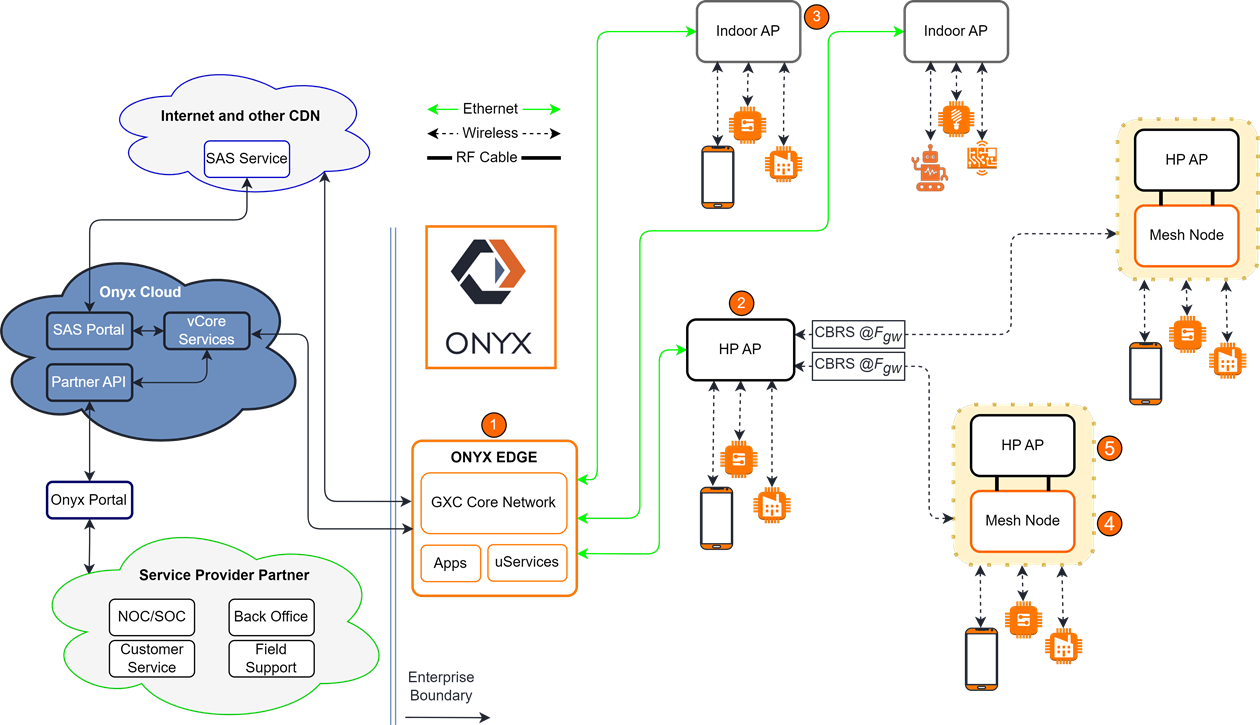
This document introduces the concepts and criteria for designing a Private Cellular Network using the GXC Mesh Node in both outdoor and indoor scenarios. *Figure Sample GXC Private Cellular Network* serves as a reference throughout the document, providing a high-level understanding of the hardware and operational characteristics of the GXC Onyx Platform.
Sample GXC Private Cellular Network
ONYX Edge ① is a hardware appliance that houses an on-premises 4G/5G mobile core network solution. Its function is to manage:
* radio registrations
* user network entry authorizations
* enforcement of network services and policies
* configurations through the Onyx Portal
* backhauling of user traffic to the Internet
Two Indoor APs ③ are directly cabled via Ethernet to the Onyx Edge and provide indoor coverage to UE operating on CBRS bands.
The Outdoor Onyx Gateway Node ② is a High Power AP Radio (transmitting at Fgw) that not only provides access to UE within range of its RF footprint but also allows the wireless extension of the Onyx Private Wireless Network using the Mesh Node ④.
To provide subscriber access, the
Mesh Node is directly cabled to an Outdoor High Powered Access Point (HP AP) ⑤ (also
referred to as the Mesh AP). This access point is configured for a different frequency
(Fmap) from the gateway, creating a new cell for subscriber devices.
## Mesh Node Implementation and Applications
### Purpose and Requirements
Mesh Nodes can be placed anywhere within range of the Gateway AP, performing best with a line-of-sight backhaul connection. The following general design rules apply to network design using a Mesh node:
* The Mesh Node AP must achieve timing synchronization through one of the following options:
* GPS (GNSS)
* Network Synchronization (Network Listening)
* This method requires a second backhaul antenna attached to the Mesh AP receiving an RSRP of ≥ -70 dBm. Contact GXC for design/configuration details.
* Antenna Isolation between backhaul and access antennas must be ≥ 50 dB. This is generally achieved through the selection of directional access and backhaul antennas, with narrow vertical beamwidth.
* As a general rule, avoid positioning Mesh Node antennas within 20m of large reflective obstacles, such as a building wall, etc.
* The Mesh AP should expand coverage radially away from the Gateway AP.
* Optimally, access and backhaul antennas should be oriented 180 degrees opposite from one another at the Mesh Node location, such that the new Mesh AP cell extends outward from the Gateway cell.
* Target backhaul signal strength range, as determined from propagation simulations, or read directly from the Mesh Node Local Control Interface (LCI).
* For Mesh Node Peak Performance: DL RSRP > -85 dBm
* For Mesh Node Stable cell-edge performance: DL RSRP > -100dBm
### Installation of the Mesh Node
For those familiar with the Onyx platform, refer to the *Mesh Node Quick Start Guide*. If you would like more detailed information, refer to the *Onyx GM01 Mesh Node Installation Guide* or *Onyx GM02 Mesh Node Installation Guide*.
### Standard Application
The primary use case for a Mesh Node is in an outdoor environment, where the availability of wired data backhaul is otherwise prohibitive. In this application, the only external cabling requirement is a source of power. *Figure Outdoor Implementation of a Mesh Node* is a graphical representation and requirements for an outdoor Mesh Node deployment.
Outdoor Implementation of a Mesh Node
### Use of Multiple Mesh Nodes
Mesh Nodes are primarily used for coverage extension and with UE share the available bandwidth of the Gateway AP. It is important to note that a Mesh Node does not increase the capacity of the Gateway AP.
*Figure Sample GXC Private Cellular Network* is an example of the Mesh Nodes used in a currently supported star configuration. Mesh Nodes in a cascaded configuration (a Mesh Node connected to another Mesh Node) is a planned feature, contact GXC for release timing and details.
### Dual Carrier/Carrier Aggregation
#### GM01 Mesh Node
* The Mesh Node supports 2CA in the downlink only.
* If the GW AP is configured for Dual Carrier, the Mesh Node will connect to one of the two carriers.
#### Mesh AP
The Mesh AP currently does not support Dual Carrier or Carrier Aggregation.
## Mesh Filter and Channel Frequency Assignments
Mesh Node to Gateway Frequency Planning
A Mesh Node uses a filter network to isolate the Mesh AP’s TX/RX frequency from the Mesh Node backhaul TX/RX frequency.
During the configuration of the SAS parameters in the Onyx Portal, the operator will configure the Gateway AP and Mesh AP for a series of Preferred Frequencies (from most to least). The operator should take into consideration the desired bandwidth of 10 or 20 MHz to avoid selecting a frequency that will fall out of the “low or high” pass band ranges shown in *Table Backhaul to Mesh Node-AP Frequency Assignments*. This process allows for SAS grant flexibility, as channel assignments can change.
{% hint style="info" %}
**NOTE:** *Table Backhaul to Mesh Node-AP Frequency Assignments* specifies the Backhaul (Blue) and Mesh AP (Yellow) 10 and 20 MHz channels that should be used when configuring the Gateway and Mesh AP frequencies. When the Backhaul falls into the “Low Band” the Mesh AP should be configured to transmit in the “High Band” and vice versa.
{% endhint %}
Backhaul to Mesh Node-AP Frequency Assignments
### Frequency Planning Example
Consider the following example.
Mesh Node Example
Refer to *Figure Mesh Node Example*, for the following example and questions.
**Gateway Node Information:**
* Operating BW = 20 MHz
* Fgw = 3575 MHz
**Questions:**
1. Determine the frequency passband for the Mesh Node and list the center channel
\
frequencies that could be used for the Mesh AP.
2. If bandwidth was changed to BW = 10 MHz, list all the center channel frequencies
\
that could be used for the Mesh AP.
**Solution:**
We have explained that Fmn = Fgw, in this case = 3575 MHz.
Since we are operating with a
BW=20 MHz, we refer to *Table Example Solution Summary* and see that Mesh Node backhaul is operating in the
filter “low pass band” range of 3570-3590 MHz. This configures the “high pass band” of
3640 to 3700 MHz for use by the Mesh AP.
The operator should then select “Preferred
Frequencies” for the Mesh AP in the “high pass band”. Examples of frequencies that could
be selected in the Onyx Portal for the Mesh AP are summarized below:
Example Solution Summary
Fgw = Fmn (MHz) (Backhaul Frequency, Low Band)
Fmap (MHz) 20 MHz (Mesh AP Center Channels, High Band)
Fmap (MHz) 10 MHz (Mesh AP Center Channels, High Band)
3575
3650
3645, 3675
3575
3670
3655, 3685
3575
3690
3665, 3695
Remember that this example looks at the single Mesh Node example. When more Mesh Nodes and APs are added, RF planning to avoid overlapping channels and SAS considerations will play a big role in frequency planning.
## Related Documentation
* *4G Onyx Portal Operations Guide*
* *GM01 Mesh Node Installation Guide*
* *GM02 Mesh Node Installation Guide*
* *GXC Glossary*
## Contact GXC
To get in touch with GXC, please visit .
---
# Agent Instructions
This documentation is published with GitBook. GitBook is the documentation platform designed so that both humans and AI agents can read, navigate, and reason over technical content effectively. Learn more at gitbook.com.
## Querying This Documentation
If you need additional information that is not directly available in this page, you can query the documentation dynamically by asking a question.
Perform an HTTP GET request on the current page URL with the `ask` query parameter, and the optional `goal` query parameter:
```
GET https://docs.gxc.io/docs/application-notes/4g-onyx-platform-mesh-node.md?ask=&goal=
```
`ask` is the immediate question: it should be specific, self-contained, and written in natural language.
`goal` is optional and describes the broader end goal you are ultimately trying to accomplish on behalf of the user. GitBook uses it to tailor the answer towards what is most useful for that goal.
The response will contain a direct answer to the question and relevant excerpts and sources from the documentation.
Use this mechanism when the answer is not explicitly present in the current page, you need clarification or additional context, or you want to retrieve related documentation sections.